

ISO 9241-125:2017
(Main)Ergonomics of human-system interaction — Part 125: Guidance on visual presentation of information
General Information
- Abstract
ISO 9241-125:2017 provides guidance for the visual presentation of information controlled by software, irrespective of the device. It includes specific properties such as the syntactic or semantic aspects of information, e.g. coding techniques, and gives provisions for the organization of information taking account of human perception and memory capabilities. Those of its provisions that do not apply to specific types of visual interfaces clearly indicate any limitations to their applicability. It does not address specific details of charts, graphs or information visualization. ISO 9241-125:2017 can be utilized throughout the design process (e.g. as specification and guidance for designers during design or as a basis for heuristic evaluation). Its provisions for the presentation of information depend upon the visual design approach, the task, the user, the environment and the single or multiple technologies that might be used for presenting the information. Consequently, this document cannot be applied without knowledge of the context of use. It is not intended to be used as a prescriptive set of rules to be applied in its entirety but rather assumes that the designer has proper information available concerning task and user requirements and understands the use of available technology. Some of the provisions of this document are based on Latin-based language usage and might not apply, or might need to be modified, for use with languages that use other alphabets. In applying those that assume a specific language base (e.g. alphabetic ordering of coding information, items in a list), it is important that care is taken to follow its intent of the standard when translation is required to a different language. ISO 9241-125:2017 does not address auditory or tactile/haptic presentation of information or modality shifting for the presentation of visual information in other modalities. NOTE ISO 9241‑112 provides high-level ergonomic guidance that applies to all modalities.
- Status
- Published
- Publication Date
- 30-Aug-2017
- Technical Committee
- ISO/TC 159/SC 4 - Ergonomics of human-system interaction
- Drafting Committee
- ISO/TC 159/SC 4 - Ergonomics of human-system interaction
- Current Stage
- 9093 - International Standard confirmed
- Start Date
- 20-Dec-2022
- Completion Date
- 29-Aug-2026
Buy Documents



ISO 9241-125:2017 - Ergonomics of human-system interaction

ISO 9241-125:2017 - Ergonomics of human-system interaction — Part 125: Guidance on visual presentation of information/31/2017


ISO 9241-125:2017 - Ergonomie de l'interaction homme-systeme

ISO 9241-125:2017 - Ergonomie de l'interaction homme-système — Partie 125: Recommandations relatives à la présentation visuelle d'informations/31/2017
Overview
ISO 9241-125:2017 - Ergonomics of human‑system interaction: Guidance on visual presentation of information provides guidance for how software-controlled information should be presented visually, regardless of device. It focuses on syntactic and semantic properties (for example, coding and labelling techniques) and on organizing information to match human perception and memory. ISO 9241-125:2017 is guidance (not a prescriptive rulebook): it is intended to be applied with knowledge of the task, users and context of use, and it does not cover detailed chart/graph design or non-visual modalities (auditory, tactile).
Key Topics and Technical Highlights
The standard addresses a broad set of visual presentation and information-structuring concerns, including:
- Visual structuring of information
- Arranging and labelling content, consistent placement, grouping and sequencing for rapid detection and comprehension
- Managing information density and distinction of groups
- Legibility and presentation properties
- Legibility of characters and symbols, character height, and scaling of visually presented information
- User interface elements and organization
- Best practices for lists, tables, entry fields and window management (identification, resizing, scrolling and focus cues)
- Graphical objects
- Guidance on cursors, pointers and icon design; text alternatives for icons; occlusion and position considerations
- Accessibility and language considerations
- Applicability limits and adaptations for non‑Latin alphabets; emphasis on understanding accessibility needs and context
- Use across devices and technology
- Guidance applies regardless of single or multiple presentation technologies but must be adapted to device, environment and user tasks
(ISO 9241‑125 intentionally omits detailed rules for charts, graphs and information visualization techniques.)
Practical Applications - Who Uses It
ISO 9241-125 is valuable for professionals involved in digital information design and evaluation:
- UI/UX designers and product designers - to create legible, well‑structured screens and controls
- Interaction designers and information architects - for organizing content, lists and tables
- Accessibility specialists and usability practitioners - for audits, heuristic evaluations and compliance checks
- Software developers and QA teams - to implement predictable window behaviour, cursor handling and element labelling
- Technical writers and content strategists - for consistent labels, units and grammatical construction
Use cases: design specifications, design reviews, heuristic evaluations, accessibility assessments and cross‑device interface planning.
Related Standards
- ISO 9241 series - ergonomics of human‑system interaction (general family)
- ISO 9241‑112 - referenced for high‑level ergonomic guidance that applies to all modalities
Keywords: ISO 9241-125, visual presentation of information, ergonomics, human-system interaction, UI design guidelines, accessibility, legibility, information structuring, user interface elements.
Relations
- Effective Date
- 12-Feb-2026
- Effective Date
- 06-Jun-2022
- Effective Date
- 04-Jun-2016
Buy Documents
ISO 9241-125:2017 - Ergonomics of human-system interaction
ISO 9241-125:2017 - Ergonomics of human-system interaction — Part 125: Guidance on visual presentation of information/31/2017
ISO 9241-125:2017 - Ergonomie de l'interaction homme-systeme
ISO 9241-125:2017 - Ergonomie de l'interaction homme-système — Partie 125: Recommandations relatives à la présentation visuelle d'informations/31/2017
Get Certified
Connect with accredited certification bodies for this standard

BSI Group
BSI (British Standards Institution) is the business standards company that helps organizations make excellence a habit.

CIS Institut d.o.o.
Personal Protective Equipment (PPE) certification body. Notified Body NB-2890 for EU Regulation 2016/425 PPE.

Kiwa BDA Testing
Building and construction product certification.
Sponsored listings
Frequently Asked Questions
ISO 9241-125:2017 is a standard published by the International Organization for Standardization (ISO). Its full title is "Ergonomics of human-system interaction — Part 125: Guidance on visual presentation of information". This standard covers: ISO 9241-125:2017 provides guidance for the visual presentation of information controlled by software, irrespective of the device. It includes specific properties such as the syntactic or semantic aspects of information, e.g. coding techniques, and gives provisions for the organization of information taking account of human perception and memory capabilities. Those of its provisions that do not apply to specific types of visual interfaces clearly indicate any limitations to their applicability. It does not address specific details of charts, graphs or information visualization. ISO 9241-125:2017 can be utilized throughout the design process (e.g. as specification and guidance for designers during design or as a basis for heuristic evaluation). Its provisions for the presentation of information depend upon the visual design approach, the task, the user, the environment and the single or multiple technologies that might be used for presenting the information. Consequently, this document cannot be applied without knowledge of the context of use. It is not intended to be used as a prescriptive set of rules to be applied in its entirety but rather assumes that the designer has proper information available concerning task and user requirements and understands the use of available technology. Some of the provisions of this document are based on Latin-based language usage and might not apply, or might need to be modified, for use with languages that use other alphabets. In applying those that assume a specific language base (e.g. alphabetic ordering of coding information, items in a list), it is important that care is taken to follow its intent of the standard when translation is required to a different language. ISO 9241-125:2017 does not address auditory or tactile/haptic presentation of information or modality shifting for the presentation of visual information in other modalities. NOTE ISO 9241‑112 provides high-level ergonomic guidance that applies to all modalities.
ISO 9241-125:2017 provides guidance for the visual presentation of information controlled by software, irrespective of the device. It includes specific properties such as the syntactic or semantic aspects of information, e.g. coding techniques, and gives provisions for the organization of information taking account of human perception and memory capabilities. Those of its provisions that do not apply to specific types of visual interfaces clearly indicate any limitations to their applicability. It does not address specific details of charts, graphs or information visualization. ISO 9241-125:2017 can be utilized throughout the design process (e.g. as specification and guidance for designers during design or as a basis for heuristic evaluation). Its provisions for the presentation of information depend upon the visual design approach, the task, the user, the environment and the single or multiple technologies that might be used for presenting the information. Consequently, this document cannot be applied without knowledge of the context of use. It is not intended to be used as a prescriptive set of rules to be applied in its entirety but rather assumes that the designer has proper information available concerning task and user requirements and understands the use of available technology. Some of the provisions of this document are based on Latin-based language usage and might not apply, or might need to be modified, for use with languages that use other alphabets. In applying those that assume a specific language base (e.g. alphabetic ordering of coding information, items in a list), it is important that care is taken to follow its intent of the standard when translation is required to a different language. ISO 9241-125:2017 does not address auditory or tactile/haptic presentation of information or modality shifting for the presentation of visual information in other modalities. NOTE ISO 9241‑112 provides high-level ergonomic guidance that applies to all modalities.
ISO 9241-125:2017 is classified under the following ICS (International Classification for Standards) categories: 13.180 - Ergonomics; 35.180 - IT Terminal and other peripheral equipment. The ICS classification helps identify the subject area and facilitates finding related standards.
ISO 9241-125:2017 has the following relationships with other standards: It is inter standard links to EN ISO 9241-125:2017, ISO 11664-3:2012, ISO 9241-12:1998. Understanding these relationships helps ensure you are using the most current and applicable version of the standard.
ISO 9241-125:2017 is available in PDF format for immediate download after purchase. The document can be added to your cart and obtained through the secure checkout process. Digital delivery ensures instant access to the complete standard document.
Standards Content (Sample)
INTERNATIONAL ISO
STANDARD 9241-125
First edition
2017-09
Ergonomics of human-system
interaction —
Part 125:
Guidance on visual presentation of
information
Ergonomie de l'interaction homme-système —
Partie 125: Recommandations relatives à la présentation visuelle
d'informations
Reference number
©
ISO 2017
© ISO 2017, Published in Switzerland
All rights reserved. Unless otherwise specified, no part of this publication may be reproduced or utilized otherwise in any form
or by any means, electronic or mechanical, including photocopying, or posting on the internet or an intranet, without prior
written permission. Permission can be requested from either ISO at the address below or ISO’s member body in the country of
the requester.
ISO copyright office
Ch. de Blandonnet 8 • CP 401
CH-1214 Vernier, Geneva, Switzerland
Tel. +41 22 749 01 11
Fax +41 22 749 09 47
copyright@iso.org
www.iso.org
ii © ISO 2017 – All rights reserved
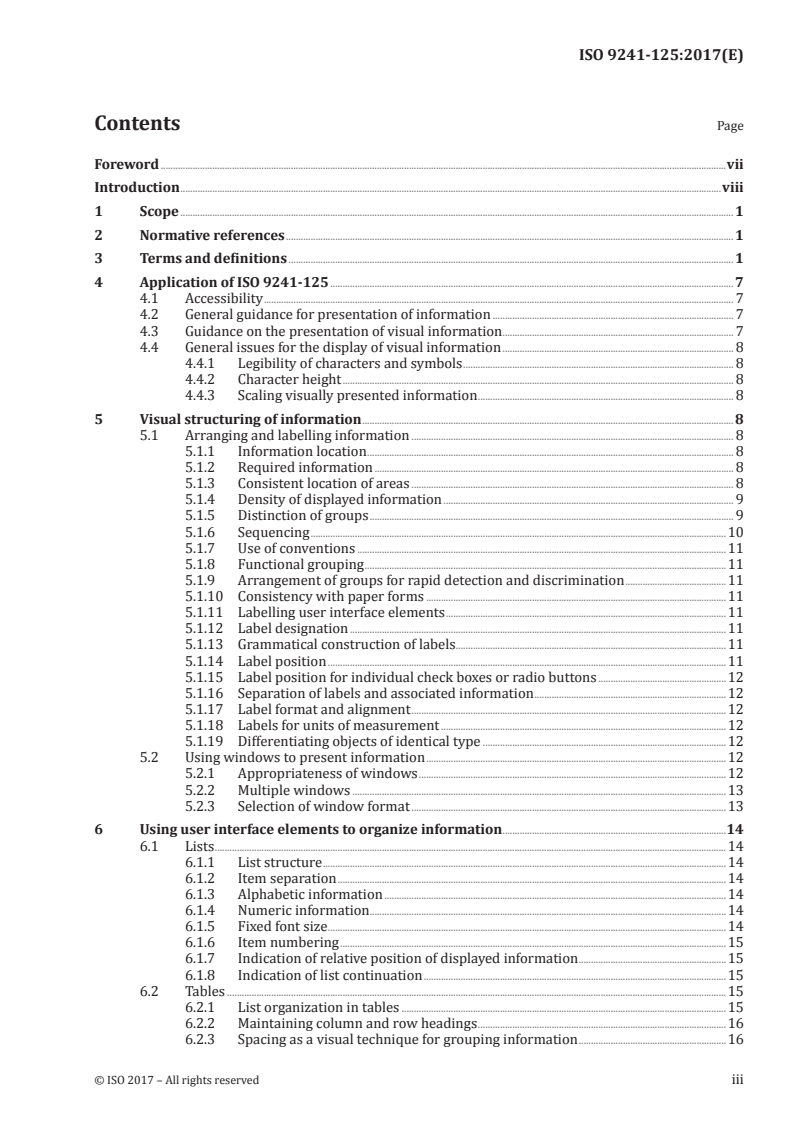
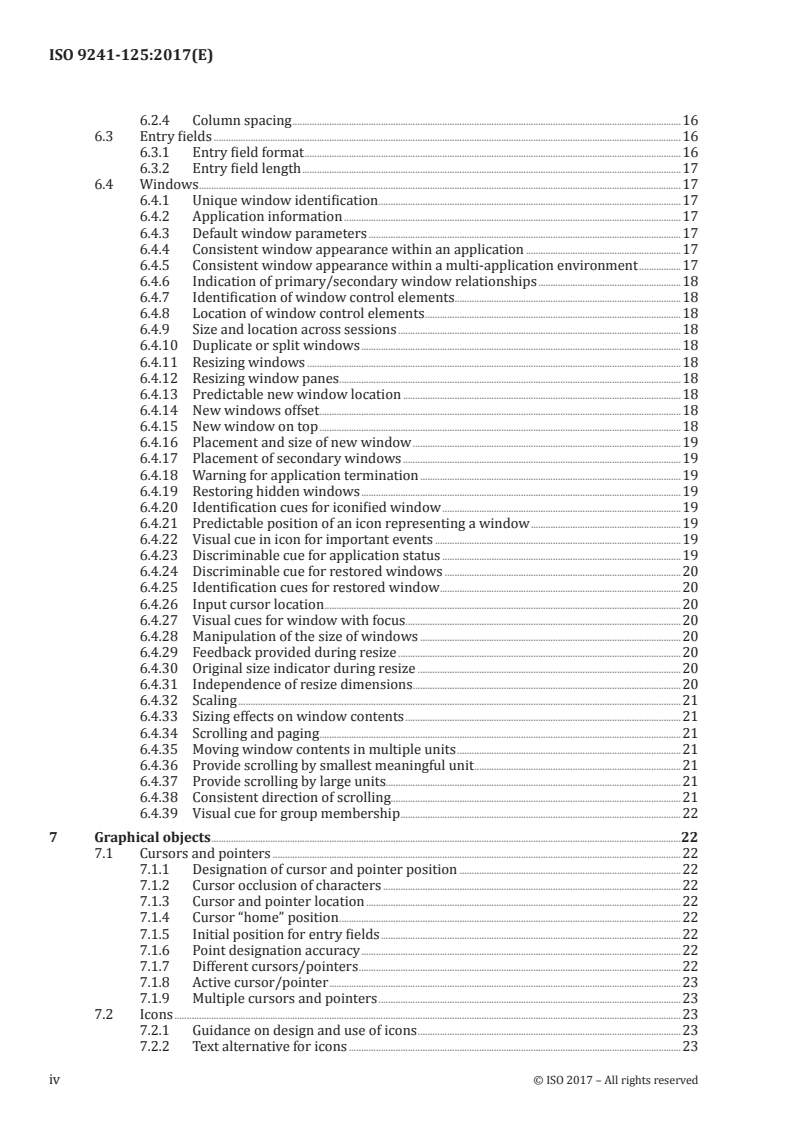
Contents Page
Foreword .vii
Introduction .viii
1 Scope . 1
2 Normative references . 1
3 Terms and definitions . 1
4 Application of ISO 9241-125 . 7
4.1 Accessibility . 7
4.2 General guidance for presentation of information . 7
4.3 Guidance on the presentation of visual information . 7
4.4 General issues for the display of visual information . 8
4.4.1 Legibility of characters and symbols . 8
4.4.2 Character height . 8
4.4.3 Scaling visually presented information . 8
5 Visual structuring of information . 8
5.1 Arranging and labelling information . 8
5.1.1 Information location . 8
5.1.2 Required information . 8
5.1.3 Consistent location of areas . 8
5.1.4 Density of displayed information . 9
5.1.5 Distinction of groups . 9
5.1.6 Sequencing .10
5.1.7 Use of conventions .11
5.1.8 Functional grouping .11
5.1.9 Arrangement of groups for rapid detection and discrimination .11
5.1.10 Consistency with paper forms .11
5.1.11 Labelling user interface elements .11
5.1.12 Label designation .11
5.1.13 Grammatical construction of labels .11
5.1.14 Label position .11
5.1.15 Label position for individual check boxes or radio buttons .12
5.1.16 Separation of labels and associated information .12
5.1.17 Label format and alignment .12
5.1.18 Labels for units of measurement .12
5.1.19 Differentiating objects of identical type .12
5.2 Using windows to present information .12
5.2.1 Appropriateness of windows .12
5.2.2 Multiple windows .13
5.2.3 Selection of window format .13
6 Using user interface elements to organize information .14
6.1 Lists .14
6.1.1 List structure .14
6.1.2 Item separation .14
6.1.3 Alphabetic information .14
6.1.4 Numeric information.14
6.1.5 Fixed font size .14
6.1.6 Item numbering .15
6.1.7 Indication of relative position of displayed information .15
6.1.8 Indication of list continuation .15
6.2 Tables .15
6.2.1 List organization in tables .15
6.2.2 Maintaining column and row headings .16
6.2.3 Spacing as a visual technique for grouping information .16
6.2.4 Column spacing .16
6.3 Entry fields .16
6.3.1 Entry field format .16
6.3.2 Entry field length .17
6.4 Windows .17
6.4.1 Unique window identification .17
6.4.2 Application information .17
6.4.3 Default window parameters .17
6.4.4 Consistent window appearance within an application .17
6.4.5 Consistent window appearance within a multi-application environment .17
6.4.6 Indication of primary/secondary window relationships .18
6.4.7 Identification of window control elements.18
6.4.8 Location of window control elements .18
6.4.9 Size and location across sessions .18
6.4.10 Duplicate or split windows .18
6.4.11 Resizing windows .18
6.4.12 Resizing window panes.18
6.4.13 Predictable new window location .18
6.4.14 New windows offset . .18
6.4.15 New window on top .18
6.4.16 Placement and size of new window .19
6.4.17 Placement of secondary windows .19
6.4.18 Warning for application termination .19
6.4.19 Restoring hidden windows .19
6.4.20 Identification cues for iconified window .19
6.4.21 Predictable position of an icon representing a window .19
6.4.22 Visual cue in icon for important events .19
6.4.23 Discriminable cue for application status .19
6.4.24 Discriminable cue for restored windows .20
6.4.25 Identification cues for restored window .20
6.4.26 Input cursor location . .20
6.4.27 Visual cues for window with focus .20
6.4.28 Manipulation of the size of windows .20
6.4.29 Feedback provided during resize .20
6.4.30 Original size indicator during resize .20
6.4.31 Independence of resize dimensions .20
6.4.32 Scaling .21
6.4.33 Sizing effects on window contents .21
6.4.34 Scrolling and paging . .21
6.4.35 Moving window contents in multiple units .21
6.4.36 Provide scrolling by smallest meaningful unit .21
6.4.37 Provide scrolling by large units.21
6.4.38 Consistent direction of scrolling.21
6.4.39 Visual cue for group membership .22
7 Graphical objects .22
7.1 Cursors and pointers .22
7.1.1 Designation of cursor and pointer position .22
7.1.2 Cursor occlusion of characters .22
7.1.3 Cursor and pointer location .22
7.1.4 Cursor “home” position .22
7.1.5 Initial position for entry fields .22
7.1.6 Point designation accuracy .22
7.1.7 Different cursors/pointers .22
7.1.8 Active cursor/pointer .23
7.1.9 Multiple cursors and pointers .23
7.2 Icons .23
7.2.1 Guidance on design and use of icons .23
7.2.2 Text alternative for icons .23
iv © ISO 2017 – All rights reserved
7.2.3 Neutral icons .23
7.2.4 Cross-cultural icons .23
7.2.5 Ease of learning .24
7.2.6 Icons containing consistent cues .24
7.2.7 National or international graphics .24
7.2.8 Reuse of existing icons .24
7.2.9 User guidance for icons .24
8 Coding techniques .24
8.1 General recommendations for codes .24
8.1.1 Introduction .24
8.1.2 Meeting user expectations.25
8.1.3 Explaining codes .25
8.1.4 Distinctiveness of codes.25
8.1.5 Consistent coding .25
8.1.6 Meaningfulness .25
8.1.7 Access to meaning of code .25
8.1.8 Use of standards or conventional meaning .26
8.1.9 Rules of code construction .26
8.1.10 Codes for missing information .26
8.1.11 Partitioning long information items .26
8.2 Alphanumeric coding .26
8.2.1 Length of character strings .26
8.2.2 Alphabetic vs. numeric codes .26
8.2.3 Same meaning for upper and lower case characters .26
8.2.4 Visually similar alphanumeric characters .27
8.2.5 Length of abbreviations .27
8.2.6 Abbreviations of different length .27
8.2.7 Truncation .27
8.2.8 Deviation from the rules of code construction for abbreviations .27
8.2.9 Conventional and task related abbreviations .27
8.3 Graphical coding .27
8.3.1 Distinctive states of user-interface elements .27
8.3.2 Levels of graphical codes .27
8.3.3 Three-dimensional coding .28
8.3.4 Coding with geometric shapes .28
8.3.5 Coding with different types of lines .28
8.3.6 Line orientation .28
8.4 Colour coding .28
8.4.1 Redundant colour coding .28
8.4.2 Colour coding for people with colour deficits .28
8.4.3 Legend showing colour codes .29
8.4.4 Redundant codes displayed in legends .29
8.4.5 Different use of one colour .29
8.4.6 Limiting the number of colours .29
8.4.7 Colour assignment to categories of information .29
8.4.8 Colour coding conventions .30
8.4.9 Number of colours used .30
8.4.10 Assignments based on cultural conventions .30
8.4.11 Cross-cultural design .30
8.4.12 Colour assignments for special and temporary states .30
8.4.13 Continuous scales.30
8.4.14 Coding differences .31
8.4.15 Coding relative values .31
8.4.16 Ordered coding .31
8.4.17 Consistency of colour codes .31
8.4.18 Change of state.31
8.4.19 Additional guidance on the use of colour .31
8.5 Markers.32
8.5.1 Special symbols for markers . .32
8.5.2 Markers for multiple selection .32
8.5.3 Unique use of symbols for markers .32
8.5.4 Positioning of markers . .32
8.6 Other coding techniques .33
8.6.1 Blink coding .33
8.6.2 Highlighting by blinking .33
8.6.3 Size coding .33
8.6.4 Luminance (brightness) coding .33
8.6.5 Relative Lightness Levels .33
8.6.6 Image polarity reversal .33
8.6.7 Underlining .33
8.6.8 Coding of areas using different coding techniques .34
9 Use of Colour .34
9.1 General recommendations.34
9.2 Specific guidance on using colour .34
9.2.1 Avoiding presentation of information by colour alone .34
9.2.2 Overuse of colours .34
9.2.3 Colour interpretation from memory colour .35
9.2.4 Colour limits for visual search .35
9.2.5 Use of focal colours when accurate colour identification is needed .35
9.2.6 Size of character strings, data fields, and symbols when presented with colour .35
9.2.7 Accurate colour discrimination .36
9.2.8 Events in the visual periphery .36
9.2.9 Object separation .36
9.2.10 Background colours .36
9.2.11 Foreground and background colours for text .36
9.2.12 Continuous reading .37
9.2.13 Unintended depth effects .37
9.2.14 Size and the use of blue .37
9.2.15 Blue and red on dark backgrounds .37
9.2.16 Spectrally extreme colours .37
9.2.17 Improved colour identification .38
9.2.18 Contrast .38
9.2.19 Contrast enhancement .38
9.2.20 Realistic colours .39
9.2.21 Drawing attention .39
9.2.22 Restricted use of warning colours .39
Bibliography .40
vi © ISO 2017 – All rights reserved
Foreword
ISO (the International Organization for Standardization) is a worldwide federation of national standards
bodies (ISO member bodies). The work of preparing International Standards is normally carried out
through ISO technical committees. Each member body interested in a subject for which a technical
committee has been established has the right to be represented on that committee. International
organizations, governmental and non-governmental, in liaison with ISO, also take part in the work.
ISO collaborates closely with the International Electrotechnical Commission (IEC) on all matters of
electrotechnical standardization.
The procedures used to develop this document and those intended for its further maintenance are
described in the ISO/IEC Directives, Part 1. In particular the different approval criteria needed for the
different types of ISO documents should be noted. This document was drafted in accordance with the
editorial rules of the ISO/IEC Directives, Part 2 (see www.iso.org/directives).
Attention is drawn to the possibility that some of the elements of this document may be the subject of
patent rights. ISO shall not be held responsible for identifying any or all such patent rights. Details of
any patent rights identified during the development of the document will be in the Introduction and/or
on the ISO list of patent declarations received (see www.iso.org/patents).
Any trade name used in this document is information given for the convenience of users and does not
constitute an endorsement.
For an explanation on the voluntary nature of standards, the meaning of ISO specific terms and
expressions related to conformity assessment, as well as information about ISO's adherence to the WTO
principles in the Technical Barriers to Trade (TBT) see the following URL: Foreword - Supplementary
information
The committee responsible for this document is ISO/TC 159, Ergonomics, Subcommittee SC 4, Ergonomics
of human–system interaction.
This first edition of ISO 9241-125, together with ISO 9241-112, cancels and replaces ISO 9241-12:1998,
which has been technically revised with the following changes:
— specific guidance relating to the presentation of visual information has been updated and extended
(recommendations for presentation of information in other modalities will be addressed in future
parts of ISO 9241);
— the characteristics of presented information have been elaborated with respect to ISO 9241-112;
— textual descriptions of the figures (alt text) have been added to enhance accessibility for sight-
impaired users (in PDF, these are “pop-ups” which appear when the cursor is passed over the figure).
A list of all parts in the ISO 9241 series can be found on the ISO website.
Introduction
ISO 9241 is a multi-part International Standard that deals with both the hardware and software
ergonomic aspects of human-system interaction.
ISO 9241-125 is intended for use by the following types of users:
a) the user interface designer, who will apply it during the development process.
b) the buyer, who will reference it during the product procurement process, and whose end users will
gain from the potential benefits it provides.
c) project managers who are responsible for managing development processes.
d) designers of user interface development tools to be used by interface designers.
e) writers of software industry user-interface guidelines to be used by interface designers, e.g.
“interface style guides”.
Guidance relating to presenting information provided in International Standards is intended to be
applied to user-interface guidelines published by industry sources.
The ultimate beneficiary of this document will be the end user of the presented information. Although
it is unlikely that the end user will read the standard or even know of its existence, its application by
designers, buyers, and evaluators should provide user interfaces that are more usable, consistent and
that enable greater productivity.
This document consists of general recommendations and conditional recommendations concerning
presentation of information. General recommendations apply to most users, tasks, environments, and
technology. In contrast, conditional recommendations are recommendations that apply only within
the specific context for which they are relevant (e.g. particular kinds of users, tasks, environments,
technology). Conditional recommendations have an “if-then” structure. The recommendations were
developed primarily by reviewing the existing relevant literature and empirical evidence, then
generalizing and formulating this work into recommendations for use by the interface designer and/or
evaluator.
viii © ISO 2017 – All rights reserved
INTERNATIONAL STANDARD ISO 9241-125:2017(E)
Ergonomics of human-system interaction —
Part 125:
Guidance on visual presentation of information
1 Scope
This document provides guidance for the visual presentation of information controlled by software,
irrespective of the device. It includes specific properties such as the syntactic or semantic aspects of
information, e.g. coding techniques, and gives provisions for the organization of information taking
account of human perception and memory capabilities. Those of its provisions that do not apply to
specific types of visual interfaces clearly indicate any limitations to their applicability. It does not
address specific details of charts, graphs or information visualization.
This document can be utilized throughout the design process (e.g. as specification and guidance for
designers during design or as a basis for heuristic evaluation). Its provisions for the presentation of
information depend upon the visual design approach, the task, the user, the environment and the
single or multiple technologies that might be used for presenting the information. Consequently, this
document cannot be applied without knowledge of the context of use. It is not intended to be used as
a prescriptive set of rules to be applied in its entirety but rather assumes that the designer has proper
information available concerning task and user requirements and understands the use of available
technology.
Some of the provisions of this document are based on Latin-based language usage and might not apply,
or might need to be modified, for use with languages that use other alphabets. In applying those that
assume a specific language base (e.g. alphabetic ordering of coding information, items in a list), it
is important that care is taken to follow its intent of the standard when translation is required to a
different language.
This document does not address auditory or tactile/haptic presentation of information or modality
shifting for the presentation of visual information in other modalities.
NOTE ISO 9241-112 provides high-level ergonomic guidance that applies to all modalities.
2 Normative references
The following documents are referred to in the text in such a way that some or all of their content
constitutes requirements of this document. For dated references, only the edition cited applies. For
undated references, the latest edition of the referenced document (including any amendments) applies.
ISO 9241-171:2008, Ergonomics of human-system interaction — Part 171: Guidance on software
accessibility
3 Terms and definitions
For the purposes of this document, the following terms and definitions apply.
ISO and IEC maintain terminological databases for use in standardization at the following addresses:
— ISO Online browsing platform: available at http://www.iso.org/obp
— IEC Electropedia: available at http://www.electropedia.org/
3.1
accessibility
extent to which products, systems, services, environments and facilities can be used by people from a
population with the widest range of user needs, characteristics and capabilities to achieve identified
goals in identified contexts of use
Note 1 to entry: Context of use includes direct use or use supported by assistive technologies.
[SOURCE: ISO 9241-112:2017, 3.15]
3.2
area
section or region of a display or window
Note 1 to entry: Figure 1 shows an example of a possible layout of different areas.
Key
1 identification area
2 input/output area
3 control area
4 message area
Figure 1 — Possible layout of different areas
3.2.1
identification area
area (3.2) where the title of the displayed information is pr
...
INTERNATIONAL ISO
STANDARD 9241-125
First edition
2017-09
Ergonomics of human-system
interaction —
Part 125:
Guidance on visual presentation of
information
Ergonomie de l'interaction homme-système —
Partie 125: Recommandations relatives à la présentation visuelle
d'informations
Reference number
©
ISO 2017
© ISO 2017, Published in Switzerland
All rights reserved. Unless otherwise specified, no part of this publication may be reproduced or utilized otherwise in any form
or by any means, electronic or mechanical, including photocopying, or posting on the internet or an intranet, without prior
written permission. Permission can be requested from either ISO at the address below or ISO’s member body in the country of
the requester.
ISO copyright office
Ch. de Blandonnet 8 • CP 401
CH-1214 Vernier, Geneva, Switzerland
Tel. +41 22 749 01 11
Fax +41 22 749 09 47
copyright@iso.org
www.iso.org
ii © ISO 2017 – All rights reserved
Contents Page
Foreword .vii
Introduction .viii
1 Scope . 1
2 Normative references . 1
3 Terms and definitions . 1
4 Application of ISO 9241-125 . 7
4.1 Accessibility . 7
4.2 General guidance for presentation of information . 7
4.3 Guidance on the presentation of visual information . 7
4.4 General issues for the display of visual information . 8
4.4.1 Legibility of characters and symbols . 8
4.4.2 Character height . 8
4.4.3 Scaling visually presented information . 8
5 Visual structuring of information . 8
5.1 Arranging and labelling information . 8
5.1.1 Information location . 8
5.1.2 Required information . 8
5.1.3 Consistent location of areas . 8
5.1.4 Density of displayed information . 9
5.1.5 Distinction of groups . 9
5.1.6 Sequencing .10
5.1.7 Use of conventions .11
5.1.8 Functional grouping .11
5.1.9 Arrangement of groups for rapid detection and discrimination .11
5.1.10 Consistency with paper forms .11
5.1.11 Labelling user interface elements .11
5.1.12 Label designation .11
5.1.13 Grammatical construction of labels .11
5.1.14 Label position .11
5.1.15 Label position for individual check boxes or radio buttons .12
5.1.16 Separation of labels and associated information .12
5.1.17 Label format and alignment .12
5.1.18 Labels for units of measurement .12
5.1.19 Differentiating objects of identical type .12
5.2 Using windows to present information .12
5.2.1 Appropriateness of windows .12
5.2.2 Multiple windows .13
5.2.3 Selection of window format .13
6 Using user interface elements to organize information .14
6.1 Lists .14
6.1.1 List structure .14
6.1.2 Item separation .14
6.1.3 Alphabetic information .14
6.1.4 Numeric information.14
6.1.5 Fixed font size .14
6.1.6 Item numbering .15
6.1.7 Indication of relative position of displayed information .15
6.1.8 Indication of list continuation .15
6.2 Tables .15
6.2.1 List organization in tables .15
6.2.2 Maintaining column and row headings .16
6.2.3 Spacing as a visual technique for grouping information .16
6.2.4 Column spacing .16
6.3 Entry fields .16
6.3.1 Entry field format .16
6.3.2 Entry field length .17
6.4 Windows .17
6.4.1 Unique window identification .17
6.4.2 Application information .17
6.4.3 Default window parameters .17
6.4.4 Consistent window appearance within an application .17
6.4.5 Consistent window appearance within a multi-application environment .17
6.4.6 Indication of primary/secondary window relationships .18
6.4.7 Identification of window control elements.18
6.4.8 Location of window control elements .18
6.4.9 Size and location across sessions .18
6.4.10 Duplicate or split windows .18
6.4.11 Resizing windows .18
6.4.12 Resizing window panes.18
6.4.13 Predictable new window location .18
6.4.14 New windows offset . .18
6.4.15 New window on top .18
6.4.16 Placement and size of new window .19
6.4.17 Placement of secondary windows .19
6.4.18 Warning for application termination .19
6.4.19 Restoring hidden windows .19
6.4.20 Identification cues for iconified window .19
6.4.21 Predictable position of an icon representing a window .19
6.4.22 Visual cue in icon for important events .19
6.4.23 Discriminable cue for application status .19
6.4.24 Discriminable cue for restored windows .20
6.4.25 Identification cues for restored window .20
6.4.26 Input cursor location . .20
6.4.27 Visual cues for window with focus .20
6.4.28 Manipulation of the size of windows .20
6.4.29 Feedback provided during resize .20
6.4.30 Original size indicator during resize .20
6.4.31 Independence of resize dimensions .20
6.4.32 Scaling .21
6.4.33 Sizing effects on window contents .21
6.4.34 Scrolling and paging . .21
6.4.35 Moving window contents in multiple units .21
6.4.36 Provide scrolling by smallest meaningful unit .21
6.4.37 Provide scrolling by large units.21
6.4.38 Consistent direction of scrolling.21
6.4.39 Visual cue for group membership .22
7 Graphical objects .22
7.1 Cursors and pointers .22
7.1.1 Designation of cursor and pointer position .22
7.1.2 Cursor occlusion of characters .22
7.1.3 Cursor and pointer location .22
7.1.4 Cursor “home” position .22
7.1.5 Initial position for entry fields .22
7.1.6 Point designation accuracy .22
7.1.7 Different cursors/pointers .22
7.1.8 Active cursor/pointer .23
7.1.9 Multiple cursors and pointers .23
7.2 Icons .23
7.2.1 Guidance on design and use of icons .23
7.2.2 Text alternative for icons .23
iv © ISO 2017 – All rights reserved
7.2.3 Neutral icons .23
7.2.4 Cross-cultural icons .23
7.2.5 Ease of learning .24
7.2.6 Icons containing consistent cues .24
7.2.7 National or international graphics .24
7.2.8 Reuse of existing icons .24
7.2.9 User guidance for icons .24
8 Coding techniques .24
8.1 General recommendations for codes .24
8.1.1 Introduction .24
8.1.2 Meeting user expectations.25
8.1.3 Explaining codes .25
8.1.4 Distinctiveness of codes.25
8.1.5 Consistent coding .25
8.1.6 Meaningfulness .25
8.1.7 Access to meaning of code .25
8.1.8 Use of standards or conventional meaning .26
8.1.9 Rules of code construction .26
8.1.10 Codes for missing information .26
8.1.11 Partitioning long information items .26
8.2 Alphanumeric coding .26
8.2.1 Length of character strings .26
8.2.2 Alphabetic vs. numeric codes .26
8.2.3 Same meaning for upper and lower case characters .26
8.2.4 Visually similar alphanumeric characters .27
8.2.5 Length of abbreviations .27
8.2.6 Abbreviations of different length .27
8.2.7 Truncation .27
8.2.8 Deviation from the rules of code construction for abbreviations .27
8.2.9 Conventional and task related abbreviations .27
8.3 Graphical coding .27
8.3.1 Distinctive states of user-interface elements .27
8.3.2 Levels of graphical codes .27
8.3.3 Three-dimensional coding .28
8.3.4 Coding with geometric shapes .28
8.3.5 Coding with different types of lines .28
8.3.6 Line orientation .28
8.4 Colour coding .28
8.4.1 Redundant colour coding .28
8.4.2 Colour coding for people with colour deficits .28
8.4.3 Legend showing colour codes .29
8.4.4 Redundant codes displayed in legends .29
8.4.5 Different use of one colour .29
8.4.6 Limiting the number of colours .29
8.4.7 Colour assignment to categories of information .29
8.4.8 Colour coding conventions .30
8.4.9 Number of colours used .30
8.4.10 Assignments based on cultural conventions .30
8.4.11 Cross-cultural design .30
8.4.12 Colour assignments for special and temporary states .30
8.4.13 Continuous scales.30
8.4.14 Coding differences .31
8.4.15 Coding relative values .31
8.4.16 Ordered coding .31
8.4.17 Consistency of colour codes .31
8.4.18 Change of state.31
8.4.19 Additional guidance on the use of colour .31
8.5 Markers.32
8.5.1 Special symbols for markers . .32
8.5.2 Markers for multiple selection .32
8.5.3 Unique use of symbols for markers .32
8.5.4 Positioning of markers . .32
8.6 Other coding techniques .33
8.6.1 Blink coding .33
8.6.2 Highlighting by blinking .33
8.6.3 Size coding .33
8.6.4 Luminance (brightness) coding .33
8.6.5 Relative Lightness Levels .33
8.6.6 Image polarity reversal .33
8.6.7 Underlining .33
8.6.8 Coding of areas using different coding techniques .34
9 Use of Colour .34
9.1 General recommendations.34
9.2 Specific guidance on using colour .34
9.2.1 Avoiding presentation of information by colour alone .34
9.2.2 Overuse of colours .34
9.2.3 Colour interpretation from memory colour .35
9.2.4 Colour limits for visual search .35
9.2.5 Use of focal colours when accurate colour identification is needed .35
9.2.6 Size of character strings, data fields, and symbols when presented with colour .35
9.2.7 Accurate colour discrimination .36
9.2.8 Events in the visual periphery .36
9.2.9 Object separation .36
9.2.10 Background colours .36
9.2.11 Foreground and background colours for text .36
9.2.12 Continuous reading .37
9.2.13 Unintended depth effects .37
9.2.14 Size and the use of blue .37
9.2.15 Blue and red on dark backgrounds .37
9.2.16 Spectrally extreme colours .37
9.2.17 Improved colour identification .38
9.2.18 Contrast .38
9.2.19 Contrast enhancement .38
9.2.20 Realistic colours .39
9.2.21 Drawing attention .39
9.2.22 Restricted use of warning colours .39
Bibliography .40
vi © ISO 2017 – All rights reserved
Foreword
ISO (the International Organization for Standardization) is a worldwide federation of national standards
bodies (ISO member bodies). The work of preparing International Standards is normally carried out
through ISO technical committees. Each member body interested in a subject for which a technical
committee has been established has the right to be represented on that committee. International
organizations, governmental and non-governmental, in liaison with ISO, also take part in the work.
ISO collaborates closely with the International Electrotechnical Commission (IEC) on all matters of
electrotechnical standardization.
The procedures used to develop this document and those intended for its further maintenance are
described in the ISO/IEC Directives, Part 1. In particular the different approval criteria needed for the
different types of ISO documents should be noted. This document was drafted in accordance with the
editorial rules of the ISO/IEC Directives, Part 2 (see www.iso.org/directives).
Attention is drawn to the possibility that some of the elements of this document may be the subject of
patent rights. ISO shall not be held responsible for identifying any or all such patent rights. Details of
any patent rights identified during the development of the document will be in the Introduction and/or
on the ISO list of patent declarations received (see www.iso.org/patents).
Any trade name used in this document is information given for the convenience of users and does not
constitute an endorsement.
For an explanation on the voluntary nature of standards, the meaning of ISO specific terms and
expressions related to conformity assessment, as well as information about ISO's adherence to the WTO
principles in the Technical Barriers to Trade (TBT) see the following URL: Foreword - Supplementary
information
The committee responsible for this document is ISO/TC 159, Ergonomics, Subcommittee SC 4, Ergonomics
of human–system interaction.
This first edition of ISO 9241-125, together with ISO 9241-112, cancels and replaces ISO 9241-12:1998,
which has been technically revised with the following changes:
— specific guidance relating to the presentation of visual information has been updated and extended
(recommendations for presentation of information in other modalities will be addressed in future
parts of ISO 9241);
— the characteristics of presented information have been elaborated with respect to ISO 9241-112;
— textual descriptions of the figures (alt text) have been added to enhance accessibility for sight-
impaired users (in PDF, these are “pop-ups” which appear when the cursor is passed over the figure).
A list of all parts in the ISO 9241 series can be found on the ISO website.
Introduction
ISO 9241 is a multi-part International Standard that deals with both the hardware and software
ergonomic aspects of human-system interaction.
ISO 9241-125 is intended for use by the following types of users:
a) the user interface designer, who will apply it during the development process.
b) the buyer, who will reference it during the product procurement process, and whose end users will
gain from the potential benefits it provides.
c) project managers who are responsible for managing development processes.
d) designers of user interface development tools to be used by interface designers.
e) writers of software industry user-interface guidelines to be used by interface designers, e.g.
“interface style guides”.
Guidance relating to presenting information provided in International Standards is intended to be
applied to user-interface guidelines published by industry sources.
The ultimate beneficiary of this document will be the end user of the presented information. Although
it is unlikely that the end user will read the standard or even know of its existence, its application by
designers, buyers, and evaluators should provide user interfaces that are more usable, consistent and
that enable greater productivity.
This document consists of general recommendations and conditional recommendations concerning
presentation of information. General recommendations apply to most users, tasks, environments, and
technology. In contrast, conditional recommendations are recommendations that apply only within
the specific context for which they are relevant (e.g. particular kinds of users, tasks, environments,
technology). Conditional recommendations have an “if-then” structure. The recommendations were
developed primarily by reviewing the existing relevant literature and empirical evidence, then
generalizing and formulating this work into recommendations for use by the interface designer and/or
evaluator.
viii © ISO 2017 – All rights reserved
INTERNATIONAL STANDARD ISO 9241-125:2017(E)
Ergonomics of human-system interaction —
Part 125:
Guidance on visual presentation of information
1 Scope
This document provides guidance for the visual presentation of information controlled by software,
irrespective of the device. It includes specific properties such as the syntactic or semantic aspects of
information, e.g. coding techniques, and gives provisions for the organization of information taking
account of human perception and memory capabilities. Those of its provisions that do not apply to
specific types of visual interfaces clearly indicate any limitations to their applicability. It does not
address specific details of charts, graphs or information visualization.
This document can be utilized throughout the design process (e.g. as specification and guidance for
designers during design or as a basis for heuristic evaluation). Its provisions for the presentation of
information depend upon the visual design approach, the task, the user, the environment and the
single or multiple technologies that might be used for presenting the information. Consequently, this
document cannot be applied without knowledge of the context of use. It is not intended to be used as
a prescriptive set of rules to be applied in its entirety but rather assumes that the designer has proper
information available concerning task and user requirements and understands the use of available
technology.
Some of the provisions of this document are based on Latin-based language usage and might not apply,
or might need to be modified, for use with languages that use other alphabets. In applying those that
assume a specific language base (e.g. alphabetic ordering of coding information, items in a list), it
is important that care is taken to follow its intent of the standard when translation is required to a
different language.
This document does not address auditory or tactile/haptic presentation of information or modality
shifting for the presentation of visual information in other modalities.
NOTE ISO 9241-112 provides high-level ergonomic guidance that applies to all modalities.
2 Normative references
The following documents are referred to in the text in such a way that some or all of their content
constitutes requirements of this document. For dated references, only the edition cited applies. For
undated references, the latest edition of the referenced document (including any amendments) applies.
ISO 9241-171:2008, Ergonomics of human-system interaction — Part 171: Guidance on software
accessibility
3 Terms and definitions
For the purposes of this document, the following terms and definitions apply.
ISO and IEC maintain terminological databases for use in standardization at the following addresses:
— ISO Online browsing platform: available at http://www.iso.org/obp
— IEC Electropedia: available at http://www.electropedia.org/
3.1
accessibility
extent to which products, systems, services, environments and facilities can be used by people from a
population with the widest range of user needs, characteristics and capabilities to achieve identified
goals in identified contexts of use
Note 1 to entry: Context of use includes direct use or use supported by assistive technologies.
[SOURCE: ISO 9241-112:2017, 3.15]
3.2
area
section or region of a display or window
Note 1 to entry: Figure 1 shows an example of a possible layout of different areas.
Key
1 identification area
2 input/output area
3 control area
4 message area
Figure 1 — Possible layout of different areas
3.2.1
identification area
area (3.2) where the title of the displayed information is pr
...
NORME ISO
INTERNATIONALE 9241-125
Première édition
2017-09
Ergonomie de l'interaction homme-
système —
Partie 125:
Recommandations relatives à la
présentation visuelle d'informations
Ergonomics of human-system interaction —
Part 125: Guidance on visual presentation of information
Numéro de référence
©
ISO 2017
DOCUMENT PROTÉGÉ PAR COPYRIGHT
© ISO 2017, Publié en Suisse
Droits de reproduction réservés. Sauf indication contraire, aucune partie de cette publication ne peut être reproduite ni utilisée
sous quelque forme que ce soit et par aucun procédé, électronique ou mécanique, y compris la photocopie, l’affichage sur
l’internet ou sur un Intranet, sans autorisation écrite préalable. Les demandes d’autorisation peuvent être adressées à l’ISO à
l’adresse ci-après ou au comité membre de l’ISO dans le pays du demandeur.
ISO copyright office
Ch. de Blandonnet 8 • CP 401
CH-1214 Vernier, Geneva, Switzerland
Tel. +41 22 749 01 11
Fax +41 22 749 09 47
copyright@iso.org
www.iso.org
ii © ISO 2017 – Tous droits réservés
Sommaire Page
Avant-propos .vii
Introduction .viii
1 Domaine d’application . 1
2 Références normatives . 1
3 Termes et définitions . 1
4 Application de l’ISO 9241-125. 7
4.1 Accessibilité . 7
4.2 Recommandations générales relatives à la présentation des informations . 7
4.3 Recommandations relatives à la présentation d’informations visuelles . 8
4.4 Problèmes généraux pour l’affichage d’informations visuelles . 8
4.4.1 Lisibilité des caractères et des symboles . 8
4.4.2 Hauteur de caractère . 8
4.4.3 Mise à l’échelle des informations présentées visuellement . 8
5 Structuration visuelle de l’information . 8
5.1 Organisation et dénomination de l’information. 8
5.1.1 Emplacement de l’information . 8
5.1.2 Informations exigées . 8
5.1.3 Emplacement homogène des zones . 9
5.1.4 Densité des informations affichées . 9
5.1.5 Distinction entre les groupes . 9
5.1.6 Séquencement .11
5.1.7 Utilisation de conventions .11
5.1.8 Groupement fonctionnel .12
5.1.9 Organisation de groupes pour une détection et une discrimination rapides .12
5.1.10 Homogénéité avec les formulaires papier .12
5.1.11 Dénomination des éléments de l’interface utilisateur .12
5.1.12 Dénomination du libellé .12
5.1.13 Construction grammaticale des libellés .12
5.1.14 Position du libellé . .12
5.1.15 Position du libellé pour les cases à cocher ou les boutons radio individuels .13
5.1.16 Séparation des libellés et des informations associées .13
5.1.17 Format et alignement des libellés .13
5.1.18 Libellés pour les unités de mesure .13
5.1.19 Différenciation d’objets de type identique .13
5.2 Utilisation de fenêtres pour présenter les informations .13
5.2.1 Pertinence des fenêtres .13
5.2.2 Fenêtres multiples .14
5.2.3 Sélection du format de fenêtre.15
6 Utilisation de l’interface utilisateur pour organiser les informations .15
6.1 Listes .15
6.1.1 Structure de liste .15
6.1.2 Séparation des éléments .15
6.1.3 Informations alphabétiques .15
6.1.4 Informations numériques .15
6.1.5 Taille de police fixe .16
6.1.6 Numérotation des éléments .16
6.1.7 Indication de la position relative des informations affichées .16
6.1.8 Indication de la continuité d’une liste .16
6.2 Tableaux .17
6.2.1 Organisation d’une liste en tableaux .17
6.2.2 Maintien des titres de colonne et de ligne .17
6.2.3 Espacement comme technique visuelle de groupement des informations.17
6.2.4 Espacement des colonnes .18
6.3 Champs de saisie .18
6.3.1 Format du champ de saisie .18
6.3.2 Longueur du champ de saisie .18
6.4 Fenêtres .19
6.4.1 Identification de fenêtre unique .19
6.4.2 Informations relatives à l’application .19
6.4.3 Paramètres de fenêtre par défaut.19
6.4.4 Aspect homogène des fenêtres au sein d’une application .19
6.4.5 Aspect homogène des fenêtres au sein d’un environnement à
applications multiples .19
6.4.6 Indication sur les relations entre fenêtre principale/secondaire .19
6.4.7 Identification des éléments de commande d’une fenêtre .20
6.4.8 Emplacement des éléments de commande d’une fenêtre .20
6.4.9 Taille et emplacement entre les sessions . .20
6.4.10 Fenêtres dupliquées ou divisées .20
6.4.11 Redimensionnement des fenêtres .20
6.4.12 Redimensionnement des volets de fenêtre .20
6.4.13 Emplacement prévisible d’une nouvelle fenêtre .20
6.4.14 Décalage des nouvelles fenêtres .20
6.4.15 Nouvelle fenêtre au premier plan .20
6.4.16 Positionnement et taille d’une nouvelle fenêtre .21
6.4.17 Positionnement des fenêtres secondaires .21
6.4.18 Avertissement de fin de l’application .21
6.4.19 Restauration des fenêtres masquées .21
6.4.20 Repères d’identification pour fenêtre réduite en icône .21
6.4.21 Position prévisible d’une icône représentant une fenêtre .21
6.4.22 Repère visuel dans l’icône pour les événements importants .21
6.4.23 Repère discriminable pour l’état de l’application .21
6.4.24 Repère discriminable pour les fenêtres restaurées .22
6.4.25 Repères d’identification pour fenêtre restaurée .22
6.4.26 Emplacement du curseur d’entrée .22
6.4.27 Repères visuels pour fenêtre avec le focus .22
6.4.28 Manipulation de la taille des fenêtres .22
6.4.29 Feedback produit pendant le redimensionnement .22
6.4.30 Indicateur de taille originale pendant le redimensionnement .22
6.4.31 Indépendance des dimensions de redimensionnement .23
6.4.32 Mise à l’échelle .23
6.4.33 Effets du dimensionnement sur le contenu de la fenêtre .23
6.4.34 Défilement et pagination .23
6.4.35 Déplacement du contenu d’une fenêtre dans plusieurs unités .23
6.4.36 Réalisation du défilement par plus petite unité significative .23
6.4.37 Réalisation du défilement par grandes unités .23
6.4.38 Sens de défilement homogène .24
6.4.39 Repère visuel pour l’appartenance à un groupe .24
7 Objets graphiques .24
7.1 Curseurs et pointeurs .24
7.1.1 Désignation de la position du curseur et du pointeur .24
7.1.2 Occultation des caractères par le curseur .24
7.1.3 Emplacement du curseur et du pointeur .24
7.1.4 Position de base du curseur .24
7.1.5 Position initiale pour les champs de saisie .24
7.1.6 Précision de désignation du point .24
7.1.7 Différents curseurs/pointeurs .25
7.1.8 Curseur/pointeur actif . .25
7.1.9 Curseurs et pointeurs multiples .25
7.2 Icônes .25
7.2.1 Recommandations relatives à la conception et l’utilisation des icônes .25
iv © ISO 2017 – Tous droits réservés
7.2.2 Alternative textuelle des icônes .25
7.2.3 Icônes neutres .25
7.2.4 Icônes interculturelles .25
7.2.5 Facilité d’apprentissage .26
7.2.6 Icônes contenant des repères homogènes.26
7.2.7 Signes graphiques nationaux ou internationaux .26
7.2.8 Réutilisation des icônes existantes .27
7.2.9 Guidage de l’utilisateur pour les icônes .27
8 Techniques de codage .27
8.1 Recommandations générales pour les codes .27
8.1.1 Introduction .27
8.1.2 Répondre aux attentes de l’utilisateur .27
8.1.3 Explication des codes . .27
8.1.4 Caractère distinctif des codes .27
8.1.5 Codage homogène .28
8.1.6 Signifiance .28
8.1.7 Accès à la signification du code .28
8.1.8 Utilisation de normes ou signification conventionnelle .28
8.1.9 Règles de construction du code .28
8.1.10 Codes pour information manquante.28
8.1.11 Découpage d’éléments d’information longs .29
8.2 Codage alphanumérique .29
8.2.1 Longueur des chaînes de caractères .29
8.2.2 Codes alphanumériques ou numériques .29
8.2.3 Signification identique pour les majuscules et les minuscules.29
8.2.4 Caractères alphanumériques visuellement similaires .29
8.2.5 Longueur des abréviations.29
8.2.6 Abréviations de différentes longueurs .29
8.2.7 Troncature .30
8.2.8 Écarts vis-à-vis des règles de construction du code des abréviations.30
8.2.9 Abréviations conventionnelles et en rapport avec la tâche .30
8.3 Codage graphique .30
8.3.1 États distinctifs des éléments d’interface utilisateur .30
8.3.2 Niveaux des codes graphiques .30
8.3.3 Codage tridimensionnel .30
8.3.4 Codage avec des formes géométriques.30
8.3.5 Codage avec différents types de lignes .31
8.3.6 Orientation de ligne . .31
8.4 Codage couleur .31
8.4.1 Codage couleur redondant .31
8.4.2 Codage couleur pour les personnes atteintes d’une déficience de
perception des couleurs .31
8.4.3 Légende indiquant les codes couleur .31
8.4.4 Codes redondants affichés dans les légendes .32
8.4.5 Usage différent d’une couleur.32
8.4.6 Limitation du nombre de couleurs .32
8.4.7 Attribution de couleurs aux catégories d’informations .32
8.4.8 Conventions de codage couleur .32
8.4.9 Nombre de couleurs utilisées .33
8.4.10 Attributions basées sur des conventions culturelles .33
8.4.11 Conception interculturelle.33
8.4.12 Attribution des couleurs aux états spéciaux et temporaires .33
8.4.13 Échelles continues .33
8.4.14 Codage des différences .34
8.4.15 Codage de valeurs relatives .34
8.4.16 Gradation du codage .34
8.4.17 Homogénéité des codes couleur . .34
8.4.18 Changement d’état .34
8.4.19 Recommandations supplémentaires relatives à l’utilisation des couleurs .35
8.5 Marqueurs .35
8.5.1 Symboles spéciaux pour les marqueurs .35
8.5.2 Marqueurs pour des sélections multiples .35
8.5.3 Usage unique des symboles pour les marqueurs .35
8.5.4 Positionnement des marqueurs.35
8.6 Autres techniques de codage .36
8.6.1 Codage par clignotement .36
8.6.2 Mise en valeur par clignotement . .36
8.6.3 Codage par la taille .36
8.6.4 Codage par luminance (brillance) .36
8.6.5 Niveaux de luminosité relatifs .37
8.6.6 Inversion de la polarité d’image .37
8.6.7 Soulignement .37
8.6.8 Codage des zones utilisant différentes techniques de codage .37
9 Utilisation de la couleur .37
9.1 Recommandations générales.37
9.2 Recommandations spécifiques relatives à l’utilisation des couleurs .38
9.2.1 Éviter la présentation d’informations par des couleurs seules .38
9.2.2 Utilisation excessive des couleurs.38
9.2.3 Intelligibilité des couleurs mémorisées .38
9.2.4 Limites de la couleur pour la recherche visuelle .38
9.2.5 Utilisation de couleurs types lorsqu’une identification précise de la
couleur est nécessaire .38
9.2.6 Taille des chaînes de caractères, champs de données et symboles
lorsqu’ils sont présentés avec une couleur .39
9.2.7 Discrimination précise des couleurs .39
9.2.8 Événements dans la périphérie visuelle .40
9.2.9 Séparation des objets .40
9.2.10 Couleurs de fond .40
9.2.11 Couleurs de premier plan et de fond pour le texte .40
9.2.12 Lecture continue .40
9.2.13 Effets de profondeur involontaires .41
9.2.14 Taille et utilisation du bleu .41
9.2.15 Bleu et rouge sur fonds sombres .41
9.2.16 Couleurs extrêmes du spectre .41
9.2.17 Identification améliorée des couleurs .41
9.2.18 Contraste .42
9.2.19 Renforcement du contraste .42
9.2.20 Couleurs réalistes .42
9.2.21 Attirer l’attention . .42
9.2.22 Restriction d’utilisation des couleurs d’avertissement .43
Bibliographie .44
vi © ISO 2017 – Tous droits réservés
Avant-propos
L'ISO (Organisation internationale de normalisation) est une fédération mondiale d'organismes
nationaux de normalisation (comités membres de l'ISO). L'élaboration des Normes internationales est
en général confiée aux comités techniques de l'ISO. Chaque comité membre intéressé par une étude
a le droit de faire partie du comité technique créé à cet effet. Les organisations internationales,
gouvernementales et non gouvernementales, en liaison avec l'ISO participent également aux travaux.
L'ISO collabore étroitement avec la Commission électrotechnique internationale (IEC) en ce qui
concerne la normalisation électrotechnique.
Les procédures utilisées pour élaborer le présent document et celles destinées à sa mise à jour sont
décrites dans les Directives ISO/IEC, Partie 1. Il convient, en particulier de prendre note des différents
critères d'approbation requis pour les différents types de documents ISO. Le présent document a été
rédigé conformément aux règles de rédaction données dans les Directives ISO/IEC, Partie 2 (voir www.
iso.org/directives).
L'attention est appelée sur le fait que certains des éléments du présent document peuvent faire l'objet de
droits de propriété intellectuelle ou de droits analogues. L'ISO ne saurait être tenue pour responsable
de ne pas avoir identifié de tels droits de propriété et averti de leur existence. Les détails concernant
les références aux droits de propriété intellectuelle ou autres droits analogues identifiés lors de
l'élaboration du document sont indiqués dans l'Introduction et/ou dans la liste des déclarations de
brevets reçues par l'ISO (voir www.iso.org/brevets).
Les appellations commerciales éventuellement mentionnées dans le présent document sont données
pour information, par souci de commodité, à l’intention des utilisateurs et ne sauraient constituer un
engagement.
Pour une explication de la nature volontaire des normes, la signification des termes et expressions
spécifiques de l'ISO liés à l'évaluation de la conformité, ou pour toute information au sujet de l'adhésion
de l'ISO aux principes de l’Organisation mondiale du commerce (OMC) concernant les obstacles
techniques au commerce (OTC), voir le lien suivant: www.iso.org/iso/fr/avant-propos.html
Ce document a été élaboré par le comité technique ISO/TC 159, Ergonomie, sous-comité SC 4, Ergonomie
de l’interaction homme/système.
Cette première édition de l’ISO 9241-125, conjointement à l’ISO 9241-112, annule et remplace
l’ISO 9241-12:1998, qui a fait l'objet d'une révision technique avec les modifications suivantes:
— les lignes directrices spécifiques se rapportant à la présentation d’informations visuelles ont été
mises à jour et étendues (les recommandations pour la présentation des informations dans d’autres
modes seront traitées dans les futures parties de la norme ISO 9241);
— les caractéristiques des informations présentées ont été élaborées par rapport à l’ISO 9241-112;
— des descriptions textuelles des figures (« alt text ») ont été ajoutées afin de les rendre plus accessibles
aux utilisateurs malvoyants (dans PDF, celles-ci sont des « pop-ups » qui apparaissent quand le
curseur passe au-dessus la figure).
Une liste de toutes les parties de la série ISO 9241- est disponible sur le site internet de l’ISO.
Introduction
L’ISO 9241 est une Norme internationale en plusieurs parties qui aborde les aspects à la fois matériels
et logiciels de l’ergonomie de l’interaction homme-système.
L’ISO 9241-125 est destinée à être utilisée par les types d’utilisateurs suivants:
a) le concepteur de l’interface utilisateur, qui l’appliquera durant le processus de développement;
b) l’acheteur, qui y fera référence durant le processus d’achat du produit, et dont les utilisateurs finaux
bénéficieront des avantages potentiels qu’elle apporte;
c) les chefs de projet, qui sont responsables de la gestion des processus de développement;
d) les concepteurs d’outils de développement d’interfaces utilisateur destinés à être utilisés par les
concepteurs d’interfaces;
e) les rédacteurs de lignes directrices d’interfaces utilisateur de l’industrie des logiciels qui sont
destinés à être utilisés par les concepteurs d’interfaces, par exemple «guides de style des interfaces».
Les recommandations relatives à la présentation d’informations figurant dans les Normes
internationales sont destinées à être appliquées aux lignes directrices des interfaces utilisateur
publiées par les sources industrielles.
Le bénéficiaire ultime du présent document sera l’utilisateur final des informations présentées. Bien
qu’il soit peu probable que l’utilisateur final lise la norme ou même connaisse son existence, il convient
que son application par les concepteurs, les acheteurs et les évaluateurs produise des interfaces
utilisateur qui sont plus faciles d’utilisation, homogènes et qui permettent une productivité accrue.
Le présent document contient des recommandations générales ainsi que des recommandations
conditionnelles relatives à la présentation des informations. Les recommandations générales
s’appliquent à la plupart des utilisateurs, des tâches, des environnements et des technologies.
Par opposition, les recommandations conditionnelles s’appliquent uniquement dans le contexte
spécifique auquel elles se rapportent (par exemple, catégories particulières d’utilisateurs, de tâches,
d’environnements et de technologies). Les recommandations conditionnelles présentent une structure
de type «si–alors». Les recommandations ont été élaborées principalement en examinant la littérature
pertinente existante et les données empiriques, puis en généralisant et en formulant ce travail dans des
recommandations à utiliser par le concepteur et/ou l’évaluateur de l’interface.
viii © ISO 2017 – Tous droits réservés
NORME INTERNATIONALE ISO 9241-125:2017(F)
Ergonomie de l'interaction homme-système —
Partie 125:
Recommandations relatives à la présentation visuelle
d'informations
1 Domaine d’application
Le présent document fournit un document d’orientation pour la présentation visuelle d’informations
sous le contrôle d'un logiciel, indépendamment du support. Il inclut des propriétés spécifiques telles
que les aspects syntaxiques ou sémantiques des informations, par exemple les techniques de codage,
et fournit des dispositions relatives à l’organisation des informations en tenant compte des capacités
humaines de perception et de mémorisation. Les dispositions qui ne s’appliquent pas à des types
spécifiques d’interfaces visuelles indiquent clairement les éventuelles limites de leur applicabilité. Ne
sont pas concernés les détails spécifiques des tableaux, des graphiques ou ceux de la visualisation des
informations.
Ce document peut être utilisé au cours de l’ensemble du processus de conception (par exemple sous la
forme de spécifications et de recommandations pour les concepteurs durant la conception ou en tant
que base pour une évaluation heuristique). Ses dispositions relatives à la présentation des informations
dépendent de l’approche de la conception visuelle, de la tâche, de l’utilisateur, de l’environnement ainsi
que des technologies, simples ou multiples, qui peuvent être utilisées pour présenter les informations.
Par conséquent, le présent document ne peut pas être appliqué sans connaître le contexte d’utilisation.
Il n’est pas conçu pour être utilisé comme un ensemble de règles prescriptives à appliquer dans son
intégralité, mais suppose plutôt que le concepteur dispose d’informations appropriées concernant la
tâche et les exigences de l’utilisateur et comprend l’utilisation de la technologie disponible.
Certaines des dispositions du présent document se basent sur l’utilisation d’une langue d’origine latine et
leur utilisation avec une langue utilisant un autre alphabet peut s’avérer impossible, ou éventuellement
nécessiter une modification. En appliquant celles qui supposent une base linguistique spécifique (par
exemple ordre alphabétique des informations de codage, des éléments d’une liste), il est important de
veiller à respecter l’esprit de la norme lorsqu’une traduction dans une autre langue est exigée.
Le présent document ne concerne pas la présentation auditive ou tactile/haptique des informations, ni
le transfert de modalité à une fin de présentation d’informations visuelles dans d’autres modalités.
NOTE L’ISO 9241-112 contient des recommandations ergonomiques de haut niveau qui s’appliquent à toutes
les modalités.
2 Références normatives
Les documents suivants cités dans le texte constituent, pour tout ou partie de leur contenu, des
exigences du présent document. Pour les références datées, seule l’édition citée s’applique. Pour les
références non datées, la dernière édition du document de référence s'applique (y compris les éventuels
amendements).
ISO 9241-171:2008, Ergonomie de l’interaction homme-système — Partie 171: Lignes directrices relatives à
l’accessibilité aux logiciels
3 Termes et définitions
Pour les besoins du présent document, les termes et définitions suivants s’appliquent.
L’ISO et l’IEC tiennent à jour des bases de données terminologiques destinées à être utilisées en
normalisation, consultables aux adresses suivantes:
— ISO Online browsing platform: disponible à l’adresse http://www.iso.org/obp;
— IEC Electropedia: disponible à l’adresse http://www.electropedia.org/.
3.1
accessibilité
mesure dans laquelle les produits, systèmes, services, environnements et installations peuvent être
utilisés par des personnes présentant le plus large éventail possible de caractéristiques, capacités et
besoins d’utilisateur, afin d’atteindre des objectifs énoncés dans des contextes d’utilisation identifiés
Note 1 à l'article: Le contexte d’utilisation comprend l’utilisation directe ou bien l’utilisation à l’aide de
technologies d’assistance.
[SOURCE: ISO 9241-112:2017, 3.15]
3.2
zone
section ou région d’un écran ou d’une fenêtre
Note 1 à l'article: La Figure 1 montre un exemple de présentation possible des différentes zones.
Légende
1 zone d’identification
2 zone d’entrée/sortie
3 zone de commande
4 zone de me
...
NORME ISO
INTERNATIONALE 9241-125
Première édition
2017-09
Ergonomie de l'interaction homme-
système —
Partie 125:
Recommandations relatives à la
présentation visuelle d'informations
Ergonomics of human-system interaction —
Part 125: Guidance on visual presentation of information
Numéro de référence
©
ISO 2017
DOCUMENT PROTÉGÉ PAR COPYRIGHT
© ISO 2017, Publié en Suisse
Droits de reproduction réservés. Sauf indication contraire, aucune partie de cette publication ne peut être reproduite ni utilisée
sous quelque forme que ce soit et par aucun procédé, électronique ou mécanique, y compris la photocopie, l’affichage sur
l’internet ou sur un Intranet, sans autorisation écrite préalable. Les demandes d’autorisation peuvent être adressées à l’ISO à
l’adresse ci-après ou au comité membre de l’ISO dans le pays du demandeur.
ISO copyright office
Ch. de Blandonnet 8 • CP 401
CH-1214 Vernier, Geneva, Switzerland
Tel. +41 22 749 01 11
Fax +41 22 749 09 47
copyright@iso.org
www.iso.org
ii © ISO 2017 – Tous droits réservés
Sommaire Page
Avant-propos .vii
Introduction .viii
1 Domaine d’application . 1
2 Références normatives . 1
3 Termes et définitions . 1
4 Application de l’ISO 9241-125. 7
4.1 Accessibilité . 7
4.2 Recommandations générales relatives à la présentation des informations . 7
4.3 Recommandations relatives à la présentation d’informations visuelles . 8
4.4 Problèmes généraux pour l’affichage d’informations visuelles . 8
4.4.1 Lisibilité des caractères et des symboles . 8
4.4.2 Hauteur de caractère . 8
4.4.3 Mise à l’échelle des informations présentées visuellement . 8
5 Structuration visuelle de l’information . 8
5.1 Organisation et dénomination de l’information. 8
5.1.1 Emplacement de l’information . 8
5.1.2 Informations exigées . 8
5.1.3 Emplacement homogène des zones . 9
5.1.4 Densité des informations affichées . 9
5.1.5 Distinction entre les groupes . 9
5.1.6 Séquencement .11
5.1.7 Utilisation de conventions .11
5.1.8 Groupement fonctionnel .12
5.1.9 Organisation de groupes pour une détection et une discrimination rapides .12
5.1.10 Homogénéité avec les formulaires papier .12
5.1.11 Dénomination des éléments de l’interface utilisateur .12
5.1.12 Dénomination du libellé .12
5.1.13 Construction grammaticale des libellés .12
5.1.14 Position du libellé . .12
5.1.15 Position du libellé pour les cases à cocher ou les boutons radio individuels .13
5.1.16 Séparation des libellés et des informations associées .13
5.1.17 Format et alignement des libellés .13
5.1.18 Libellés pour les unités de mesure .13
5.1.19 Différenciation d’objets de type identique .13
5.2 Utilisation de fenêtres pour présenter les informations .13
5.2.1 Pertinence des fenêtres .13
5.2.2 Fenêtres multiples .14
5.2.3 Sélection du format de fenêtre.15
6 Utilisation de l’interface utilisateur pour organiser les informations .15
6.1 Listes .15
6.1.1 Structure de liste .15
6.1.2 Séparation des éléments .15
6.1.3 Informations alphabétiques .15
6.1.4 Informations numériques .15
6.1.5 Taille de police fixe .16
6.1.6 Numérotation des éléments .16
6.1.7 Indication de la position relative des informations affichées .16
6.1.8 Indication de la continuité d’une liste .16
6.2 Tableaux .17
6.2.1 Organisation d’une liste en tableaux .17
6.2.2 Maintien des titres de colonne et de ligne .17
6.2.3 Espacement comme technique visuelle de groupement des informations.17
6.2.4 Espacement des colonnes .18
6.3 Champs de saisie .18
6.3.1 Format du champ de saisie .18
6.3.2 Longueur du champ de saisie .18
6.4 Fenêtres .19
6.4.1 Identification de fenêtre unique .19
6.4.2 Informations relatives à l’application .19
6.4.3 Paramètres de fenêtre par défaut.19
6.4.4 Aspect homogène des fenêtres au sein d’une application .19
6.4.5 Aspect homogène des fenêtres au sein d’un environnement à
applications multiples .19
6.4.6 Indication sur les relations entre fenêtre principale/secondaire .19
6.4.7 Identification des éléments de commande d’une fenêtre .20
6.4.8 Emplacement des éléments de commande d’une fenêtre .20
6.4.9 Taille et emplacement entre les sessions . .20
6.4.10 Fenêtres dupliquées ou divisées .20
6.4.11 Redimensionnement des fenêtres .20
6.4.12 Redimensionnement des volets de fenêtre .20
6.4.13 Emplacement prévisible d’une nouvelle fenêtre .20
6.4.14 Décalage des nouvelles fenêtres .20
6.4.15 Nouvelle fenêtre au premier plan .20
6.4.16 Positionnement et taille d’une nouvelle fenêtre .21
6.4.17 Positionnement des fenêtres secondaires .21
6.4.18 Avertissement de fin de l’application .21
6.4.19 Restauration des fenêtres masquées .21
6.4.20 Repères d’identification pour fenêtre réduite en icône .21
6.4.21 Position prévisible d’une icône représentant une fenêtre .21
6.4.22 Repère visuel dans l’icône pour les événements importants .21
6.4.23 Repère discriminable pour l’état de l’application .21
6.4.24 Repère discriminable pour les fenêtres restaurées .22
6.4.25 Repères d’identification pour fenêtre restaurée .22
6.4.26 Emplacement du curseur d’entrée .22
6.4.27 Repères visuels pour fenêtre avec le focus .22
6.4.28 Manipulation de la taille des fenêtres .22
6.4.29 Feedback produit pendant le redimensionnement .22
6.4.30 Indicateur de taille originale pendant le redimensionnement .22
6.4.31 Indépendance des dimensions de redimensionnement .23
6.4.32 Mise à l’échelle .23
6.4.33 Effets du dimensionnement sur le contenu de la fenêtre .23
6.4.34 Défilement et pagination .23
6.4.35 Déplacement du contenu d’une fenêtre dans plusieurs unités .23
6.4.36 Réalisation du défilement par plus petite unité significative .23
6.4.37 Réalisation du défilement par grandes unités .23
6.4.38 Sens de défilement homogène .24
6.4.39 Repère visuel pour l’appartenance à un groupe .24
7 Objets graphiques .24
7.1 Curseurs et pointeurs .24
7.1.1 Désignation de la position du curseur et du pointeur .24
7.1.2 Occultation des caractères par le curseur .24
7.1.3 Emplacement du curseur et du pointeur .24
7.1.4 Position de base du curseur .24
7.1.5 Position initiale pour les champs de saisie .24
7.1.6 Précision de désignation du point .24
7.1.7 Différents curseurs/pointeurs .25
7.1.8 Curseur/pointeur actif . .25
7.1.9 Curseurs et pointeurs multiples .25
7.2 Icônes .25
7.2.1 Recommandations relatives à la conception et l’utilisation des icônes .25
iv © ISO 2017 – Tous droits réservés
7.2.2 Alternative textuelle des icônes .25
7.2.3 Icônes neutres .25
7.2.4 Icônes interculturelles .25
7.2.5 Facilité d’apprentissage .26
7.2.6 Icônes contenant des repères homogènes.26
7.2.7 Signes graphiques nationaux ou internationaux .26
7.2.8 Réutilisation des icônes existantes .27
7.2.9 Guidage de l’utilisateur pour les icônes .27
8 Techniques de codage .27
8.1 Recommandations générales pour les codes .27
8.1.1 Introduction .27
8.1.2 Répondre aux attentes de l’utilisateur .27
8.1.3 Explication des codes . .27
8.1.4 Caractère distinctif des codes .27
8.1.5 Codage homogène .28
8.1.6 Signifiance .28
8.1.7 Accès à la signification du code .28
8.1.8 Utilisation de normes ou signification conventionnelle .28
8.1.9 Règles de construction du code .28
8.1.10 Codes pour information manquante.28
8.1.11 Découpage d’éléments d’information longs .29
8.2 Codage alphanumérique .29
8.2.1 Longueur des chaînes de caractères .29
8.2.2 Codes alphanumériques ou numériques .29
8.2.3 Signification identique pour les majuscules et les minuscules.29
8.2.4 Caractères alphanumériques visuellement similaires .29
8.2.5 Longueur des abréviations.29
8.2.6 Abréviations de différentes longueurs .29
8.2.7 Troncature .30
8.2.8 Écarts vis-à-vis des règles de construction du code des abréviations.30
8.2.9 Abréviations conventionnelles et en rapport avec la tâche .30
8.3 Codage graphique .30
8.3.1 États distinctifs des éléments d’interface utilisateur .30
8.3.2 Niveaux des codes graphiques .30
8.3.3 Codage tridimensionnel .30
8.3.4 Codage avec des formes géométriques.30
8.3.5 Codage avec différents types de lignes .31
8.3.6 Orientation de ligne . .31
8.4 Codage couleur .31
8.4.1 Codage couleur redondant .31
8.4.2 Codage couleur pour les personnes atteintes d’une déficience de
perception des couleurs .31
8.4.3 Légende indiquant les codes couleur .31
8.4.4 Codes redondants affichés dans les légendes .32
8.4.5 Usage différent d’une couleur.32
8.4.6 Limitation du nombre de couleurs .32
8.4.7 Attribution de couleurs aux catégories d’informations .32
8.4.8 Conventions de codage couleur .32
8.4.9 Nombre de couleurs utilisées .33
8.4.10 Attributions basées sur des conventions culturelles .33
8.4.11 Conception interculturelle.33
8.4.12 Attribution des couleurs aux états spéciaux et temporaires .33
8.4.13 Échelles continues .33
8.4.14 Codage des différences .34
8.4.15 Codage de valeurs relatives .34
8.4.16 Gradation du codage .34
8.4.17 Homogénéité des codes couleur . .34
8.4.18 Changement d’état .34
8.4.19 Recommandations supplémentaires relatives à l’utilisation des couleurs .35
8.5 Marqueurs .35
8.5.1 Symboles spéciaux pour les marqueurs .35
8.5.2 Marqueurs pour des sélections multiples .35
8.5.3 Usage unique des symboles pour les marqueurs .35
8.5.4 Positionnement des marqueurs.35
8.6 Autres techniques de codage .36
8.6.1 Codage par clignotement .36
8.6.2 Mise en valeur par clignotement . .36
8.6.3 Codage par la taille .36
8.6.4 Codage par luminance (brillance) .36
8.6.5 Niveaux de luminosité relatifs .37
8.6.6 Inversion de la polarité d’image .37
8.6.7 Soulignement .37
8.6.8 Codage des zones utilisant différentes techniques de codage .37
9 Utilisation de la couleur .37
9.1 Recommandations générales.37
9.2 Recommandations spécifiques relatives à l’utilisation des couleurs .38
9.2.1 Éviter la présentation d’informations par des couleurs seules .38
9.2.2 Utilisation excessive des couleurs.38
9.2.3 Intelligibilité des couleurs mémorisées .38
9.2.4 Limites de la couleur pour la recherche visuelle .38
9.2.5 Utilisation de couleurs types lorsqu’une identification précise de la
couleur est nécessaire .38
9.2.6 Taille des chaînes de caractères, champs de données et symboles
lorsqu’ils sont présentés avec une couleur .39
9.2.7 Discrimination précise des couleurs .39
9.2.8 Événements dans la périphérie visuelle .40
9.2.9 Séparation des objets .40
9.2.10 Couleurs de fond .40
9.2.11 Couleurs de premier plan et de fond pour le texte .40
9.2.12 Lecture continue .40
9.2.13 Effets de profondeur involontaires .41
9.2.14 Taille et utilisation du bleu .41
9.2.15 Bleu et rouge sur fonds sombres .41
9.2.16 Couleurs extrêmes du spectre .41
9.2.17 Identification améliorée des couleurs .41
9.2.18 Contraste .42
9.2.19 Renforcement du contraste .42
9.2.20 Couleurs réalistes .42
9.2.21 Attirer l’attention . .42
9.2.22 Restriction d’utilisation des couleurs d’avertissement .43
Bibliographie .44
vi © ISO 2017 – Tous droits réservés
Avant-propos
L'ISO (Organisation internationale de normalisation) est une fédération mondiale d'organismes
nationaux de normalisation (comités membres de l'ISO). L'élaboration des Normes internationales est
en général confiée aux comités techniques de l'ISO. Chaque comité membre intéressé par une étude
a le droit de faire partie du comité technique créé à cet effet. Les organisations internationales,
gouvernementales et non gouvernementales, en liaison avec l'ISO participent également aux travaux.
L'ISO collabore étroitement avec la Commission électrotechnique internationale (IEC) en ce qui
concerne la normalisation électrotechnique.
Les procédures utilisées pour élaborer le présent document et celles destinées à sa mise à jour sont
décrites dans les Directives ISO/IEC, Partie 1. Il convient, en particulier de prendre note des différents
critères d'approbation requis pour les différents types de documents ISO. Le présent document a été
rédigé conformément aux règles de rédaction données dans les Directives ISO/IEC, Partie 2 (voir www.
iso.org/directives).
L'attention est appelée sur le fait que certains des éléments du présent document peuvent faire l'objet de
droits de propriété intellectuelle ou de droits analogues. L'ISO ne saurait être tenue pour responsable
de ne pas avoir identifié de tels droits de propriété et averti de leur existence. Les détails concernant
les références aux droits de propriété intellectuelle ou autres droits analogues identifiés lors de
l'élaboration du document sont indiqués dans l'Introduction et/ou dans la liste des déclarations de
brevets reçues par l'ISO (voir www.iso.org/brevets).
Les appellations commerciales éventuellement mentionnées dans le présent document sont données
pour information, par souci de commodité, à l’intention des utilisateurs et ne sauraient constituer un
engagement.
Pour une explication de la nature volontaire des normes, la signification des termes et expressions
spécifiques de l'ISO liés à l'évaluation de la conformité, ou pour toute information au sujet de l'adhésion
de l'ISO aux principes de l’Organisation mondiale du commerce (OMC) concernant les obstacles
techniques au commerce (OTC), voir le lien suivant: www.iso.org/iso/fr/avant-propos.html
Ce document a été élaboré par le comité technique ISO/TC 159, Ergonomie, sous-comité SC 4, Ergonomie
de l’interaction homme/système.
Cette première édition de l’ISO 9241-125, conjointement à l’ISO 9241-112, annule et remplace
l’ISO 9241-12:1998, qui a fait l'objet d'une révision technique avec les modifications suivantes:
— les lignes directrices spécifiques se rapportant à la présentation d’informations visuelles ont été
mises à jour et étendues (les recommandations pour la présentation des informations dans d’autres
modes seront traitées dans les futures parties de la norme ISO 9241);
— les caractéristiques des informations présentées ont été élaborées par rapport à l’ISO 9241-112;
— des descriptions textuelles des figures (« alt text ») ont été ajoutées afin de les rendre plus accessibles
aux utilisateurs malvoyants (dans PDF, celles-ci sont des « pop-ups » qui apparaissent quand le
curseur passe au-dessus la figure).
Une liste de toutes les parties de la série ISO 9241- est disponible sur le site internet de l’ISO.
Introduction
L’ISO 9241 est une Norme internationale en plusieurs parties qui aborde les aspects à la fois matériels
et logiciels de l’ergonomie de l’interaction homme-système.
L’ISO 9241-125 est destinée à être utilisée par les types d’utilisateurs suivants:
a) le concepteur de l’interface utilisateur, qui l’appliquera durant le processus de développement;
b) l’acheteur, qui y fera référence durant le processus d’achat du produit, et dont les utilisateurs finaux
bénéficieront des avantages potentiels qu’elle apporte;
c) les chefs de projet, qui sont responsables de la gestion des processus de développement;
d) les concepteurs d’outils de développement d’interfaces utilisateur destinés à être utilisés par les
concepteurs d’interfaces;
e) les rédacteurs de lignes directrices d’interfaces utilisateur de l’industrie des logiciels qui sont
destinés à être utilisés par les concepteurs d’interfaces, par exemple «guides de style des interfaces».
Les recommandations relatives à la présentation d’informations figurant dans les Normes
internationales sont destinées à être appliquées aux lignes directrices des interfaces utilisateur
publiées par les sources industrielles.
Le bénéficiaire ultime du présent document sera l’utilisateur final des informations présentées. Bien
qu’il soit peu probable que l’utilisateur final lise la norme ou même connaisse son existence, il convient
que son application par les concepteurs, les acheteurs et les évaluateurs produise des interfaces
utilisateur qui sont plus faciles d’utilisation, homogènes et qui permettent une productivité accrue.
Le présent document contient des recommandations générales ainsi que des recommandations
conditionnelles relatives à la présentation des informations. Les recommandations générales
s’appliquent à la plupart des utilisateurs, des tâches, des environnements et des technologies.
Par opposition, les recommandations conditionnelles s’appliquent uniquement dans le contexte
spécifique auquel elles se rapportent (par exemple, catégories particulières d’utilisateurs, de tâches,
d’environnements et de technologies). Les recommandations conditionnelles présentent une structure
de type «si–alors». Les recommandations ont été élaborées principalement en examinant la littérature
pertinente existante et les données empiriques, puis en généralisant et en formulant ce travail dans des
recommandations à utiliser par le concepteur et/ou l’évaluateur de l’interface.
viii © ISO 2017 – Tous droits réservés
NORME INTERNATIONALE ISO 9241-125:2017(F)
Ergonomie de l'interaction homme-système —
Partie 125:
Recommandations relatives à la présentation visuelle
d'informations
1 Domaine d’application
Le présent document fournit un document d’orientation pour la présentation visuelle d’informations
sous le contrôle d'un logiciel, indépendamment du support. Il inclut des propriétés spécifiques telles
que les aspects syntaxiques ou sémantiques des informations, par exemple les techniques de codage,
et fournit des dispositions relatives à l’organisation des informations en tenant compte des capacités
humaines de perception et de mémorisation. Les dispositions qui ne s’appliquent pas à des types
spécifiques d’interfaces visuelles indiquent clairement les éventuelles limites de leur applicabilité. Ne
sont pas concernés les détails spécifiques des tableaux, des graphiques ou ceux de la visualisation des
informations.
Ce document peut être utilisé au cours de l’ensemble du processus de conception (par exemple sous la
forme de spécifications et de recommandations pour les concepteurs durant la conception ou en tant
que base pour une évaluation heuristique). Ses dispositions relatives à la présentation des informations
dépendent de l’approche de la conception visuelle, de la tâche, de l’utilisateur, de l’environnement ainsi
que des technologies, simples ou multiples, qui peuvent être utilisées pour présenter les informations.
Par conséquent, le présent document ne peut pas être appliqué sans connaître le contexte d’utilisation.
Il n’est pas conçu pour être utilisé comme un ensemble de règles prescriptives à appliquer dans son
intégralité, mais suppose plutôt que le concepteur dispose d’informations appropriées concernant la
tâche et les exigences de l’utilisateur et comprend l’utilisation de la technologie disponible.
Certaines des dispositions du présent document se basent sur l’utilisation d’une langue d’origine latine et
leur utilisation avec une langue utilisant un autre alphabet peut s’avérer impossible, ou éventuellement
nécessiter une modification. En appliquant celles qui supposent une base linguistique spécifique (par
exemple ordre alphabétique des informations de codage, des éléments d’une liste), il est important de
veiller à respecter l’esprit de la norme lorsqu’une traduction dans une autre langue est exigée.
Le présent document ne concerne pas la présentation auditive ou tactile/haptique des informations, ni
le transfert de modalité à une fin de présentation d’informations visuelles dans d’autres modalités.
NOTE L’ISO 9241-112 contient des recommandations ergonomiques de haut niveau qui s’appliquent à toutes
les modalités.
2 Références normatives
Les documents suivants cités dans le texte constituent, pour tout ou partie de leur contenu, des
exigences du présent document. Pour les références datées, seule l’édition citée s’applique. Pour les
références non datées, la dernière édition du document de référence s'applique (y compris les éventuels
amendements).
ISO 9241-171:2008, Ergonomie de l’interaction homme-système — Partie 171: Lignes directrices relatives à
l’accessibilité aux logiciels
3 Termes et définitions
Pour les besoins du présent document, les termes et définitions suivants s’appliquent.
L’ISO et l’IEC tiennent à jour des bases de données terminologiques destinées à être utilisées en
normalisation, consultables aux adresses suivantes:
— ISO Online browsing platform: disponible à l’adresse http://www.iso.org/obp;
— IEC Electropedia: disponible à l’adresse http://www.electropedia.org/.
3.1
accessibilité
mesure dans laquelle les produits, systèmes, services, environnements et installations peuvent être
utilisés par des personnes présentant le plus large éventail possible de caractéristiques, capacités et
besoins d’utilisateur, afin d’atteindre des objectifs énoncés dans des contextes d’utilisation identifiés
Note 1 à l'article: Le contexte d’utilisation comprend l’utilisation directe ou bien l’utilisation à l’aide de
technologies d’assistance.
[SOURCE: ISO 9241-112:2017, 3.15]
3.2
zone
section ou région d’un écran ou d’une fenêtre
Note 1 à l'article: La Figure 1 montre un exemple de présentation possible des différentes zones.
Légende
1 zone d’identification
2 zone d’entrée/sortie
3 zone de commande
4 zone de me
...