

ISO 16484-6:2020
(Main)Building automation and control systems (BACS) — Part 6: Data communication conformance testing
General Information
- Abstract
This standard provides a comprehensive set of procedures for verifying the correct implementation of each capability claimed on a BACnet PICS including: (a) support of each claimed BACnet service, either as an initiator, executor, or both, (b) support of each claimed BACnet object-type, including both required properties and each claimed optional property, (c) support of the BACnet network layer protocol, (d) support of each claimed data link option, and (e) support of all claimed special functionality.
- Status
- Withdrawn
- Publication Date
- 31-Mar-2020
- Technical Committee
- ISO/TC 205 - Building environment design
- Drafting Committee
- ISO/TC 205/WG 3 - Building Automation and Control System (BACS) Design
- Current Stage
- 9599 - Withdrawal of International Standard
- Start Date
- 06-Dec-2024
- Completion Date
- 29-Aug-2026
Buy Documents

ISO 16484-6:2020 - Building automation and control systems (BACS) — Part 6: Data communication conformance testing/1/2020


ISO 16484-6:2020 - Building automation and control systems (BACS)
Overview
ISO 16484-6:2020 - "Building automation and control systems (BACS) - Part 6: Data communication conformance testing" defines standardized procedures to verify a device or system’s claimed BACnet capabilities. The fourth edition (2020) specifies how to test that each item listed on a BACnet PICS (Protocol Implementation Conformance Statement) is correctly implemented, covering services, object types and properties, network and data-link behavior, and any special functionality. The standard is intended for consistent, repeatable BACnet conformance testing across vendors and test laboratories.
Key topics and requirements
- PICS / EPICS validation: Defines an electronic PICS (EPICS) file format, character encoding, structure and consistency tests to ensure the device’s declared features match tested behavior.
- Object support tests: Verifies read/write support and required/optional properties for each claimed BACnet object-type (e.g., Analog Input, Binary Output), plus object functionality checks.
- Service tests: Comprehensive application service initiation and execution tests for BACnet services (examples in the standard include ReadProperty, WriteProperty, ReadPropertyMultiple, Confirmed/Unconfirmed COV/Event notifications, SubscribeCOV, Create/DeleteObject, TimeSynchronization, and security-related services such as Authenticate and RequestKey).
- Network and data link verification: Tests support for the BACnet network layer protocol and each claimed data link option (e.g., MS/TP, BACnet/IP - specific link types are defined by implementer claims).
- Special functionality: Procedures to validate any additional or proprietary capabilities claimed on the PICS.
- Conformance test language (TCSL) and conventions: Standardized statements, time dependencies and test descriptions to promote consistent interpretation and execution.
Applications
ISO 16484-6:2020 is used to:
- Certify BACnet devices in independent test laboratories and certification bodies.
- Support manufacturer development and QA for consistent BACnet implementation.
- Provide procurement and acceptance testing criteria for consultants, system integrators and building owners.
- Harmonize interoperability testing during system integration of building automation components.
Typical practical outcomes include validated PICS files, test reports demonstrating compliance with claimed BACnet services and objects, and reduced integration risk in commercial and institutional buildings.
Who should use it
- Device manufacturers (firmware/software validation)
- Independent test laboratories and certification bodies
- System integrators and commissioning teams
- Specifiers, consultants and procurement officers who require defined conformance criteria
Related standards
- Other parts of the ISO 16484 series (related BACS/BACnet standards) and relevant national standards or certification schemes. For authoritative copies, consult ISO or your national standards body.
Relations
- Effective Date
- 25-Aug-2026
- Effective Date
- 12-Feb-2026
- Consolidates
ISO 5295:2017 - Synchronous belts — Calculation of power rating and drive centre distance - Effective Date
- 06-Jun-2022
- Effective Date
- 24-Aug-2024
- Effective Date
- 23-Apr-2020
Buy Documents
ISO 16484-6:2020 - Building automation and control systems (BACS) — Part 6: Data communication conformance testing/1/2020
ISO 16484-6:2020 - Building automation and control systems (BACS)
Get Certified
Connect with accredited certification bodies for this standard

BSI Group
BSI (British Standards Institution) is the business standards company that helps organizations make excellence a habit.

DIBt (Deutsches Institut für Bautechnik)
German Institute for Building Technology.
DIN CERTCO
DIN Group product certification.
Sponsored listings
Frequently Asked Questions
ISO 16484-6:2020 is a standard published by the International Organization for Standardization (ISO). Its full title is "Building automation and control systems (BACS) — Part 6: Data communication conformance testing". This standard covers: This standard provides a comprehensive set of procedures for verifying the correct implementation of each capability claimed on a BACnet PICS including: (a) support of each claimed BACnet service, either as an initiator, executor, or both, (b) support of each claimed BACnet object-type, including both required properties and each claimed optional property, (c) support of the BACnet network layer protocol, (d) support of each claimed data link option, and (e) support of all claimed special functionality.
This standard provides a comprehensive set of procedures for verifying the correct implementation of each capability claimed on a BACnet PICS including: (a) support of each claimed BACnet service, either as an initiator, executor, or both, (b) support of each claimed BACnet object-type, including both required properties and each claimed optional property, (c) support of the BACnet network layer protocol, (d) support of each claimed data link option, and (e) support of all claimed special functionality.
ISO 16484-6:2020 is classified under the following ICS (International Classification for Standards) categories: 35.240.67 - IT applications in building and construction industry; 91.040.01 - Buildings in general. The ICS classification helps identify the subject area and facilitates finding related standards.
ISO 16484-6:2020 has the following relationships with other standards: It is inter standard links to EN ISO 16484-1:2024, EN ISO 16484-6:2020, ISO 5295:2017, ISO 16484-6:2024, ISO 16484-6:2014. Understanding these relationships helps ensure you are using the most current and applicable version of the standard.
ISO 16484-6:2020 is available in PDF format for immediate download after purchase. The document can be added to your cart and obtained through the secure checkout process. Digital delivery ensures instant access to the complete standard document.
Standards Content (Sample)
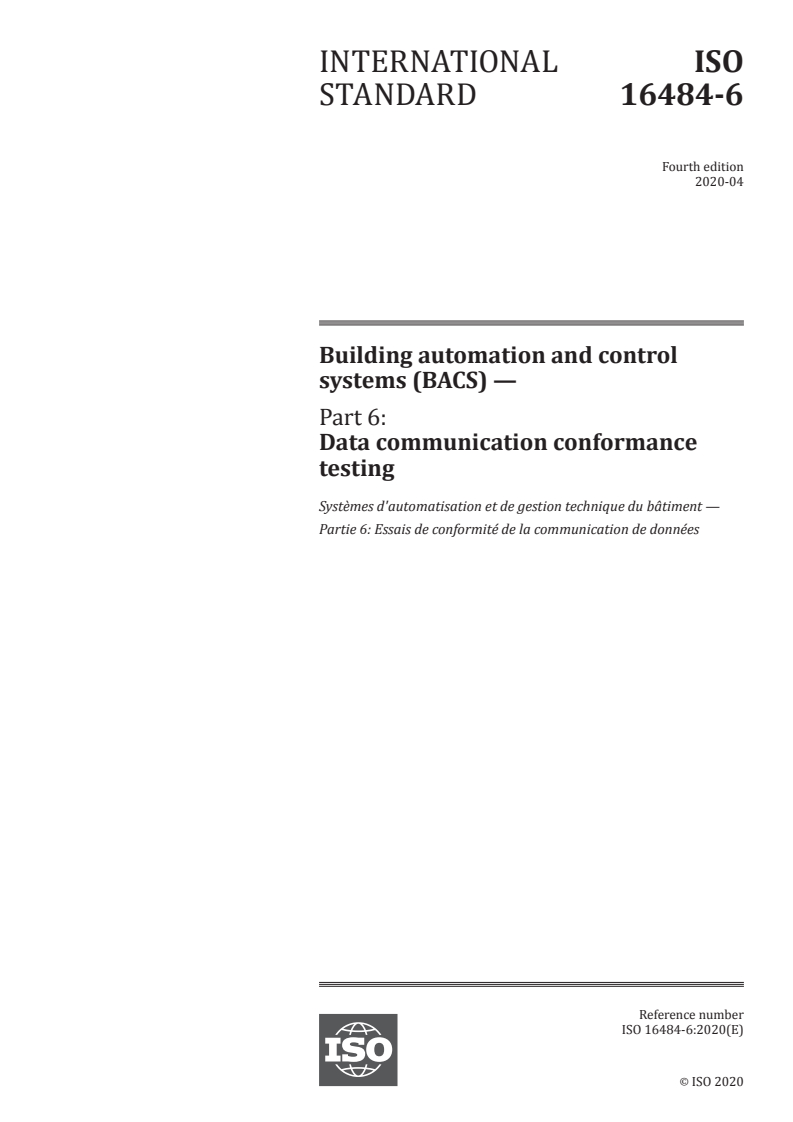
INTERNATIONAL ISO
STANDARD 16484-6
Fourth edition
2020-04
Building automation and control
systems (BACS) —
Part 6:
Data communication conformance
testing
Systèmes d'automatisation et de gestion technique du bâtiment —
Partie 6: Essais de conformité de la communication de données
Reference number
©
ISO 2020
© ISO 2020
All rights reserved. Unless otherwise specified, or required in the context of its implementation, no part of this publication may
be reproduced or utilized otherwise in any form or by any means, electronic or mechanical, including photocopying, or posting
on the internet or an intranet, without prior written permission. Permission can be requested from either ISO at the address
below or ISO’s member body in the country of the requester.
ISO copyright office
CP 401 • Ch. de Blandonnet 8
CH-1214 Vernier, Geneva
Phone: +41 22 749 01 11
Fax: +41 22 749 09 47
Email: copyright@iso.org
Website: www.iso.org
Published in Switzerland
ii © ISO 2020 – All rights reserved
Foreword
ISO (the International Organization for Standardization) is a worldwide federation of national standards
bodies (ISO member bodies). The work of preparing International Standards is normally carried out
through ISO technical committees. Each member body interested in a subject for which a technical
committee has been established has the right to be represented on that committee. International
organizations, governmental and non-governmental, in liaison with ISO, also take part in the work. ISO
collaborates closely with the International Electrotechnical Commission (IEC) on all matters of
electrotechnical standardization.
The procedures used to develop this document and those intended for its further maintenance are
described in the ISO/IEC Directives, Part 1. In particular, the different approval criteria needed for the
different types of ISO documents should be noted. International Standards are drafted in accordance with
the editorial rules of the ISO/IEC Directives, Part 2 (see www.iso.org/directives).
Attention is drawn to the possibility that some of the elements of this document may be the subject of
patent rights. ISO shall not be held responsible for identifying any or all such patent rights. Details of any
patent rights identified during the development of the document will be in the Introduction and/or on
the ISO list of patent declarations received (see www.iso.org/patents).
Any trade name used in this document is information given for the convenience of users and does not
constitute an endorsement.
For an explanation of the voluntary nature of standards, the meaning of ISO specific terms and
expressions related to conformity assessment, as well as information about ISO's adherence to the World
Trade Organization (WTO) principles in the Technical Barriers to Trade (TBT) see
www.iso.org/iso/foreword.html.
This document was prepared by Technical Committee ISO/TC 205, Building environmental design, in
collaboration with the European Committee for Standardization (CEN) Technical Committee CEN/TC
247, Building Automation, Controls and Building Management, in accordance with the Agreement on
technical cooperation between ISO and CEN (Vienna Agreement).
This fourth edition cancels and replaces the third edition (ISO 16484-6:2014), which has been technically
revised See the detailed list of changes in pages 724 to 728.
A list of all parts in the ISO 16484 series can be found on the ISO website.
Any feedback or questions on this document should be directed to the user’s national standards body. A
complete listing of these bodies can be found at www.iso.org/members.html.
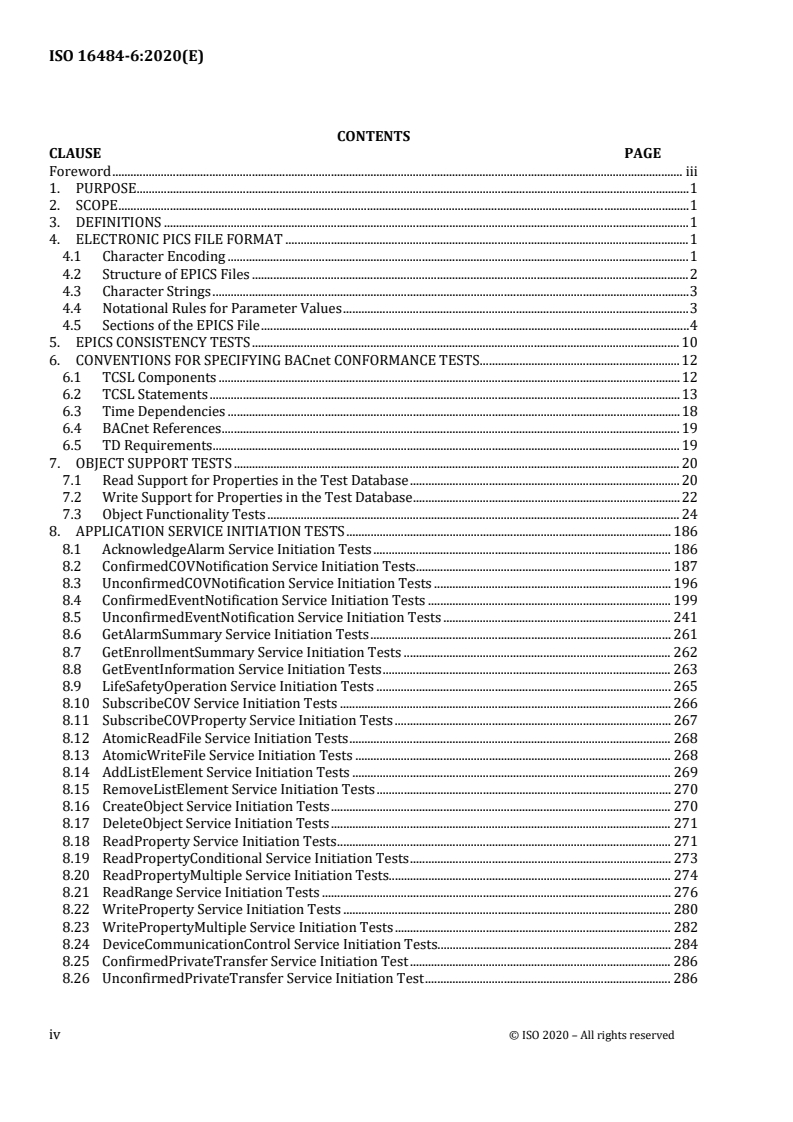
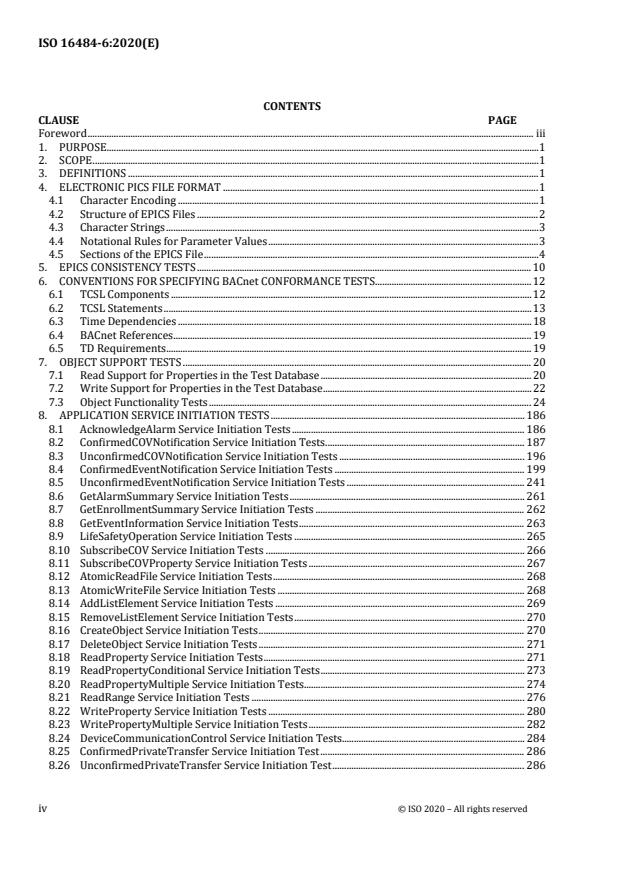
CONTENTS
CLAUSE PAGE
Foreword . iii
1. PURPOSE . 1
2. SCOPE . 1
3. DEFINITIONS . 1
4. ELECTRONIC PICS FILE FORMAT . 1
4.1 Character Encoding . 1
4.2 Structure of EPICS Files . 2
4.3 Character Strings . 3
4.4 Notational Rules for Parameter Values . 3
4.5 Sections of the EPICS File . 4
5. EPICS CONSISTENCY TESTS . 10
6. CONVENTIONS FOR SPECIFYING BACnet CONFORMANCE TESTS . 12
6.1 TCSL Components . 12
6.2 TCSL Statements . 13
6.3 Time Dependencies . 18
6.4 BACnet References . 19
6.5 TD Requirements . 19
7. OBJECT SUPPORT TESTS . 20
7.1 Read Support for Properties in the Test Database . 20
7.2 Write Support for Properties in the Test Database . 22
7.3 Object Functionality Tests . 24
8. APPLICATION SERVICE INITIATION TESTS . 186
8.1 AcknowledgeAlarm Service Initiation Tests . 186
8.2 ConfirmedCOVNotification Service Initiation Tests . 187
8.3 UnconfirmedCOVNotification Service Initiation Tests . 196
8.4 ConfirmedEventNotification Service Initiation Tests . 199
8.5 UnconfirmedEventNotification Service Initiation Tests . 241
8.6 GetAlarmSummary Service Initiation Tests . 261
8.7 GetEnrollmentSummary Service Initiation Tests . 262
8.8 GetEventInformation Service Initiation Tests . 263
8.9 LifeSafetyOperation Service Initiation Tests . 265
8.10 SubscribeCOV Service Initiation Tests . 266
8.11 SubscribeCOVProperty Service Initiation Tests . 267
8.12 AtomicReadFile Service Initiation Tests . 268
8.13 AtomicWriteFile Service Initiation Tests . 268
8.14 AddListElement Service Initiation Tests . 269
8.15 RemoveListElement Service Initiation Tests . 270
8.16 CreateObject Service Initiation Tests . 270
8.17 DeleteObject Service Initiation Tests . 271
8.18 ReadProperty Service Initiation Tests . 271
8.19 ReadPropertyConditional Service Initiation Tests . 273
8.20 ReadPropertyMultiple Service Initiation Tests. 274
8.21 ReadRange Service Initiation Tests . 276
8.22 WriteProperty Service Initiation Tests . 280
8.23 WritePropertyMultiple Service Initiation Tests . 282
8.24 DeviceCommunicationControl Service Initiation Tests. 284
8.25 ConfirmedPrivateTransfer Service Initiation Test . 286
8.26 UnconfirmedPrivateTransfer Service Initiation Test . 286
iv © ISO 2020 – All rights reserved
8.27 ReinitializeDevice Service Initiation Tests. 286
8.28 ConfirmedTextMessage Service Initiation Tests . 287
8.29 UnconfirmedTextMessage Service Initiation Tests . 288
8.30 TimeSynchronization Service Initiation Tests . 289
8.31 UTCTimeSynchronization Service Initiation Tests . 290
8.32 Who-Has Service Initiation Tests . 290
8.33 I-Have Service Initiation Tests . 291
8.34 Who-Is Service Initiation Tests . 291
8.35 I-Am Service Initiation Tests . 292
8.36 VT-Open Service Initiation Tests . 292
8.37 VT-Close Service Initiation Tests . 293
8.38 VT-Data Service Initiation Tests . 294
8.39 RequestKey Service Initiation Tests . 296
8.40 Authenticate Service Initiation Tests . 297
9. APPLICATION SERVICE EXECUTION TESTS . 301
9.1 AcknowledgeAlarm Service Execution Tests . 301
9.2 ConfirmedCOVNotification Service Execution Tests . 327
9.3 UnconfirmedCOVNotification Service Execution Tests . 332
9.4 ConfirmedEventNotification Service Execution Tests . 334
9.5 UnconfirmedEventNotification Service Execution Tests . 337
9.6 GetAlarmSummary Service Execution Tests . 337
9.7 GetEnrollmentSummary Service Execution Tests . 338
9.8 GetEventInformation Service Execution Tests . 342
9.9 LifeSafetyOperation Service Execution Test . 345
9.10 SubscribeCOV Service Execution Tests . 346
9.11 SubscribeCOVProperty Service Execution Tests . 354
9.12 AtomicReadFile Service Execution Tests . 361
9.13 AtomicWriteFile Service Execution Tests . 368
9.14 AddListElement Service Execution Tests . 379
9.15 RemoveListElement Service Execution Tests . 381
9.16 CreateObject Service Execution Tests . 383
9.17 DeleteObject Service Execution Tests . 388
9.18 ReadProperty Service Execution Tests . 389
9.19 ReadPropertyConditional Service Execution Tests . 391
9.20 ReadPropertyMultiple Service Execution Tests . 392
9.21 ReadRange Service Execution Tests . 400
9.22 WriteProperty Service Execution Tests . 410
9.23 WritePropertyMultiple Service Execution Tests . 415
9.24 DeviceCommunicationControl Service Execution Test . 424
9.25 ConfirmedPrivateTransfer Service Execution Tests . 430
9.26 UnconfirmedPrivateTransfer Service Execution Tests . 431
9.27 ReinitializeDevice Service Execution Tests . 431
9.28 ConfirmedTextMessage Service Execution Tests . 434
9.29 UnconfirmedTextMessage Service Execution Tests. 435
9.30 TimeSynchronization Service Execution Tests . 435
9.31 UTCTimeSynchronization Service Execution Tests . 437
9.32 Who-Has Service Execution Tests . 437
9.33 Who-Is Service Execution Tests . 444
9.34 VT-Open Service Execution Tests . 447
9.35 VT-Close Service Execution Tests . 449
9.36 VT-Data Service Execution Tests . 450
9.37 RequestKey Service Execution Test . 450
9.38 Authenticate Service Execution Tests . 452
9.39 General Testing of Service Execution . 456
10. NETWORK LAYER PROTOCOL TESTS . 458
10.1 General Network Layer Tests . 458
10.2 Router Functionality Tests . 459
10.3 Half-Router Functionality Tests . 483
10.4 B/IP PAD Tests . 490
10.5 Initiating Network Layer Messages . 492
10.6 Non-Router Functionality Tests . 494
10.7 Route Binding Tests . 496
10.8 Virtual Routing Functionality Tests . 501
11. LOGICAL LINK LAYER PROTOCOL TESTS . 520
11.1 UI Command and Response . 520
11.2 XID Command and Response . 520
11.3 TEST Command and Response . 521
12. DATA LINK LAYER PROTOCOLS TESTS . 523
12.1 MS/TP State Machine Tests . 523
12.2 PTP State Machine Tests . 587
13. SPECIAL FUNCTIONALITY TESTS . 626
13.1 Segmentation . 626
13.2 Time Master . 635
13.3 Character Sets . 640
13.4 Malformed PDUs . 640
13.5 Slave Proxy Tests . 642
13.6 Automatic Network Mapping . 644
13.7 Automatic Device Mapping. 645
13.8 Backup and Restore Procedure Tests . 645
13.9 Application State Machine Tests . 657
13.10 Workstation Scheduling Tests . 658
14. BACnet/IP Functionality Tests . 676
14.1 Non-BBMD B/IP Device . 676
14.2 BBMD B/IP Device with a Server Application . 678
14.3 Broadcast Distribution Table Operations . 682
14.4 Foreign Device Table Operations (Negative Tests) . 686
14.5 BACnet Broadcast Management (No Foreign Device Table, No Applications) . 687
14.6 Foreign Device Management . 689
14.7 Broadcast Management (BBMD, Foreign Devices, Local Application) . 693
14.8 Registering as a Foreign Device. 701
14.9 Initiating BVLL Service Requests Conveying an NPDU . 702
15. Reporting Test Results . 704
ANNEX A – EXAMPLE EPICS (INFORMATIVE) . 705
HISTORY OF REVISIONS . 722
vi © ISO 2020 – All rights reserved
4. ELECTRONIC PICS FILE FORMAT
1. PURPOSE
To define a standard method for verifying that an implementation of the BACnet protocol provides each capability claimed
in its Protocol Implementation Conformance Statement (PICS) in conformance with the BACnet standard.
2. SCOPE
This standard provides a comprehensive set of procedures for verifying the correct implementation of each capability
claimed on a BACnet PICS including:
(a) support of each claimed BACnet service, either as an initiator, executor, or both,
(b) support of each claimed BACnet object-type, including both required properties and each claimed optional
property,
(c) support of the BACnet network layer protocol,
(d) support of each claimed data link option, and
(e) support of all claimed special functionality.
3. DEFINITIONS
All definitions from ANSI/ASHRAE Standard 135-2016 also apply to this addendum.
3.1 local network: the network to which a BACnet device is directly connected.
3.2 remote network: a network that is accessible from a BACnet device only by passing through one or more routers.
3.3 test database: a database of BACnet functionality and objects created by reading the contents of an EPICS.
3.4 Abbreviations and Acronyms Used in the Standard
BNF Backus-Naur Form syntax
EPICS electronic protocol implementation conformance statement
IUT implementation under test
TCSL testing and conformance scripting language
TD testing device
TPI text protocol information
4. ELECTRONIC PICS FILE FORMAT
An electronic protocol implementation conformance statement (EPICS) file contains a BACnet protocol implementation
conformance statement expressed in a standardized text form. EPICS files are machine and human readable representations
of the implementation of BACnet objects and services within a given device. EPICS files shall use the extension ".TPI"
(text protocol information) and contain normal editable text lines consisting of text character codes ending in carriage
return/linefeed pairs (X'0D', X'0A').
EPICS files are used by software testing tools to conduct and interpret the results of tests defined in this standard. An
EPICS file shall accompany any device tested according to the procedures of this standard.
4.1 Character Encoding
BACnet provides for a variety of possible character encodings. The character encodings in BACnet fall into three groups:
octet streams, double octet streams and quad octet streams. Octet streams represent characters as single octet values. In
some cases, such as Microsoft DBCS and JIS C 6226, certain octet values signal that the second octet which follows should
be viewed along with the leading octet as a single value, thus extending the range to greater than 256 possible characters.
In contrast, double octet streams view pairs of octets as representing single characters. The ISO 10646 UCS-2 encoding is
an example. The first or leading octet of the pair is the most significant part of the value. Quad octet streams, such as ISO
10646 UCS-4, treat tuples of four octets at a time as single characters with the first or leading octet being the most
significant.
4. ELECTRONIC PICS FILE FORMAT
To accommodate the various encodings that may be used with BACnet device descriptions, EPICS files begin with a header
that serves both to identify the file as an EPICS file, and to identify the particular encoding used. The header begins with
the string "PICS #" where # is replaced by a numeral representing the character set as shown in Table 4-1.
Table 4-1. Character Set Codes
code character set
0 ANSI X3.4
1 Microsoft DBCS
2 JIS C 6226
3 ISO 10646 (UCS-4)
4 ISO 10646 (UCS-2)
5 ISO 8859-1
An octet stream format can be recognized by examining the first eight octets of the EPICS file. Using ANSI X3.4 encoding
as an example these eight octets will contain: X'50' X'49' X'43' X'53' X'20' X'30' X'0D' X'0A'. This represents the text
"PICS 0" followed by carriage return and linefeed.
A double octet stream format can be recognized by examining the first 16 octets of the EPICS file. Using ISO 10646 UCS-
2 encoding as an example these 16 octets will contain:
X'00' X'50' X'00' X'49' X'00' X'43' X'00' X'53'
X'00' X'20' X'00' X'34' X'00' X'0D' X'00' X'0A'
This represents the text "PICS 4" followed by carriage return and linefeed.
A quad octet stream format can be recognized by examining the first 32 octets of the EPICS file. Using ISO 10646 UCS-
4 as an example these 32 octets will contain:
X'00' X'00' X'00' X'50' X'00' X'00' X'00' X'49'
X'00' X'00' X'00' X'43' X'00' X'00' X'00' X'53'
X'00' X'00' X'00' X'20' X'00' X'00' X'00' X'33'
X'00' X'00' X'00' X'0D' X'00' X'00' X'00' X'0A'
This represents the text "PICS 3" followed by carriage return and linefeed.
4.2 Structure of EPICS Files
EPICS files consist of text lines ending in carriage return/linefeed pairs (X'0D', X'0A') encoded as octet, double octet or
quad octet streams as defined in 4.1. In the rest of this standard, the term "character" will be used to mean one symbol
encoded as one, two, or four octets based on the character encoding used in the EPICS file header. For example, the
character space may be encoded as X'20' or X'0020' or X'00000020'. In this standard all characters will be shown in their
single octet form.
The special symbol ↵ is used in this Clause to signify the presence of a carriage return/linefeed pair (X'0D0A'). Except
within character strings, the character codes tab (X'09'), space (X'20'), carriage return (X'0D') and linefeed (X'0A') shall be
considered to be white space. Any sequence of 1 or more white space characters shall be equivalent to a single white space
character. Except within a character string, a sequence of two dashes (X'2D') shall signify the beginning of a comment
which shall end with the next carriage return/linefeed pair, i.e., the end of the line upon which the -- appears. Comments
shall be considered to be white space, and may thus be inserted freely.
EPICS files shall have, as their first line following the header, the literal text:
BACnet Protocol Implementation Conformance Statement ↵
This text serves as a signature identifying the EPICS file format.
Lines that define the sections of the EPICS (see 4.5) and the particular implementation data for a given device follow the
signature line.
2 © ISO 2020 – All Rights Reserved
4. ELECTRONIC PICS FILE FORMAT
The EPICS file ends with a line containing the following literal text:
End of BACnet Protocol Implementation Conformance Statement ↵
4.3 Character Strings
The occurrence of a double quote (X'22'), single quote (X'27') or accent grave (X'60') shall signify character strings. For
double quotes, the end of the string shall be signified by the next occurrence of a double quote, or the end of the line. For
single quote or accent grave, the end of the string shall be signified by the next occurrence of a single quote (X'27'), or the
end of the line. Thus strings which need to include a single quote or accent grave as a literal character in the string shall
use the double quote quoting method, while strings which need to include double quote shall use the single quote or accent
grave quoting method.
4.4 Notational Rules for Parameter Values
Within each section, parameters may need to be expressed in one of several forms. The following rules govern the format
for parameters:
(a) key words are case insensitive so that X'41' through X'5A' are equivalent to X'61' through X'7A';
(b) null values are shown by the string "NULL";
(c) Boolean values are shown by the strings "T" or "TRUE" if the value is true, or "F" or "FALSE" if the value is
false;
(d) integer values are shown as strings of digits, possibly with a leading minus (-): 12345 or -111;
(e) real values are shown with a decimal point, which may not be the first or last character: 1.23, 0.02, 1.0 but not
.02;
(f) octet strings are shown as pairs of hex digits enclosed in either single quotes (X'2D') or accent graves (X'60'), and
preceded by the letter "X": X'001122';
(g) character strings are represented as one or more characters enclosed in double, single or accent grave quotes as
defined in 4.3: 'text' or 'text' or "text";
(h) bitstrings are shown as a list, enclosed by curly brackets ({ } or X'7B' and X'7D'), of true and false values: {T,T,F}
or {TRUE, TRUE, FALSE}. When the actual value of a bit does not matter, a question mark is used: {T,T,?};
(i) enumerated values are represented as named, rather than numeric, values. Enumeration names are case insensitive
so that X'41' through X'5A' are equivalent to X'61' through X'7A'. The underscore (X'5F') and dash (X'2D') are
considered equivalent in enumeration names. Proprietary values are shown as a named text with no whitespace
and ending in a non-negative decimal numeric. Each must start with the word "proprietary": Object_Type,
proprietary-object-type-653;
(j) dates are represented enclosed in parenthesis: (Monday, 24-January-1998). Any "wild card" or unspecified field
is shown by an asterisk (X'2A'): (Monday, *-January-1998). The omission of day of week implies that the day is
unspecified: (24-January-1998);
(k) times are represented as hours, minutes, seconds, hundredths in the format hh:mm:ss.xx: 2:05:44.00, 16:54:59.99.
Any "wild card" field is shown by an asterisk (X'2A'): 16:54:*.*;
(l) object identifiers are shown enclosed by parentheses, with commas separating the object type and the instance
number: (analog-input, 56). Proprietary object types replace the object type enumeration with the word
"proprietary" followed by the numeric value of the object type: (proprietary 700,1);
(m) constructed data items are represented enclosed by curly brackets ({ } or X'7B' and X'7D'), with elements separated
by commas. If an element is itself a constructed value, then that element shall be enclosed in curly brackets.
4.4.1 Complex Parameter Values
Some parameter values, notably property values for constructed or CHOICE types of encoded values, need to use a more
complex notation to represent their values. This notation is tied to the ASN.1 encoding for those property values and may
appear obscure out of context. These additional rules govern the presentation of those types of parameter values:
(a) values which are a CHOICE of application-tagged values are represented by the value of the chosen item encoded
as described in 4.4;
(b) values which are a CHOICE of context-tagged values are represented by the context tag number enclosed in square
brackets, followed by the representation of the value of the chosen item;
(c) list values (ASN.1 "SEQUENCE OF") are represented enclosed in parenthsis, with the elements of the list
separated by commas. If an element is itself a constructed value, then that element shall be enclosed in curly
brackets;
4. ELECTRONIC PICS FILE FORMAT
(d) array values are represented enclosed in curly brackets, with the elements of the array separated by commas. If an
element is itself a constructed value, then that element shall be enclosed in curly brackets.
4.4.2 Specifying Limits on Parameter Values
Some properties may have restrictions on the range or resolution of their values. In order to correctly interpret the results
of tests in which the value of a property is changed using WriteProperty, WritePropertyMultiple, or AddListElement then
read back using ReadProperty or ReadPropertyMultiple, it is necessary to know what these restrictions are. The test
database may contain restriction statements that define these constraints. The permissible restrictions and the datatypes
they apply to are:
(a) minimum - the minimum value for Unsigned, Integer, Real, or Double datatypes. The earliest date for the Date
datatype;
(b) maximum - the maximum value for Unsigned, Integer, Real, or Double datatypes. The latest date for the Date
datatype;
(c) resolution - the minimum guaranteed resolution for Real and Double datatypes. The minimum time resolution in
seconds for the Time datatype;
(d) maximum length string - the maximum length of a CharacterString or OctetString;
(e) maximum length list - the maximum number of elements guaranteed to fit in a list;
(f) maximum length array - the maximum number of elements in an array;
(g) allowed values - a comma-delimited list of supported enumerations for an Enumerated datatype. A comma-
delimited list of object types for properties that reference an external object identifier.
Restriction statements shall be listed within pointed brackets (< and >) following the default value. If there are multiple
restrictions within a single set of angle brackets, then the restrictions shall be separated by a semicolon (;). A restriction
statement consists of the restriction name followed by a colon (:) followed by the restriction value or, where appropriate, a
comma-delimited list of possible values.
Here are some examples of property values with restriction statements as they could appear in the test database.
present-value: 13.4
description: "this is a description"
units: milliamperes
object-property-reference: (analog input, 12)
The Units property is a special case, because changing the units can change the value of the Present_Value property as well
as any restrictions on its value. Therefore, minimum, maximum, and resolution restrictions are only valid for the default
value of the Units property.
It is possible to specify default restrictions for most datatypes as described in 4.5.8. Restriction statements in the test
database override the default restrictions for the individual property that contains the restriction statement.
4.5 Sections of the EPICS File
Each section of the EPICS file begins with a section name followed by a colon ( : or X'3A'). After the colon is a set of one
or more parameters delimited by a set of curly braces ({ } or X'7B' X'7D').
The following symbols are used as placeholders to indicate the presence of parameter information:
(a) the open box symbol inside quotation marks, "", is used to indicate that a character string parameter shall be
present;
(b) the open box symbol with no quotation marks, , is used to indicate that a parameter with a datatype other than
a character string shall be present;
(c) a question mark, ?, is used in the test database to indicate that the property is present but the value is unknown
because it depends on hardware input or is being changed by an internal algorithm.
An example EPICS file may be found in Annex A.
4 © ISO 2020 – All Rights Reserved
4. ELECTRONIC PICS FILE FORMAT
4.5.1 General Information Sections
These sections provide general information about the BACnet device. The syntax for these sections is shown below.
Vendor Name: ""↵
Product Name: ""↵
Product Model Number: ""↵
Product Description: ""↵
4.5.2 Conformance Sections
These sections provide information about the BACnet functionality that the device claims to support.
4.5.2.1 BIBBs Supported
This section indicates which BIBBs are supported. The syntax is shown below. Each BIBB shall be listed, one per line
between the curly braces. An empty list indicates that no BIBBs are supported.
BIBBs Supported: ↵
{↵
↵
}↵
The BIBBs may be any of those BIBBs described in Annex K. The format in the EPICS shall be to use the short acronym
described in the title for each BIBB. For example: A device which supports 'Data Sharing - ReadProperty - B' should
include 'DS-RP-B' in this section.
For example:
BIBBS Supported: ↵
{↵
DS-RP-B↵
DS-WP-B↵
DS-RPM-B↵
DM-DOB-B↵
DM-DDB-B↵
DM-DDB-A↵
}↵
4.5.3 Application Services Supported
This section indicates which standard application services are supported. The syntax is shown below. Each supported
service shall be listed between curly braces one service per line, followed by the words "Initiate" or "Execute" to indicate
whether the service can be initiated, executed, or both.
BACnet Standard Application Services Supported: ↵
{↵
Initiate↵
Execute↵
Initiate Execute↵
}
The standard services may be any of the services listed in the Clause 21 production BACnetServicesSupported.
The format should match the title of each corresponding services section in the standard minus the text 'Service'. For
example, if the device supports the AcknowledgeAlarm service, the text 'AcknowledgeAlarm' should be included in this
section of the EPICS.
4. ELECTRONIC PICS FILE FORMAT
For example:
BACnet Standard Application Services Supported: ↵
{↵
Who-Is Initiate Execute↵
I-Am Initiate Execute↵
Who-Has Execute↵
I-Have Initiate ↵
ReadProperty Execute↵
ReadPropertyMultiple Execute↵
WriteProperty Execute↵
}
4.5.4 Object Types Supported
This section indicates which standard object types are supported. The syntax is shown below. Each supported object type
shall be listed between curly braces one object type per line, optionally followed by the words "Createable", "Deleteable",
or both to indicate that dynamic creation or deletion is supported.
Standard Object Types Supported: ↵
{↵
↵
Createable↵
Deleteable↵
Createable Deleteable↵
}↵
The standard objects may be any of the objects listed in the Clause 21 production, BACnetObjectTypesSupported.
The forma
...
INTERNATIONAL ISO
STANDARD 16484-6
Fourth edition
2020-04
Building automation and control
systems (BACS) —
Part 6:
Data communication conformance
testing
Systèmes d'automatisation et de gestion technique du bâtiment —
Partie 6: Essais de conformité de la communication de données
Reference number
©
ISO 2020
© ISO 2020
All rights reserved. Unless otherwise specified, or required in the context of its implementation, no part of this publication may
be reproduced or utilized otherwise in any form or by any means, electronic or mechanical, including photocopying, or posting
on the internet or an intranet, without prior written permission. Permission can be requested from either ISO at the address
below or ISO’s member body in the country of the requester.
ISO copyright office
CP 401 • Ch. de Blandonnet 8
CH-1214 Vernier, Geneva
Phone: +41 22 749 01 11
Fax: +41 22 749 09 47
Email: copyright@iso.org
Website: www.iso.org
Published in Switzerland
ii © ISO 2020 – All rights reserved
Foreword
ISO (the International Organization for Standardization) is a worldwide federation of national standards
bodies (ISO member bodies). The work of preparing International Standards is normally carried out
through ISO technical committees. Each member body interested in a subject for which a technical
committee has been established has the right to be represented on that committee. International
organizations, governmental and non-governmental, in liaison with ISO, also take part in the work. ISO
collaborates closely with the International Electrotechnical Commission (IEC) on all matters of
electrotechnical standardization.
The procedures used to develop this document and those intended for its further maintenance are
described in the ISO/IEC Directives, Part 1. In particular, the different approval criteria needed for the
different types of ISO documents should be noted. International Standards are drafted in accordance with
the editorial rules of the ISO/IEC Directives, Part 2 (see www.iso.org/directives).
Attention is drawn to the possibility that some of the elements of this document may be the subject of
patent rights. ISO shall not be held responsible for identifying any or all such patent rights. Details of any
patent rights identified during the development of the document will be in the Introduction and/or on
the ISO list of patent declarations received (see www.iso.org/patents).
Any trade name used in this document is information given for the convenience of users and does not
constitute an endorsement.
For an explanation of the voluntary nature of standards, the meaning of ISO specific terms and
expressions related to conformity assessment, as well as information about ISO's adherence to the World
Trade Organization (WTO) principles in the Technical Barriers to Trade (TBT) see
www.iso.org/iso/foreword.html.
This document was prepared by Technical Committee ISO/TC 205, Building environmental design, in
collaboration with the European Committee for Standardization (CEN) Technical Committee CEN/TC
247, Building Automation, Controls and Building Management, in accordance with the Agreement on
technical cooperation between ISO and CEN (Vienna Agreement).
This fourth edition cancels and replaces the third edition (ISO 16484-6:2014), which has been technically
revised See the detailed list of changes in pages 724 to 728.
A list of all parts in the ISO 16484 series can be found on the ISO website.
Any feedback or questions on this document should be directed to the user’s national standards body. A
complete listing of these bodies can be found at www.iso.org/members.html.
CONTENTS
CLAUSE PAGE
Foreword . iii
1. PURPOSE . 1
2. SCOPE . 1
3. DEFINITIONS . 1
4. ELECTRONIC PICS FILE FORMAT . 1
4.1 Character Encoding . 1
4.2 Structure of EPICS Files . 2
4.3 Character Strings . 3
4.4 Notational Rules for Parameter Values . 3
4.5 Sections of the EPICS File . 4
5. EPICS CONSISTENCY TESTS . 10
6. CONVENTIONS FOR SPECIFYING BACnet CONFORMANCE TESTS . 12
6.1 TCSL Components . 12
6.2 TCSL Statements . 13
6.3 Time Dependencies . 18
6.4 BACnet References . 19
6.5 TD Requirements . 19
7. OBJECT SUPPORT TESTS . 20
7.1 Read Support for Properties in the Test Database . 20
7.2 Write Support for Properties in the Test Database . 22
7.3 Object Functionality Tests . 24
8. APPLICATION SERVICE INITIATION TESTS . 186
8.1 AcknowledgeAlarm Service Initiation Tests . 186
8.2 ConfirmedCOVNotification Service Initiation Tests . 187
8.3 UnconfirmedCOVNotification Service Initiation Tests . 196
8.4 ConfirmedEventNotification Service Initiation Tests . 199
8.5 UnconfirmedEventNotification Service Initiation Tests . 241
8.6 GetAlarmSummary Service Initiation Tests . 261
8.7 GetEnrollmentSummary Service Initiation Tests . 262
8.8 GetEventInformation Service Initiation Tests . 263
8.9 LifeSafetyOperation Service Initiation Tests . 265
8.10 SubscribeCOV Service Initiation Tests . 266
8.11 SubscribeCOVProperty Service Initiation Tests . 267
8.12 AtomicReadFile Service Initiation Tests . 268
8.13 AtomicWriteFile Service Initiation Tests . 268
8.14 AddListElement Service Initiation Tests . 269
8.15 RemoveListElement Service Initiation Tests . 270
8.16 CreateObject Service Initiation Tests . 270
8.17 DeleteObject Service Initiation Tests . 271
8.18 ReadProperty Service Initiation Tests . 271
8.19 ReadPropertyConditional Service Initiation Tests . 273
8.20 ReadPropertyMultiple Service Initiation Tests. 274
8.21 ReadRange Service Initiation Tests . 276
8.22 WriteProperty Service Initiation Tests . 280
8.23 WritePropertyMultiple Service Initiation Tests . 282
8.24 DeviceCommunicationControl Service Initiation Tests. 284
8.25 ConfirmedPrivateTransfer Service Initiation Test . 286
8.26 UnconfirmedPrivateTransfer Service Initiation Test . 286
iv © ISO 2020 – All rights reserved
8.27 ReinitializeDevice Service Initiation Tests. 286
8.28 ConfirmedTextMessage Service Initiation Tests . 287
8.29 UnconfirmedTextMessage Service Initiation Tests . 288
8.30 TimeSynchronization Service Initiation Tests . 289
8.31 UTCTimeSynchronization Service Initiation Tests . 290
8.32 Who-Has Service Initiation Tests . 290
8.33 I-Have Service Initiation Tests . 291
8.34 Who-Is Service Initiation Tests . 291
8.35 I-Am Service Initiation Tests . 292
8.36 VT-Open Service Initiation Tests . 292
8.37 VT-Close Service Initiation Tests . 293
8.38 VT-Data Service Initiation Tests . 294
8.39 RequestKey Service Initiation Tests . 296
8.40 Authenticate Service Initiation Tests . 297
9. APPLICATION SERVICE EXECUTION TESTS . 301
9.1 AcknowledgeAlarm Service Execution Tests . 301
9.2 ConfirmedCOVNotification Service Execution Tests . 327
9.3 UnconfirmedCOVNotification Service Execution Tests . 332
9.4 ConfirmedEventNotification Service Execution Tests . 334
9.5 UnconfirmedEventNotification Service Execution Tests . 337
9.6 GetAlarmSummary Service Execution Tests . 337
9.7 GetEnrollmentSummary Service Execution Tests . 338
9.8 GetEventInformation Service Execution Tests . 342
9.9 LifeSafetyOperation Service Execution Test . 345
9.10 SubscribeCOV Service Execution Tests . 346
9.11 SubscribeCOVProperty Service Execution Tests . 354
9.12 AtomicReadFile Service Execution Tests . 361
9.13 AtomicWriteFile Service Execution Tests . 368
9.14 AddListElement Service Execution Tests . 379
9.15 RemoveListElement Service Execution Tests . 381
9.16 CreateObject Service Execution Tests . 383
9.17 DeleteObject Service Execution Tests . 388
9.18 ReadProperty Service Execution Tests . 389
9.19 ReadPropertyConditional Service Execution Tests . 391
9.20 ReadPropertyMultiple Service Execution Tests . 392
9.21 ReadRange Service Execution Tests . 400
9.22 WriteProperty Service Execution Tests . 410
9.23 WritePropertyMultiple Service Execution Tests . 415
9.24 DeviceCommunicationControl Service Execution Test . 424
9.25 ConfirmedPrivateTransfer Service Execution Tests . 430
9.26 UnconfirmedPrivateTransfer Service Execution Tests . 431
9.27 ReinitializeDevice Service Execution Tests . 431
9.28 ConfirmedTextMessage Service Execution Tests . 434
9.29 UnconfirmedTextMessage Service Execution Tests. 435
9.30 TimeSynchronization Service Execution Tests . 435
9.31 UTCTimeSynchronization Service Execution Tests . 437
9.32 Who-Has Service Execution Tests . 437
9.33 Who-Is Service Execution Tests . 444
9.34 VT-Open Service Execution Tests . 447
9.35 VT-Close Service Execution Tests . 449
9.36 VT-Data Service Execution Tests . 450
9.37 RequestKey Service Execution Test . 450
9.38 Authenticate Service Execution Tests . 452
9.39 General Testing of Service Execution . 456
10. NETWORK LAYER PROTOCOL TESTS . 458
10.1 General Network Layer Tests . 458
10.2 Router Functionality Tests . 459
10.3 Half-Router Functionality Tests . 483
10.4 B/IP PAD Tests . 490
10.5 Initiating Network Layer Messages . 492
10.6 Non-Router Functionality Tests . 494
10.7 Route Binding Tests . 496
10.8 Virtual Routing Functionality Tests . 501
11. LOGICAL LINK LAYER PROTOCOL TESTS . 520
11.1 UI Command and Response . 520
11.2 XID Command and Response . 520
11.3 TEST Command and Response . 521
12. DATA LINK LAYER PROTOCOLS TESTS . 523
12.1 MS/TP State Machine Tests . 523
12.2 PTP State Machine Tests . 587
13. SPECIAL FUNCTIONALITY TESTS . 626
13.1 Segmentation . 626
13.2 Time Master . 635
13.3 Character Sets . 640
13.4 Malformed PDUs . 640
13.5 Slave Proxy Tests . 642
13.6 Automatic Network Mapping . 644
13.7 Automatic Device Mapping. 645
13.8 Backup and Restore Procedure Tests . 645
13.9 Application State Machine Tests . 657
13.10 Workstation Scheduling Tests . 658
14. BACnet/IP Functionality Tests . 676
14.1 Non-BBMD B/IP Device . 676
14.2 BBMD B/IP Device with a Server Application . 678
14.3 Broadcast Distribution Table Operations . 682
14.4 Foreign Device Table Operations (Negative Tests) . 686
14.5 BACnet Broadcast Management (No Foreign Device Table, No Applications) . 687
14.6 Foreign Device Management . 689
14.7 Broadcast Management (BBMD, Foreign Devices, Local Application) . 693
14.8 Registering as a Foreign Device. 701
14.9 Initiating BVLL Service Requests Conveying an NPDU . 702
15. Reporting Test Results . 704
ANNEX A – EXAMPLE EPICS (INFORMATIVE) . 705
HISTORY OF REVISIONS . 722
vi © ISO 2020 – All rights reserved
4. ELECTRONIC PICS FILE FORMAT
1. PURPOSE
To define a standard method for verifying that an implementation of the BACnet protocol provides each capability claimed
in its Protocol Implementation Conformance Statement (PICS) in conformance with the BACnet standard.
2. SCOPE
This standard provides a comprehensive set of procedures for verifying the correct implementation of each capability
claimed on a BACnet PICS including:
(a) support of each claimed BACnet service, either as an initiator, executor, or both,
(b) support of each claimed BACnet object-type, including both required properties and each claimed optional
property,
(c) support of the BACnet network layer protocol,
(d) support of each claimed data link option, and
(e) support of all claimed special functionality.
3. DEFINITIONS
All definitions from ANSI/ASHRAE Standard 135-2016 also apply to this addendum.
3.1 local network: the network to which a BACnet device is directly connected.
3.2 remote network: a network that is accessible from a BACnet device only by passing through one or more routers.
3.3 test database: a database of BACnet functionality and objects created by reading the contents of an EPICS.
3.4 Abbreviations and Acronyms Used in the Standard
BNF Backus-Naur Form syntax
EPICS electronic protocol implementation conformance statement
IUT implementation under test
TCSL testing and conformance scripting language
TD testing device
TPI text protocol information
4. ELECTRONIC PICS FILE FORMAT
An electronic protocol implementation conformance statement (EPICS) file contains a BACnet protocol implementation
conformance statement expressed in a standardized text form. EPICS files are machine and human readable representations
of the implementation of BACnet objects and services within a given device. EPICS files shall use the extension ".TPI"
(text protocol information) and contain normal editable text lines consisting of text character codes ending in carriage
return/linefeed pairs (X'0D', X'0A').
EPICS files are used by software testing tools to conduct and interpret the results of tests defined in this standard. An
EPICS file shall accompany any device tested according to the procedures of this standard.
4.1 Character Encoding
BACnet provides for a variety of possible character encodings. The character encodings in BACnet fall into three groups:
octet streams, double octet streams and quad octet streams. Octet streams represent characters as single octet values. In
some cases, such as Microsoft DBCS and JIS C 6226, certain octet values signal that the second octet which follows should
be viewed along with the leading octet as a single value, thus extending the range to greater than 256 possible characters.
In contrast, double octet streams view pairs of octets as representing single characters. The ISO 10646 UCS-2 encoding is
an example. The first or leading octet of the pair is the most significant part of the value. Quad octet streams, such as ISO
10646 UCS-4, treat tuples of four octets at a time as single characters with the first or leading octet being the most
significant.
4. ELECTRONIC PICS FILE FORMAT
To accommodate the various encodings that may be used with BACnet device descriptions, EPICS files begin with a header
that serves both to identify the file as an EPICS file, and to identify the particular encoding used. The header begins with
the string "PICS #" where # is replaced by a numeral representing the character set as shown in Table 4-1.
Table 4-1. Character Set Codes
code character set
0 ANSI X3.4
1 Microsoft DBCS
2 JIS C 6226
3 ISO 10646 (UCS-4)
4 ISO 10646 (UCS-2)
5 ISO 8859-1
An octet stream format can be recognized by examining the first eight octets of the EPICS file. Using ANSI X3.4 encoding
as an example these eight octets will contain: X'50' X'49' X'43' X'53' X'20' X'30' X'0D' X'0A'. This represents the text
"PICS 0" followed by carriage return and linefeed.
A double octet stream format can be recognized by examining the first 16 octets of the EPICS file. Using ISO 10646 UCS-
2 encoding as an example these 16 octets will contain:
X'00' X'50' X'00' X'49' X'00' X'43' X'00' X'53'
X'00' X'20' X'00' X'34' X'00' X'0D' X'00' X'0A'
This represents the text "PICS 4" followed by carriage return and linefeed.
A quad octet stream format can be recognized by examining the first 32 octets of the EPICS file. Using ISO 10646 UCS-
4 as an example these 32 octets will contain:
X'00' X'00' X'00' X'50' X'00' X'00' X'00' X'49'
X'00' X'00' X'00' X'43' X'00' X'00' X'00' X'53'
X'00' X'00' X'00' X'20' X'00' X'00' X'00' X'33'
X'00' X'00' X'00' X'0D' X'00' X'00' X'00' X'0A'
This represents the text "PICS 3" followed by carriage return and linefeed.
4.2 Structure of EPICS Files
EPICS files consist of text lines ending in carriage return/linefeed pairs (X'0D', X'0A') encoded as octet, double octet or
quad octet streams as defined in 4.1. In the rest of this standard, the term "character" will be used to mean one symbol
encoded as one, two, or four octets based on the character encoding used in the EPICS file header. For example, the
character space may be encoded as X'20' or X'0020' or X'00000020'. In this standard all characters will be shown in their
single octet form.
The special symbol ↵ is used in this Clause to signify the presence of a carriage return/linefeed pair (X'0D0A'). Except
within character strings, the character codes tab (X'09'), space (X'20'), carriage return (X'0D') and linefeed (X'0A') shall be
considered to be white space. Any sequence of 1 or more white space characters shall be equivalent to a single white space
character. Except within a character string, a sequence of two dashes (X'2D') shall signify the beginning of a comment
which shall end with the next carriage return/linefeed pair, i.e., the end of the line upon which the -- appears. Comments
shall be considered to be white space, and may thus be inserted freely.
EPICS files shall have, as their first line following the header, the literal text:
BACnet Protocol Implementation Conformance Statement ↵
This text serves as a signature identifying the EPICS file format.
Lines that define the sections of the EPICS (see 4.5) and the particular implementation data for a given device follow the
signature line.
2 © ISO 2020 – All Rights Reserved
4. ELECTRONIC PICS FILE FORMAT
The EPICS file ends with a line containing the following literal text:
End of BACnet Protocol Implementation Conformance Statement ↵
4.3 Character Strings
The occurrence of a double quote (X'22'), single quote (X'27') or accent grave (X'60') shall signify character strings. For
double quotes, the end of the string shall be signified by the next occurrence of a double quote, or the end of the line. For
single quote or accent grave, the end of the string shall be signified by the next occurrence of a single quote (X'27'), or the
end of the line. Thus strings which need to include a single quote or accent grave as a literal character in the string shall
use the double quote quoting method, while strings which need to include double quote shall use the single quote or accent
grave quoting method.
4.4 Notational Rules for Parameter Values
Within each section, parameters may need to be expressed in one of several forms. The following rules govern the format
for parameters:
(a) key words are case insensitive so that X'41' through X'5A' are equivalent to X'61' through X'7A';
(b) null values are shown by the string "NULL";
(c) Boolean values are shown by the strings "T" or "TRUE" if the value is true, or "F" or "FALSE" if the value is
false;
(d) integer values are shown as strings of digits, possibly with a leading minus (-): 12345 or -111;
(e) real values are shown with a decimal point, which may not be the first or last character: 1.23, 0.02, 1.0 but not
.02;
(f) octet strings are shown as pairs of hex digits enclosed in either single quotes (X'2D') or accent graves (X'60'), and
preceded by the letter "X": X'001122';
(g) character strings are represented as one or more characters enclosed in double, single or accent grave quotes as
defined in 4.3: 'text' or 'text' or "text";
(h) bitstrings are shown as a list, enclosed by curly brackets ({ } or X'7B' and X'7D'), of true and false values: {T,T,F}
or {TRUE, TRUE, FALSE}. When the actual value of a bit does not matter, a question mark is used: {T,T,?};
(i) enumerated values are represented as named, rather than numeric, values. Enumeration names are case insensitive
so that X'41' through X'5A' are equivalent to X'61' through X'7A'. The underscore (X'5F') and dash (X'2D') are
considered equivalent in enumeration names. Proprietary values are shown as a named text with no whitespace
and ending in a non-negative decimal numeric. Each must start with the word "proprietary": Object_Type,
proprietary-object-type-653;
(j) dates are represented enclosed in parenthesis: (Monday, 24-January-1998). Any "wild card" or unspecified field
is shown by an asterisk (X'2A'): (Monday, *-January-1998). The omission of day of week implies that the day is
unspecified: (24-January-1998);
(k) times are represented as hours, minutes, seconds, hundredths in the format hh:mm:ss.xx: 2:05:44.00, 16:54:59.99.
Any "wild card" field is shown by an asterisk (X'2A'): 16:54:*.*;
(l) object identifiers are shown enclosed by parentheses, with commas separating the object type and the instance
number: (analog-input, 56). Proprietary object types replace the object type enumeration with the word
"proprietary" followed by the numeric value of the object type: (proprietary 700,1);
(m) constructed data items are represented enclosed by curly brackets ({ } or X'7B' and X'7D'), with elements separated
by commas. If an element is itself a constructed value, then that element shall be enclosed in curly brackets.
4.4.1 Complex Parameter Values
Some parameter values, notably property values for constructed or CHOICE types of encoded values, need to use a more
complex notation to represent their values. This notation is tied to the ASN.1 encoding for those property values and may
appear obscure out of context. These additional rules govern the presentation of those types of parameter values:
(a) values which are a CHOICE of application-tagged values are represented by the value of the chosen item encoded
as described in 4.4;
(b) values which are a CHOICE of context-tagged values are represented by the context tag number enclosed in square
brackets, followed by the representation of the value of the chosen item;
(c) list values (ASN.1 "SEQUENCE OF") are represented enclosed in parenthsis, with the elements of the list
separated by commas. If an element is itself a constructed value, then that element shall be enclosed in curly
brackets;
4. ELECTRONIC PICS FILE FORMAT
(d) array values are represented enclosed in curly brackets, with the elements of the array separated by commas. If an
element is itself a constructed value, then that element shall be enclosed in curly brackets.
4.4.2 Specifying Limits on Parameter Values
Some properties may have restrictions on the range or resolution of their values. In order to correctly interpret the results
of tests in which the value of a property is changed using WriteProperty, WritePropertyMultiple, or AddListElement then
read back using ReadProperty or ReadPropertyMultiple, it is necessary to know what these restrictions are. The test
database may contain restriction statements that define these constraints. The permissible restrictions and the datatypes
they apply to are:
(a) minimum - the minimum value for Unsigned, Integer, Real, or Double datatypes. The earliest date for the Date
datatype;
(b) maximum - the maximum value for Unsigned, Integer, Real, or Double datatypes. The latest date for the Date
datatype;
(c) resolution - the minimum guaranteed resolution for Real and Double datatypes. The minimum time resolution in
seconds for the Time datatype;
(d) maximum length string - the maximum length of a CharacterString or OctetString;
(e) maximum length list - the maximum number of elements guaranteed to fit in a list;
(f) maximum length array - the maximum number of elements in an array;
(g) allowed values - a comma-delimited list of supported enumerations for an Enumerated datatype. A comma-
delimited list of object types for properties that reference an external object identifier.
Restriction statements shall be listed within pointed brackets (< and >) following the default value. If there are multiple
restrictions within a single set of angle brackets, then the restrictions shall be separated by a semicolon (;). A restriction
statement consists of the restriction name followed by a colon (:) followed by the restriction value or, where appropriate, a
comma-delimited list of possible values.
Here are some examples of property values with restriction statements as they could appear in the test database.
present-value: 13.4
description: "this is a description"
units: milliamperes
object-property-reference: (analog input, 12)
The Units property is a special case, because changing the units can change the value of the Present_Value property as well
as any restrictions on its value. Therefore, minimum, maximum, and resolution restrictions are only valid for the default
value of the Units property.
It is possible to specify default restrictions for most datatypes as described in 4.5.8. Restriction statements in the test
database override the default restrictions for the individual property that contains the restriction statement.
4.5 Sections of the EPICS File
Each section of the EPICS file begins with a section name followed by a colon ( : or X'3A'). After the colon is a set of one
or more parameters delimited by a set of curly braces ({ } or X'7B' X'7D').
The following symbols are used as placeholders to indicate the presence of parameter information:
(a) the open box symbol inside quotation marks, "", is used to indicate that a character string parameter shall be
present;
(b) the open box symbol with no quotation marks, , is used to indicate that a parameter with a datatype other than
a character string shall be present;
(c) a question mark, ?, is used in the test database to indicate that the property is present but the value is unknown
because it depends on hardware input or is being changed by an internal algorithm.
An example EPICS file may be found in Annex A.
4 © ISO 2020 – All Rights Reserved
4. ELECTRONIC PICS FILE FORMAT
4.5.1 General Information Sections
These sections provide general information about the BACnet device. The syntax for these sections is shown below.
Vendor Name: ""↵
Product Name: ""↵
Product Model Number: ""↵
Product Description: ""↵
4.5.2 Conformance Sections
These sections provide information about the BACnet functionality that the device claims to support.
4.5.2.1 BIBBs Supported
This section indicates which BIBBs are supported. The syntax is shown below. Each BIBB shall be listed, one per line
between the curly braces. An empty list indicates that no BIBBs are supported.
BIBBs Supported: ↵
{↵
↵
}↵
The BIBBs may be any of those BIBBs described in Annex K. The format in the EPICS shall be to use the short acronym
described in the title for each BIBB. For example: A device which supports 'Data Sharing - ReadProperty - B' should
include 'DS-RP-B' in this section.
For example:
BIBBS Supported: ↵
{↵
DS-RP-B↵
DS-WP-B↵
DS-RPM-B↵
DM-DOB-B↵
DM-DDB-B↵
DM-DDB-A↵
}↵
4.5.3 Application Services Supported
This section indicates which standard application services are supported. The syntax is shown below. Each supported
service shall be listed between curly braces one service per line, followed by the words "Initiate" or "Execute" to indicate
whether the service can be initiated, executed, or both.
BACnet Standard Application Services Supported: ↵
{↵
Initiate↵
Execute↵
Initiate Execute↵
}
The standard services may be any of the services listed in the Clause 21 production BACnetServicesSupported.
The format should match the title of each corresponding services section in the standard minus the text 'Service'. For
example, if the device supports the AcknowledgeAlarm service, the text 'AcknowledgeAlarm' should be included in this
section of the EPICS.
4. ELECTRONIC PICS FILE FORMAT
For example:
BACnet Standard Application Services Supported: ↵
{↵
Who-Is Initiate Execute↵
I-Am Initiate Execute↵
Who-Has Execute↵
I-Have Initiate ↵
ReadProperty Execute↵
ReadPropertyMultiple Execute↵
WriteProperty Execute↵
}
4.5.4 Object Types Supported
This section indicates which standard object types are supported. The syntax is shown below. Each supported object type
shall be listed between curly braces one object type per line, optionally followed by the words "Createable", "Deleteable",
or both to indicate that dynamic creation or deletion is supported.
Standard Object Types Supported: ↵
{↵
↵
Createable↵
Deleteable↵
Createable Deleteable↵
}↵
The standard objects may be any of the objects listed in the Clause 21 production, BACnetObjectTypesSupported.
The forma
...