

ASTM F2218-02(2022)
(Guide)Standard Guide for Hardware Implementation for Computerized Systems
General Information
- Abstract
SIGNIFICANCE AND USE
3.1 This guide is aimed at providing a general understanding of the various types of hardware devices that form the core of information processing systems for ship and marine use. Ship and marine information processing systems require specific devices in order to perform automated tasks in a specialized environment. In addition to providing information services for each individual installation, these devices are often networked and are capable of supplementary functions that benefits ship and marine operations.
3.2 A variety of choices exists for deployment of information processing devices and greatly increases the complexity of the selection task for ship and marine systems. The choice of a particular device or system cannot be made solely on the singular requirements of one application or function. Modern information processing systems are usually installed in a complex environment where systems must be made to interact with each other. Ship and marine installations add an even further layer of complexity to the process of choosing adequate computerized systems. This guide aims to alleviate this task by giving users specific choices that are proven technologies that perform in a complex environment.
3.3 Hardware resources used in ship and marine installations are a result of careful consideration of utility and function. These resources may require some physical specialization in order to inhabit a particular environment, but they are in no way different from equipment used in shore-based situations. Ship and marine computer system configurations, interconnections, and support services are essentially the same as those found in a land-based network environment and as a result, the skill sets of ship and marine information processing system users, administrators, and support personnel are interchangeable with those of shore-based activities.
SCOPE
1.1 This guide provides assistance in the choice of computing hardware resources for ship and marine environments and describes:
1.1.1 The core characteristics of interoperable systems that can be incorporated into accepted concepts such as the Open System Interconnection (OSI) model;
1.1.2 Process-based models, such as the Technical Reference Model (TRM), that rely on interoperable computing hardware resources to provide the connection between the operator, network, application, and information; and,
1.1.3 The integrated architecture that can be used to meet minimum information processing requirements for ship and marine environments.
1.2 The use of models such as OSI and TRM provide a structured method for design and implementation of practical shipboard information processing systems and provides planners and architects with a roadmap that can be easily understood and conveyed to implementers. The use of such models permit functional capabilities to be embodied within concrete systems and equipment.
1.3 The information provided in this guide is understood to represent a set of concepts and technologies that have, over time, evolved into accepted standards that are proven in various functional applications. However, the one universal notion that still remains from the earliest days of information processing is that technological change is inevitable. Accordingly, the user of this guide must understand that such progress may rapidly invalidate or supersede the information contained herein. Nonetheless, the concept of implementing ship and marine computing systems based on these functional principles allows for logical and rational development and provides a sound process for eventual upgrade and improvement.
1.4 This international standard was developed in accordance with internationally recognized principles on standardization established in the Decision on Principles for the Development of International Standards, Guides and Recommendations issued by the World Trade Organization Technical Barriers to Trade (TBT) Committee.
- Status
- Published
- Publication Date
- 31-Jan-2022
- Technical Committee
- F25 - Ships and Marine Technology
- Drafting Committee
- F25.05 - Computer Applications
Overview
ASTM F2218-02(2022): Standard Guide for Hardware Implementation for Computerized Systems offers essential guidance for selecting and implementing computing hardware in ship and marine environments. Developed by ASTM International, this standard targets hardware selection, system integration, and deployment challenges unique to marine information processing systems. The guide addresses interoperability, process models, and architectural requirements needed to support automated tasks and efficient operation of maritime information systems.
This standard is especially important as shipboard information systems frequently depend on specialized hardware capable of withstanding the rugged marine environment while enabling seamless information flow. By adopting standardized frameworks and interoperability models like OSI and TRM, ship operators, system integrators, and marine technology planners can design robust, scalable computer architectures geared to long-term operational excellence.
Key Topics
Hardware Selection Criteria: The guide outlines principal considerations in choosing CPUs, buses, memory, I/O interfaces, and peripheral devices for maritime applications. It emphasizes compatibility, performance, cost, and scalability.
Interoperability Models: The use of structured frameworks such as the Open System Interconnection (OSI) model and the Technical Reference Model (TRM) is recommended for logical system design and communication between components.
System Configuration Guidance: The standard reviews configurations commonly used in marine environments, including personal workstations, servers, and embedded computers, with an emphasis on reusability and standardization.
Component Technologies: Key hardware components such as main memory (RAM, cache), storage devices (magnetic disks, optical media, RAID technology), and various bus architectures (PCI, VME, SBUS) are discussed regarding their relevance and optimal use in maritime systems.
Support for Heterogeneous and Homogeneous Systems: The guide recognizes the complexity of integrating new hardware technologies and maintaining legacy support, recommending strategies for both homogeneous client pools and heterogeneous server suites to maximize interoperability and innovation.
Peripheral and Storage Device Integration: Considerations for device compatibility, platform independence, and I/O interface standards are included, providing a roadmap for smooth integration of emerging devices and legacy hardware.
Applications
Shipboard Computer System Design: Planners, naval architects, and marine IT specialists use this standard to select and integrate computing hardware that meets specialized shipboard requirements for durability, interoperability, and reliability.
Networked Marine Operations: Supports ship-to-shore and internal vessel communications, including automation systems, data distribution, and real-time process monitoring, using robust hardware platforms.
System Upgrades and Technology Refresh: Offers foundational principles for phased modernization of existing ship and marine information systems, promoting open systems and minimizing vendor lock-in.
Interchangeability and Compatibility: Ensures that systems developed for the marine sector can utilize common skills, support practices, and hardware components with land-based computing environments-simplifying logistics, training, maintenance, and support.
Deployment of Specialized Computing Resources: Guides the integration of embedded computers for operational automation and control in adverse maritime conditions where high availability and security are critical.
Related Standards
- ASTM F1757: Guide for Digital Communication Protocols for Computerized Systems, relevant for networked data exchange.
- ANSI X3.131, X3.172, X3.230, X3.270: Standards for SCSI and Fibre Channel hardware interfaces, essential for storage and communication systems.
- IEEE 802.11: Standards for wireless local area network (LAN) implementations in shipboard environments.
- ISO 9945-1, 9945-2: POSIX standards for portable operating system interfaces in computer environments.
- TIA/EIA 568-A: Commercial building telecommunications cabling standard, applicable to shipboard network infrastructure.
By aligning with ASTM F2218-02(2022), stakeholders advance toward industry best practices for hardware implementation in marine and shipboard systems, ensuring longevity, interoperability, and ease of future upgrades in rapidly evolving digital landscapes. This standard is vital for optimizing the design, selection, and integration of computerized systems in challenging maritime settings.
Relations
- Refers
ASTM F1757-96(2008) - Standard Guide for Digital Communication Protocols for Computerized Systems - Effective Date
- 01-May-2008
- Refers
ASTM F1757-96(2002) - Standard Guide for Digital Communication Protocols for Computerized Systems - Effective Date
- 10-Nov-1996
Get Certified
Connect with accredited certification bodies for this standard

BSI Group
BSI (British Standards Institution) is the business standards company that helps organizations make excellence a habit.

DNV
DNV is an independent assurance and risk management provider.

Lloyd's Register
Lloyd's Register is a global professional services organisation specialising in engineering and technology.
Sponsored listings
Frequently Asked Questions
ASTM F2218-02(2022) is a guide published by ASTM International. Its full title is "Standard Guide for Hardware Implementation for Computerized Systems". This standard covers: SIGNIFICANCE AND USE 3.1 This guide is aimed at providing a general understanding of the various types of hardware devices that form the core of information processing systems for ship and marine use. Ship and marine information processing systems require specific devices in order to perform automated tasks in a specialized environment. In addition to providing information services for each individual installation, these devices are often networked and are capable of supplementary functions that benefits ship and marine operations. 3.2 A variety of choices exists for deployment of information processing devices and greatly increases the complexity of the selection task for ship and marine systems. The choice of a particular device or system cannot be made solely on the singular requirements of one application or function. Modern information processing systems are usually installed in a complex environment where systems must be made to interact with each other. Ship and marine installations add an even further layer of complexity to the process of choosing adequate computerized systems. This guide aims to alleviate this task by giving users specific choices that are proven technologies that perform in a complex environment. 3.3 Hardware resources used in ship and marine installations are a result of careful consideration of utility and function. These resources may require some physical specialization in order to inhabit a particular environment, but they are in no way different from equipment used in shore-based situations. Ship and marine computer system configurations, interconnections, and support services are essentially the same as those found in a land-based network environment and as a result, the skill sets of ship and marine information processing system users, administrators, and support personnel are interchangeable with those of shore-based activities. SCOPE 1.1 This guide provides assistance in the choice of computing hardware resources for ship and marine environments and describes: 1.1.1 The core characteristics of interoperable systems that can be incorporated into accepted concepts such as the Open System Interconnection (OSI) model; 1.1.2 Process-based models, such as the Technical Reference Model (TRM), that rely on interoperable computing hardware resources to provide the connection between the operator, network, application, and information; and, 1.1.3 The integrated architecture that can be used to meet minimum information processing requirements for ship and marine environments. 1.2 The use of models such as OSI and TRM provide a structured method for design and implementation of practical shipboard information processing systems and provides planners and architects with a roadmap that can be easily understood and conveyed to implementers. The use of such models permit functional capabilities to be embodied within concrete systems and equipment. 1.3 The information provided in this guide is understood to represent a set of concepts and technologies that have, over time, evolved into accepted standards that are proven in various functional applications. However, the one universal notion that still remains from the earliest days of information processing is that technological change is inevitable. Accordingly, the user of this guide must understand that such progress may rapidly invalidate or supersede the information contained herein. Nonetheless, the concept of implementing ship and marine computing systems based on these functional principles allows for logical and rational development and provides a sound process for eventual upgrade and improvement. 1.4 This international standard was developed in accordance with internationally recognized principles on standardization established in the Decision on Principles for the Development of International Standards, Guides and Recommendations issued by the World Trade Organization Technical Barriers to Trade (TBT) Committee.
SIGNIFICANCE AND USE 3.1 This guide is aimed at providing a general understanding of the various types of hardware devices that form the core of information processing systems for ship and marine use. Ship and marine information processing systems require specific devices in order to perform automated tasks in a specialized environment. In addition to providing information services for each individual installation, these devices are often networked and are capable of supplementary functions that benefits ship and marine operations. 3.2 A variety of choices exists for deployment of information processing devices and greatly increases the complexity of the selection task for ship and marine systems. The choice of a particular device or system cannot be made solely on the singular requirements of one application or function. Modern information processing systems are usually installed in a complex environment where systems must be made to interact with each other. Ship and marine installations add an even further layer of complexity to the process of choosing adequate computerized systems. This guide aims to alleviate this task by giving users specific choices that are proven technologies that perform in a complex environment. 3.3 Hardware resources used in ship and marine installations are a result of careful consideration of utility and function. These resources may require some physical specialization in order to inhabit a particular environment, but they are in no way different from equipment used in shore-based situations. Ship and marine computer system configurations, interconnections, and support services are essentially the same as those found in a land-based network environment and as a result, the skill sets of ship and marine information processing system users, administrators, and support personnel are interchangeable with those of shore-based activities. SCOPE 1.1 This guide provides assistance in the choice of computing hardware resources for ship and marine environments and describes: 1.1.1 The core characteristics of interoperable systems that can be incorporated into accepted concepts such as the Open System Interconnection (OSI) model; 1.1.2 Process-based models, such as the Technical Reference Model (TRM), that rely on interoperable computing hardware resources to provide the connection between the operator, network, application, and information; and, 1.1.3 The integrated architecture that can be used to meet minimum information processing requirements for ship and marine environments. 1.2 The use of models such as OSI and TRM provide a structured method for design and implementation of practical shipboard information processing systems and provides planners and architects with a roadmap that can be easily understood and conveyed to implementers. The use of such models permit functional capabilities to be embodied within concrete systems and equipment. 1.3 The information provided in this guide is understood to represent a set of concepts and technologies that have, over time, evolved into accepted standards that are proven in various functional applications. However, the one universal notion that still remains from the earliest days of information processing is that technological change is inevitable. Accordingly, the user of this guide must understand that such progress may rapidly invalidate or supersede the information contained herein. Nonetheless, the concept of implementing ship and marine computing systems based on these functional principles allows for logical and rational development and provides a sound process for eventual upgrade and improvement. 1.4 This international standard was developed in accordance with internationally recognized principles on standardization established in the Decision on Principles for the Development of International Standards, Guides and Recommendations issued by the World Trade Organization Technical Barriers to Trade (TBT) Committee.
ASTM F2218-02(2022) is classified under the following ICS (International Classification for Standards) categories: 35.160 - Microprocessor systems; 47.020.01 - General standards related to shipbuilding and marine structures. The ICS classification helps identify the subject area and facilitates finding related standards.
ASTM F2218-02(2022) has the following relationships with other standards: It is inter standard links to ASTM F1757-96(2008), ASTM F1757-96(2002). Understanding these relationships helps ensure you are using the most current and applicable version of the standard.
ASTM F2218-02(2022) is available in PDF format for immediate download after purchase. The document can be added to your cart and obtained through the secure checkout process. Digital delivery ensures instant access to the complete standard document.
Standards Content (Sample)
This international standard was developed in accordance with internationally recognized principles on standardization established in the Decision on Principles for the
Development of International Standards, Guides and Recommendations issued by the World Trade Organization Technical Barriers to Trade (TBT) Committee.
Designation: F2218 − 02 (Reapproved 2022) An American National Standard
Standard Guide for
Hardware Implementation for Computerized Systems
This standard is issued under the fixed designation F2218; the number immediately following the designation indicates the year of
original adoption or, in the case of revision, the year of last revision.Anumber in parentheses indicates the year of last reapproval.A
superscript epsilon (´) indicates an editorial change since the last revision or reapproval.
1. Scope ization established in the Decision on Principles for the
Development of International Standards, Guides and Recom-
1.1 This guide provides assistance in the choice of comput-
mendations issued by the World Trade Organization Technical
ing hardware resources for ship and marine environments and
Barriers to Trade (TBT) Committee.
describes:
1.1.1 The core characteristics of interoperable systems that
2. Referenced Documents
can be incorporated into accepted concepts such as the Open
System Interconnection (OSI) model; 2.1 ASTM Standards:
1.1.2 Process-based models, such as the Technical Refer- E1013 Terminology Relating to Computerized Systems
ence Model (TRM), that rely on interoperable computing (Withdrawn 2000)
hardware resources to provide the connection between the F1757GuideforDigitalCommunicationProtocolsforCom-
operator, network, application, and information; and, puterized Systems
1.1.3 The integrated architecture that can be used to meet
2.2 ANSI Standards:
minimum information processing requirements for ship and
X3.131Information Systems—Small Computer Systems
marine environments.
Interface-2 (SCSI-2)
X3.172American National Standard Dictionary for Infor-
1.2 The use of models such as OSI and TRM provide a
structured method for design and implementation of practical mation Systems
X3.230 Information Systems—Fibre Channel—Physical
shipboard information processing systems and provides plan-
ners and architects with a roadmap that can be easily under- and Signaling Interface (FC-PH)
X3.232Information Technology—SCSI-2 Common Access
stood and conveyed to implementers. The use of such models
permit functional capabilities to be embodied within concrete Method Transport and SCSI Interface Module
X3.253 Information Systems—SCSI-3 Parallel Interface
systems and equipment.
(SPI)
1.3 The information provided in this guide is understood to
X3.269Information Technology—Fibre Channel Protocol
represent a set of concepts and technologies that have, over
for SCSI
time, evolved into accepted standards that are proven in
X3.270 Information Technology—SCSI-3 Architecture
various functional applications. However, the one universal
Model (SAM)
notion that still remains from the earliest days of information
X3.276Information Technology—SCSI-3 Controller Com-
processing is that technological change is inevitable.
mands (SCC)
Accordingly, the user of this guide must understand that such
X3.277Information Technology—SCSI-3 Fast-20
progress may rapidly invalidate or supersede the information
X3.292Information Technology—SCSI-3 Interlocked Pro-
contained herein. Nonetheless, the concept of implementing
tocol (SIP)
ship and marine computing systems based on these functional
X3.294 Information Technology—Serial Storage
principles allows for logical and rational development and
Architecture—SCSI-2 Protocol (SSA-S2P)
provides a sound process for eventual upgrade and improve-
X3.297 Information Systems—Fibre Channel—Physical
ment.
and Signaling Interface-2 (FC-PH2)
1.4 This international standard was developed in accor-
dance with internationally recognized principles on standard-
For referenced ASTM standards, visit the ASTM website, www.astm.org, or
contact ASTM Customer Service at service@astm.org. For Annual Book of ASTM
This guide is under the jurisdiction of ASTM Committee F25 on Ships and Standards volume information, refer to the standard’s Document Summary page on
Marine Technology and is the direct responsibility of Subcommittee F25.05 on the ASTM website.
Computer Applications. The last approved version of this historical standard is referenced on
Current edition approved Feb. 1, 2022. Published April 2022. Originally www.astm.org.
approved in 2002. Last previous edition approved in 2015 as F2218–02 (2015). Available fromAmerican National Standards Institute (ANSI), 25 W. 43rd St.,
DOI: 10.1520/F2218-02R22. 4th Floor, New York, NY 10036, http://www.ansi.org.
Copyright © ASTM International, 100 Barr Harbor Drive, PO Box C700, West Conshohocken, PA 19428-2959. United States
F2218 − 02 (2022)
X3.301Information Technology—SCSI-3 Primary Com- 3.2 A variety of choices exists for deployment of informa-
mands (SPC) tionprocessingdevicesandgreatlyincreasesthecomplexityof
X3.304 Information Technology—SCSI-3 Multimedia the selection task for ship and marine systems.The choice of a
Commands (MMC) particular device or system cannot be made solely on the
MS58Information Technology—Standard Recommended singular requirements of one application or function. Modern
Practice for Implementation of Small Computer Systems information processing systems are usually installed in a
Interface (SCSI-2), (X3.131.1994) for Scanners complex environment where systems must be made to interact
NCITS 306 Information Technology—Serial Storage with each other. Ship and marine installations add an even
Architecture—SCSI-3 Protocol (SSA-S3P) furtherlayerofcomplexitytotheprocessofchoosingadequate
NCITS 309Information Technology—SCSI-3 Block Com- computerizedsystems.Thisguideaimstoalleviatethistaskby
mands (SBC) giving users specific choices that are proven technologies that
2.3 IEEE Standards: perform in a complex environment.
100Standard Dictionary for Electrical and ElectronicTerms
3.3 Hardware resources used in ship and marine installa-
488 Digital Interface for Programmable Instrumentation
tions are a result of careful consideration of utility and
610.7Standard Glossary for Computer Networking Termi-
function. These resources may require some physical special-
nology
izationinordertoinhabitaparticularenvironment,buttheyare
796Microcomputer System Bus
in no way different from equipment used in shore-based
802.11Wireless LAN MediumAccess Control and Physical
situations. Ship and marine computer system configurations,
Layer Specifications
interconnections, and support services are essentially the same
1003.2dPOSIX—Part 2 Shell and Utilities—Amendment:
as those found in a land-based network environment and as a
Batch Environment
result, the skill sets of ship and marine information processing
1003.5 Binding for System Application Program Interface
system users, administrators, and support personnel are inter-
(API)
changeable with those of shore-based activities.
1003.bBinding for SystemApplication Programming Inter-
face (API)—Amendment 1: Real-time Extensions
4. Standards Profiles
1014Versatile Backplane Bus: VMEbus
4.1 Standards profiles are sets of specifications bundled
1101.10Additional Mechanical Specifications for Micro-
together to describe the technical standard for a function or a
computers using the IEEE Std 1101.1 Equipment Practice
service (such as operating systems, network, and data inter-
1155VMEbus Extensions for Instrumentation: VXIbus
change services), and will include minimum criteria for the
1212.1Communicating Among Processors and Peripherals
information and technology that support specific functional
Using Shared Memory (Direct Memory Access DMA)
requirements. Profiles equate to the lowest level process, and
1394High Performance Serial Bus
document agreed-to implementation requirements used in
1496Chip and Module Interconnect Bus: Sbus
building and operating systems. Systems using the same
139432-bit Microprocessor Architecture
standards, but different options, will probably not interface
2.4 ISO Standards:
correctly. The Technical Reference Model (TRM) is useful for
1155Portable Operating System Interface for Computer
assembling standards profiles across technology categories of
Environments (POSIX)
Computing Resources, Information Management, and Appli-
9945-1System Application Program Interface (API) [C
cations.
language]
4.1.1 The TRM identifies and specifies the support services
9945-2 Shell and Utilities
(multimedia,communications,andsoforth)andinterfacesthat
2.5 TIA/EIA Standard:
provideacommonoperatingenvironmentandsupporttheflow
568-ACommercial Building Telecommunications Cabling
of information among enterprise and common support appli-
Standard
cations. This model represents the computer resources, infor-
mationmanagement,andapplicationscategoriesandinterfaces
3. Significance and Use
withthecommunicationandnetworkingtechnologycategories
3.1 This guide is aimed at providing a general understand-
that are appropriately represented by the ISO Open System
ing of the various types of hardware devices that form the core
Interconnect model. The TRM addresses standard profiles that
of information processing systems for ship and marine use.
provide seamless application support over widely distributed
Ship and marine information processing systems require spe-
computing resources and attendant interfaces between the
cific devices in order to perform automated tasks in a special-
computing resources and other technologies.
ized environment. In addition to providing information ser-
4.2 Computing hardware resources represent generally con-
vices for each individual installation, these devices are often
sists of Central Processing Unit(s) (CPU), Input and Output
networked and are capable of supplementary functions that
(I/O) interfaces, main memory, buses, and peripherals. The
benefits ship and marine operations.
external environment considerations that affect computing
hardware resource selection are security, communications,
Available from Institute of Electrical and Electronics Engineers, Inc. (IEEE),
real-time, and high availability. The computing hardware
445 Hoes Ln., P.O. Box 1331, Piscataway, NJ 08854-1331, http://www.ieee.org.
resource provides the environment necessary to support appli-
Available from Telecommunications Industry Association (TIA), 1320 North
Courthouse Road, Suite 200, Arlington, VA 22201, http://www.tiaonline.org. cation software. From the perspective of the application
F2218 − 02 (2022)
software, services are provided by the computing resource, servers are homogeneous as well. Independent of whether or
whethertheparticularservicesareprovidedlocallyorremotely not the server suite employed is heterogeneous or
as part of a distributed system. homogeneous, it is important that they perform their function
transparently to the user (that is, the user neither knows nor
4.3 The architecture needed to support a typical application
cares about the location, number, or vendor of the server being
consists of computers that perform as clients and servers. The
used.) Requiring servers to be homogeneous would restrict the
servers host the primary application software and contain the
introductionofnewservertechnology,chokinginnovationand
processing power necessary to support multiple users. Servers
preventing the installation from taking advantage of advances
also host the data needed to support the application. The
in computing such as massively parallel processors.
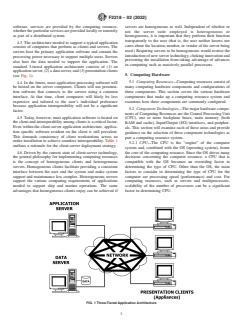
standard 3-tiered application architecture consists of (1)an
applicationserver,(2)adataserver,and(3)presentationclients
5. Computing Hardware
(see Fig. 1).
5.1 Computing Resources—Computing resources consist of
4.4 In the future, most application processing software will
be hosted on the server computers. Clients will use presenta- many computing hardware components and configurations of
tion software that connects to the servers using a common these components. This section covers the various hardware
interface. At that time, client computers will likely be less components that make up a computing resource system and
expensive and tailored to the user’s individual preference examines how these components are commonly configured.
because application interoperability will not be a significant
5.2 Component Technologies—The major hardware compo-
factor.
nents of Computing Resources are the Central Processing Unit
4.5 Today, however, most application software is hosted on
(CPU), one or more backplane buses, main memory (both
the client and interoperability among clients is a critical factor.
RAM and cache), Input/Output (I/O) interfaces, and peripher-
Even within the client-server application architecture, applica-
als. This section will examine each of these areas and provide
tion specific software resident on the client is still prevalent.
guidance on the selection of these component technologies as
This demands consistency of client workstations across an
part a computing resource system.
entire installation to achieve seamless interoperability. Table 1
5.2.1 CPU—The CPU is the “engine” of the computer
outlines a rationale for the client-server deployment strategy.
system and, combined with the OS (operating system), forms
4.6 Driven by the current state of client-server technology, the core of the computing resource. Since the OS drives many
the general philosophy for implementing computing resources decisions concerning the computer resource, a CPU that is
is the concept of homogeneous clients and heterogeneous compatible with the OS becomes an overriding factor in
servers. Homogeneous clients facilitate providing a consistent determining the type of CPU. Other than the OS, the main
interface between the user and the system and make system factors to consider in determining the type of CPU for the
support and maintenance less complex. Heterogeneous servers computer are processing speed (performance) and cost. For
support the various computing requirements of applications computing resources, such as servers and multiprocessors,
needed to support ship and marine operations. The same
scalability of the number of processors can be a significant
advantages that homogeneous clients enjoy can be achieved if factor in determining CPU.
FIG. 1 Three-Tiered Application Architecture
F2218 − 02 (2022)
TABLE 1 Client-Server Deployment Rationale
Rationale for Heterogeneous The server must be tailored to the specific application that may not be supportable by computers most prevalent in the
Servers marketplace.
Many applications work well in their current computing environment and it is not cost effective to change.
It is not practical to have all applications on a common server for multiple reasons including the need to maintain competition
between computer developers and vendors.
Encourages innovation by not restricting the type of computer used for the development of applications.
Rationale for Homogeneous Allows for a common, consistent user interface.
Clients
Maximizes interoperability.
Minimizes re-training required as users transfer to different organizations within the enterprise.
Maximizes the ability to use common support and maintenance skills, parts and labor; thereby minimizing cost.
Maximizes portability of support for applications across the enterprise as well as portability of user skills.
Allows for economies of scale in both procurement (volume discounts) and support (more focused skill set for help desk
personnel).
TABLE 2 CPU Sample Implementations TABLE 3 Sample Bus Implementations
Clients, Servers, and Special Purpose PCI
Intel Pentium/Celeron VME/VXI
AMD K6/Athlon/Duron SBUS
VIA C3/Cyrix VXI
Motorola PowerPC CardBus
Transmeta Crusoe GPIB/HP-IB
EISA
Servers and Special Purpose
MIPS 32/64
NOTE 1—Peripheral Connect Interface (PCI) bus is quickly gaining
Compaq Alpha
favor as a low-cost preferred system bus architecture. PCI provides the
Hewlett Packard PA-RISC
necessary throughput to support the high-end data rates required by many
Sun Microsystems SPARC/UltraSPARC
of today’s applications. Most commercially available computers come
Motorola PowerPC
with a PCI bus.
NOTE 2—EISA bus should be used only to accommodate legacy
systems.
NOTE 3—AlthoughVME bus is more popular,VXI bus offers a greater
5.2.2 Bus—The computer bus connects the different com-
degreeofstandardizationandthereforeagreaterdegreeofinteroperability
ponents of the computer resource together and allows them to
between vendor’s products. These are the buses of choice for embedded
pass data between them at high speeds. Computer resource
systems. IEEE Std 1014 applies to VME and Std 1155 applies to VXI.
configurations, such as personal workstations, often limit or
NOTE 4—GBIB is the Standardized version (IEEE Std 488) of the
determine the type of bus that will be used. Often there are
HP-IB implementation developed by Hewlett-Packard.
multiple buses connected together to allow for multiple types
NOTE 5—CardBus is the new 32-bit high performance bus defined by
the new PC Card Standard released by the PCMCIA standards body and
ofcomponentcardsortoextendanon-expandablesystembus.
trade association. The PC Card Standard replaces the outdated PCMCIA
Considerations in determining the type of bus to use are:
version 2.0 and version 2.1 standards.
number and type of commercial products compatible with the
bus architecture, number of parallel data bit lines, clock speed,
and cost. Once the appropriate bus architecture is determined, rapidly gaining wide acceptance. Older architecture memory
an important computer resource factor becomes how many designs are generally slower and less efficient and should be
interface slots are available on the bus for component cards. avoided to the extent possible.
5.2.2.1 Use buses that provide the necessary performance 5.2.3.1 Cache is usually hard wired to the motherboard and
economically and are compatible with the board level compo- hasafasteraccesstimethanRAM.Computersystemcachesof
nents that are needed to meet requirements. For buses that 512 KB or larger are generally satisfactory.
provide slots for component cards, use standard buses that are 5.2.3.2 RAM can often be on a separate memory board and
supported by multiple vendors providing compatible compo- is used to store the OS, applications that are running, and data
nent cards. files. The amount of RAM needed for a computer system can
5.2.3 Main Memory—Main memory is the storage ware- vary with the environment and the OS. Servers generally need
house of the computer where data and programs are stored for about an order of magnitude more RAM than personal work-
efficient processing. In the context of this section, main stations. For personal workstations with a 16/32 bit operating
memoryreferstocacheandRAM.Themainfactortoconsider system, 64 MB or more of RAM is recommended; for
in acquisition of a computer system is the quantity (in workstations with 32/64 bit operating systems, 128 MB or
megabytes) of RAM. Other considerations are access speed, moreisrecommended.Forservers,usetheNetworkOperating
mounting design, and parity. Computer systems with too little System (NOS) guidelines based on the environment.The three
memory run slowly, won’t load, and crash often. Mounting major factors used to determine the amount of RAM for a
designs today generally provide for easily upgradeable server are number of user connections, number of processes
Memory Modules. SDRAM (Synchronous Dynamic Random running, and amount of hard drive space.
Access Memory) has long been a standard for memory, but 5.2.4 Input/Output (I/O) Interfaces—I/O interfaces allow
more advanced designs such as DDR (Double Data Rate) and the computing resource to move data between the “outside
Rambus memory offer better speed and throughput and are world” and the CPU and main memory. Operations like
F2218 − 02 (2022)
TABLE 4 Recommended Memory (RAM) Standards
document to the printer to get a hardcopy use I/O interfaces.
Dynamic Random Access Memory (DRAM) Quite often the information is sent to or received from a
Extended Data Output Dynamic Random Access Memory
peripheral, which is discussed in the next section.
(EDO DRAM)
5.2.4.1 Use I/O interfaces that use open access standards,
Synchronous Dynamic Random Access Memory (SDRAM)
Double Data Rate Memory (DDR)
support open device connections, and are platform indepen-
RAMBUS Memory
dent.
5.2.5 Peripherals—Peripherals provide data access, input,
NOTE 1—Extended Data Out (EDO) DRAM was long a standard for
mass-market memory, but Synchronous DRAM (SDRAM) is now the storage, and connectivity for a computing resource. The
standard for currently installed machines. SDRAM is a memory architec-
number of peripherals available on the commercial market
ture that incorporates many improvements over traditional DRAM tech-
continues to explode, generally driven by processor speeds,
nologies. SDRAM is a new technology that runs at the same clock speed
memory/storage capacities, and I/O speeds.Although there are
as the microprocessor. The clock on the memory chip is coordinated with
many different types of peripherals, such as printers,
the clock of the CPU, so the timing of both the memory and the CPU are
“in synch.” This reduces or eliminates wait states, and makes SDRAM
facsimiles, modems, scanners, video cameras, microphones,
significantly more efficient than Fast Page Mode (FPM) or even Extended
speakers, and so forth, the main issue in specifying/procuring
Data Out (EDO) memory.
these items is the compatibility of their I/O interfaces with the
NOTE 2—Even more speed and throughput improvements are being
computer (see 5.2.4) and application software. Apart from
realizedwithDoubleDataRate(DDR)andRambusMemory;selectionof
these compatibility issues, the major considerations for acquir-
a memory architecture will need to be made according to a careful
consideration of cost (particularly over the anticipated service life of a ing peripherals are cost and performance (which can include
system) and performance considerations.
both speed and quality). A major category of peripherals is
static storage devices. As distinguished from main memory
loading a program or file from a floppy or CD, sending and (covered in 5.2.3), static storage devices retain data when the
receiving information over the LAN or WAN, or sending a power is off.The remainder of this section will discuss storage
TABLE 5 Recommended I/O Interface Standards
SCSI-2 SCSI-3 FC-PH/FC-AL ESCON IPI PC Card
USB IEEE 1394 XIO Serial Parallel
NOTE 1—Fibre Channel (FC-PH) is emerging as a host-level interface standard for delivery of high I/O data transfers. FC-PH provides connections
for workstation clustering, storage clustering and network-based storage concepts, parallel processing, load leveling, host-to-host or server-to-server
communications, host- or server-to-mass storage communications, bulk data transfer, and multimedia. FC-PH is also being used as a system bus at the
CPUandmemorylevelaswellasawaytoclustermultiplesystemssimilartoNon-UniformMemoryAccess(NUMA).NUMAdescribesanarchitectural
approach to clustering multiple systems such that distributed memory appears to the operating system as shared memory. This architectural approach
allows a benefit to the user of a shared memory programming model with the scalability of a massively parallel processor’s (MPPs) distributed memory
model. FC-PH currently provides up to 1.062 GigaBits Per Second (Gbps) bandwidth using optical fiber.
NOTE 2—FC-PH-based storage subsystems will be supported on mainframes; therefore, the Enterprise Systems Connection or ESCON-based systems
will be phased out.
NOTE3—TheUpperLayerProtocol(ULP)overFC-PHfromthemainframewillinitiallydeployasSCSI-2orSCSI-3andmigratequicklytoIntelligent
Peripheral Interface (IPI). IPI will be deployed on large servers before it will be deployed on mainframes. Note that IPI is a protocol only; SCSI is both
a protocol and an interface. FC-PH is an interface that can support various ULPs.
NOTE 4—For servers and higher end personal workstations, SCSI is the predominant host-level interface for current disk and peripheral devices. As
the demand for higher data transfer rates and expanded connectivity requirements increase, SCSI-2 and SCSI-3 over FC-PH in a PCI form factor will
be the appropriate long-term direction.
NOTE 5—Enhanced IDE is the predominant peripheral interface for lower end personal workstations. SCSI is the current interface of choice for
high-speed devices, such as high-capacity disk and tape drives and is the appropriate long-term direction for both the commodity level and high capacity
devices.
NOTE6—PersonalComputerMemoryCardInternationalAssociation(PCMCIA)announcedthatPCMCIAcardsarenowreferredtoasPCCards.The
PCCardStandarddefinesa68-pininterfacebetweentheperipheralcardandthePCCard“socket”intowhichitgetsinserted.Italsodefinesthreestandard
PC Card sizes, Type I, Type II and Type III.All PC Cards measure the same length and width, roughly the size of a credit card. Where they differ is in
their thickness. Type I, the smallest form factor, often used for memory cards, measures 3.3 mm in thickness. Type II, available for those peripherals
requiring taller components such as LAN cards and modems, measures 5 mm thick.Type III is the tallest form factor and measures 10.5 mm thick.Type
III PC cards can support small rotating disks and other tall components.
NOTE 7—As mentioned under “Bus” (see 1.1.2), CardBus is a new standard introduced as an addendum to the PCMCIAPC Card standard. CardBus
is a 32-bit bus-mastering card operating at 33 Mhz transferring data at up to 132 MBytes per second. (The 16-bit PC Card bus data rate is 20 MBytes
per second.) Like PC Cards, CardBus uses the 68-pin interface but operates at 3.3 volts versus the 5 volts used by PC Cards. CardBus slots are backward
compatible with PC Cards. Card sockets can support PC Cards only or CardBus cards only, but not a mixture of the two.
NOTE 8—Serial I/O refers to standard serial interfaces such as RS 232, 422, 423, and 449.
NOTE 9—Parallel I/O refers to standard parallel interfaces such as micro-Centronix.
NOTE10—XIOisanemergingI/OsolutionbasedonSpecialix’SIcontroller,andincorporatingthehighperformanceI/Oprocessorandcommunication
technology introduced in the RIO range. XIO is ideal for the 16-32 user system where sustaining high performance is essential.
NOTE 11—IEEE 1394, also known as “Firewire,” is a high speed serial I/O that supports data rates up to 400Mbps.
F2218 − 02 (2022)
TABLE 6 Storage Device Media
devices. Use peripherals that support standard I/O interfaces
and are platform independent. 3.5 in. magnetic disk
3.5 in. floppy disk
5.2.5.1 Storage Device Standards—Storage refers to the
5.25 in. WORM
capability to store information outside the central processor.
5.25 in. MO
ISO 13346
For most computers, the predominant technology for storage
CD-ROM
has been magnetic disk and will remain so for the next few
Flash Memory Removable Devices
years.
Smart cards
DVD
(1)Storage media is the physical material on which data is
⁄2-in. helical tape
stored. The choice of media is usually determined by the
4mmDAT
applicationneedsintermsofdataaccessibility,storagedensity,
DLT Tape
3490E cartridge tape
transferrates,andreliability.Broadindustrystandardsexistfor
3.5-in. magnetic disk, 4-mm digital audio tape (DAT), 8-mm
NOTE 1—8-mm helical tape is appropriate for backup and archive use;
helical tape, digital linear tape (DLT), ⁄2-in. tape, and compact
however, it is slow and unreliable for near-line storage solutions where
disk-read only memory (CD-ROM). However, industry is in
frequent access is required. 4mm DAT offers a faster, more reliable
theprocessofagreeingonastandardforDigitalVersatileDisk solution to high-capacity and high-access applications.
NOTE2— ⁄2-in.helicaltapeoffershigherstoragecapacitythan4mmor
(DVD) which will able to read CD-ROMs as well as the new
8mm;however,itisexpensive,proprietary,andonlyStorageTechnology
DVDs. Standards do exist for write once read many (WORM)
supports it.
opticalandmagneto-optical(MO)disks.Althoughthephysical
NOTE 3—3490E square cartridge ⁄2-in. tape is predominantly a main-
mediumforopticaltechnologiesconformstoanopenstandard,
frame technology for off-line data storage.
the device’s recording format may not.
NOTE 4—High capacity tape applies capacity multipliers of 2× to 4× to
(2)Archived data on outdated storage media (for example,
current technology. Gains are achieved through increased density factors
as well as media length (number of media ft per unit).
5.25-in. floppy disks) should be transferred to media that is
NOTE5—FlashMemoryStoragedevicesarefindingwideacceptancein
more current to avoid data being “trapped” on obsolete media
Asia.Theycanholdasmuchas128MBofdatainakeychainformfactor
that cannot be read by devices currently on the market.
that plugs into an available USB port.
(3) As networks proliferate and storage requirements
NOTE 6—Smart cards are being used in Europe and Asia. Smart cards
expand, storage technology that uses standard interfaces and
will be used predominantly as an intelligent storage media for providing
promotes hardware and software supplier independence is
services to individuals.
necessary. This technology will enable us to take advantage of NOTE7—TheDigitalVideoDisk(DVD,alsoknownasDigitalVersatile
Disk) allows for dual-sided as well as dual-layered implementations that
the open systems environment.
will increase CD-ROM capacities significantly. In addition, transfer rates
(4)Implement storage technology and storage device me-
may improve to as high as 16 Mega Bits Per Second (Mbps).
dia that use open access standards, support open device
interface standards, and are platform independent.
method for accessing and manipulating data. These PWs are
5.2.5.2 RAID Technology—Redundant Array of Indepen-
commonly known as Personal Computers or PC’s, desktop
dent Disks (RAID) technology protects from data loss by
computers, portables (laptops or notebooks), or workstations
providing a level of redundancy immediately within an array.
and use one of several bus architectures. Low-end PWs are
The array contains removable disk drive modules that are
used primarily to support the general office work place. More
automatically rebuilt in the event of a device failure without
powerful PWs are predominantly used in high-end computer
causingthesystemtoshutdown.WhenRAIDlevelsotherthan
applications such as Computer-Aided Design/Computer-Aided
0 are used, no downtime is required to replace a failed disk
Manufacturing/Computer-Aided Engineering (CAD/CAM/
drive. Data is continuously available while reconstruction of
CAE), application development, multimedia, and decision
thefaileddiskoccursinthebackground.Muchofthebenefitof
support data analysis presentation.
RAID technology lies in its capability to off-load storage
5.3.1.1 Also included in PWs are handheld computers—
management overhead from the host system. To realize this
PersonalDigitalAssistants(PDAs),alsoreferredtoasPersonal
benefit, RAID developers endow their array controllers with
Information Managers (PIMs). Handhelds are computer sys-
significant levels of intelligence. For instance,Adaptive RAID
tems that fit in a person’s hand and are extremely portable.
supports multiple RAID levels based on workload character-
Handheld systems also tend to have two types of input
istics. Choose the RAID level based on your specific need.
methods:penorkeyboard.Thepeninputcanbeusedasdigital
5.3 System Configurations—The hardware component tech-
ink, a mouse, or for handwriting recognition.
nologies mentioned in 5.2 can be configured in many different
5.3.1.2 Combine components that provide flexible,
ways to accomplish different tasks and meet different require-
scaleable, and easy-to-use personal workstations that support
ments. This section examines some of the common configura-
the Client/Server model of computing, data access, and multi-
tions (Personal Workstations, Servers and Embedded Comput-
media.Allow for an external communication device such as a
ers) with guidance on what component technologies to use for
modem or network interface card.
each configuration.
5.3.1.3 Table 9 provides a quick summary of the nominal
5.3.1 Personal Workstation—Personal Workstations (PW) specifications for Personal Workstation implementation.
are devices that contain at least one CPU (sometimes several) 5.3.2 Servers—Servers are computing resources that can be
and provide a user interface, typically a GUI, as well as configured to support groups from small teams (work group
personal productivity tools, local data storage, and a flexible servers) to entire ships (campus servers). Work group servers
F2218 − 02 (2022)
TABLE 7 Recommended Personal Workstation (Portable)
cations server, optical disk servers, and mail servers. A brief
Hardware Configuration Guidance
description of these servers follows:
CPU Bus Memory I/O Peripherals
(1) Database Servers—Large databases make extensive
Pentium/Celeron PCI RAM$ E/IDE HD > 10GB
use of disk space and processor power and typically require
128MB
their own dedicated database server hardware. Increasingly
K6/Athlon/Duron Cache$ USB 3.5-in. floppy
512KB
these database servers have more than one CPU and more than
C3/Cyrix PC Card DVD/CD-ROM
one network interface channel to keep up with the demands
PowerPC
placed upon them by large numbers of simultaneous users.
Crusoe
(2) Multimedia Servers—If an installation has a large
archive of audio or video data, or if it intends to distribute
TABLE 8 Recommended Personal Workstation (Desktop)
audio or video data in real-time, it will require a multimedia
Hardware Configuration Guidance
data server. Archives of audio and video data require huge
CPU Bus Memory I/O Peripherals
amounts of disk space. Moving this data over the network
Pentium/Celeron PCI RAM$ E/IDE HD > 10GB
(typically through streaming audio or video services and
128MB
protocols) is also resource intensive. Both requirements typi-
K6/Athlon/Duron EISA Cache$ SCSI-2,3 3.5-in. floppy
cally require the dedicated use of a multimedia server.
512KB
C3/Cyrix USB CD-ROM
(3) Data Push Servers—If an installation implements a
PowerPC IEEE-1394 DVD
data push mechanism for distributing information to internal
PC Card or
Cardbus and/orexternaldesktops,itwillhavetohostthatpushfunction
onadatapushserver.Dependingonthenumberandvolumeof
NOTE 1—EISA bus should be used only to accommodate legacy
channels being pushed, the data push server software may
systems.
reside on hardware that is also performing other server
functionality (typically the web server).
TABLE 9 Personal Workstation Configuration Summary
(4) Application Servers—One option for centralizing sys-
Personal
tem management and reducing total cost of ownership in a
Workstation
Desktop Laptop
also used as network environment is to run the actual application programs
a Server
on a few high-powered application servers rather than on the
Processor Pentium/Celeron Pentium/Celeron Pentium/Celeron
desktop clients. This is a common approach in UNIX-based
K6/Athlon/ K6/Athlon/Duron K6/Athlon/Duron
computing environments through the use of the X Windows
Duron C3/ C3/Cyrix C3/Cyrix
CyrixPowerPC PowerPC PowerPC
graphicalinterfacetoopendisplayandcontrolwindowsonone
Crusoe
system for an application running on another system. A new
System Bus PCI PCI, EISA PCI
variation of this approach brings current Microsoft Windows
Memory 256 MB SDRAM 256 MB SDRAM 256 MB SDRAM
Input/Output E/IDE E/IDE E/IDE
applicationstosystemsthatareunder-powered(old286or386
SCSI-3 PC Card X2 PC Card X2
CPUPCs)orthatarenotrunningthe16/32bitbasedWindows
PC Card X2 Serial Serial
operating system (UNIX workstations, Java Network Comput-
Serial Parallel Parallel
Parallel USB USB
ers). This is made possible by running the applications on
USB IEEE 1394 Modem
sharedWindows NT/2000 application servers and just sending
IEEE 1394 Modem NIC
Dual Network NIC (Modem and NIC the user interface over the network to the user’s local system.
Interface (Modem and NIC can
(5) Optical Disk Servers—With the huge amounts of refer-
Card (NIC) can be on a PC Card)
encedataavailableonCDROMandtheincreasingavailability
be on a PC Card)
Storage 3.5-in. floppy 3.5-in. Floppy 3.5-in. Floppy ofCDROMwritersfororganizationstousetocreatetheirown
CD-ROM CD-ROM CD-ROM
archival data storage on CD ROM, there is a growing need to
4-mm DAT 10 GB HDD 10 GB HDD
have multiple CD ROM disks online at once. A new class of
40 GB HDD
Operating 64 bit 32 bit 16/32 bit
hardware, the CD ROM Server, is a stand-alone network
System
device that includes a large number of CD ROM drives which
canbemadeavailableasshareddiskstoallusersonanetwork.
(6) Mail Servers—In an organization that has a number of
networked PW clients, mail servers provide store and forward
provide support, such as directory, file, print, and authentica-
functionsforelectronicmessages.Theseserversreceive,store,
tion services, in a LAN environment. Campus servers may
and distribute electronic messages and require a large amount
augment and, for many new applications, replace traditional
of storage, proportional to the number of e-mail accounts they
mainframes. Selecting systems that address and support fea-
carry. They also require numerous network connections and
tures and services of both systems management and reliability,
modemconnectionstoreceiveanddistributemessagesfrom/to
availability, and serviceability is important. Campus servers
users and other organizations.
often implement RAID storage technology to provide services
5.3.2.2 Evaluate servers for their interoperability,
with high reliability and availability (see 5.2.5.2).
5.3.2.1 There are different types of servers, performing portability, reliability, availability, serviceability, and scalabil-
more specific functions. Some of these server types include: ity. The capability to easily upgrade processor performance or
database servers, multimedia servers, data push server, appli- toaddadditionalprocessors,diskstorage,andcommunications
F2218 − 02 (2022)
TABLE 11 Embedded Computer Systems Hardware Configuration
supportextendsthelifeoftheplatformandenhancesthereturn
Guidance
on investment. Use hardware components that are standards
CPU Bus Memory I/O Peripherals
based, primarily those that are compatible with interface bus
A
Pentium/Celeron VXI TBD SCSI-2, 3 Hard Drive
standards. Select scaleable servers that can increase perfor-
Power PC VME FC-PH 3.5-in. floppy
mance by adding components and by supporting standards-
K6/Athlon/Duron PCI IPI CD-ROM
basednetworkprotocols.Throughtheuseofamultiprocessing MIPS GPIB/HP-IB ESCON DVD
SPARC EISA E/IDE
architecture, hardware should be scaleable and should enable
Alpha SBUS Serial
parallel processing.
Crusoe CardBus Parallel
5.3.3 Embedded Computers—When readily available com- PC Card or
CardBus
puters do not meet the requirements, components must be
A
Varies widely based upon system requirements.
integrated to form a system. This often involves a design of
board level components to perform the necessary functions.
NOTE1—AlthoughVMEbusismorepopularandoffersawidervariety
Themajordesignconsiderationistheselectionofabackplane
ofvendorproducts,VXIbusoffersagreaterdegreeofstandardizationand
bus that will allow all of the components to communicate with
therefore a greater degree of interoperability among vendors’ products.
eachother.Thisdecisioncanimpactdramaticallythecost,both These are the buses of choice for embedded systems.
in the development and the logistics support of the system. NOTE2—AsthepopularityofPCIbusrisesandthenumberofavailable
products increases, PCI becomes a more desirable architecture for
Considerations in determining the bus include availability of
embedded systems.
components and existing systems bus architectures (to reduce
the logistics support costs). Commercially available compo-
nents should be considered first before custom designing and
6.3 Copper cabling should be avoided in the backbone
buildingthecomponents.Whendesigningembeddedcomputer
because it has inherently low bandwidth over significant
systems, use industry standard buses and standard components
distance. If copper is unavoidable, it should be limited to areas
to the maximum extent possible.
that can be easily, and inexpensively, rewired with fiber when
appropriate. If copper is used, select only properly terminated
6. Cable Plant
and tested Category 5 (“Cat 5”) cable for cable from the
telecommunicationsclosettothedesktop.(UnshieldedTwisted
6.1 The cable plant includes copper cable and fiber optic
Pair(UTP)Cat5isthecopperstandardfordataratesupto155
cable. Fiber optic cable is the solid media preferred for its
Mbps.) Thin-wire coax, thick-wire coax, RS-232/422, Cat-
current high-capacity (100’s of Mbps), future bandwidth po-
egory 3 and “telephone” wire should be avoided—the minor
tential (Gbps to Tbps), reliability, reduced susceptibility to
cost savings is not usually justifiable because of limited data
Electromagnetic Interference (EMI), and security. (Although
rates and degraded interoperability. (Allowable exceptions are
fiber cannot be made completely secure without encryption or
recognized when linking distant, or otherwise limited-access
proper physical protection, it cannot be “tapped” without
areas, which are already wired.)
physical manipulation.)
6.4 Definitions:
6.2 Fiber optic cable is required to support voice and
6.4.1 Trunk Cable—A trunk cable is a cable that connects
high-speed data. Fiber optic cable is recommended in other
two main interconnection boxes or patch panels. It is used to
areaswherefeasible.Ifcostlimitsitsuse,thenfiberopticcable
provide connectivity between the service areas of the cable
should be run at least in the backbone of the network and to
plant.
major junction points (telephone closets, for example). A mix
6.4.2 Local Cable—Alocal cable is a cable that connects a
of 62.5 mm core/125 mm cladding multimode and 8 mm
main interconnection box or patch panel to user system
core/125 mm cladding single-mode fiber should be pulled in
equipment or a local breakout box.
jacketedbundles,terminated,andtested.Thecostavoidanceof
6.4.3 System Specific Cable—A system specific cable di-
installing additional single-mode cable is relatively low com-
rectly connects two pieces of user system equipment, indepen-
pared to the future benefits it presents.
dentofthecableplant.Asystemspecificcableistypicallyused
to connect equipment within the same service area of the cable
plant.
6.4.4 Drop Cable—A drop cable is a system specific cable
TABLE 10 Server Hardware Configuration Guidance
betweenareadymovablepieceofusersystemequipment,such
CPU Bus Memory I/O Peripherals
as a PC or printer, and the local breakout box in the area. A
A
Pentium PCI RAM$ SCSI-2, 3 HD > 40GB
A drop cable is not considered to be part of the cable plant.
CD-ROM/
Athlon VME/VXI 512MB FC-PH
DVD
Cache$
MIPS CardBus PC Card or
A
RAID
6.5 Fiber Optic Cable—Fiber optic cable is the preferred
2MB
Alpha SBUS CardBus
1,3,4,5,6
media for all network applications due to its growth potential.
PowerPC GPIB/HP-IB IPI
4-mm DAT
DLT
PA-RISC EISA
(In shipboard and other high Electromagnetic Interference
UltraSparc
(EMI) environments, fiber optic cable is critical in eliminating
A
Refer to server OS documentation to determine memory requirements.
the effects of noise.) The backbone network must use fiber
optic cabling, as part of the Fiber Optic Cable Plant (FOCP)—
NOTE 1—PCI is a system bus architecture and interface standard that
twisted pair (shielded or unshielded) or coaxial cable should
will be used to support I/O needs. Unlike SCSI, PCI is not an I/O
interface. PCI will likely become the de facto open standard. not be used. Where possible, multimode graded index fiber
F2218 − 02 (2022)
with a 62.5-micrometre (µm) core/125 µm cladding should be upgrades suit the needs of the ship, a lower cost interim
used. Due to the low relative marginal cost, single-mode fiber upgrade would be to replace the legacy copper links with fiber
(8µmcore/125µmcladding)shouldbeprovidedinatleastthe opticlinks,andintegratethoselinksintotheship’sFOCP.This
backbone FOCP and preferably to major junction points. interim physical integration will simplify the further upgrade
from a separate legacy system to an integrated network
6.5.1 Multimode fiber (62.5 µm) is easier to terminate and
application.
test,
...